Thermal Imaging Camera for iPhone: What Homeowners Need to Know
A thermal imaging camera for iPhone attaches to the phone's Lightning or USB-C port (the connector depends on the iPhone generation), and the phone provides the display, processor, and storage. The category is mature in 2026 with options from FLIR, Seek, Topdon, Hikmicro, Infiray, and others. Prices range from about $200 for entry-tier units up to $700+ for premium wireless models. This guide explains how iPhone thermal attachments work, the spec checklist that matters, the 2026 product lineup with realistic price ranges, where iPhone attachments fall short, common interpretation mistakes, care and storage notes, and the cases where a phone attachment is enough versus when a standalone camera (or hired professional) makes more sense.
Part of our Thermal Imaging for Homes guide — start there for the full picture →
How does an iPhone thermal attachment work?
The attachment contains the microbolometer sensor and lens; the iPhone provides everything else — screen, image processing, storage, and (in most cases) power. The manufacturer's iOS app reads the detector data over Lightning or USB-C, applies thermal palette and emissivity adjustments, overlays visible-light edges on the image (FLIR's MSX is the most polished), and saves stills and video to the Photos app or app-specific library.
This architecture means a $400-$500 iPhone attachment can produce results comparable to a $700-$1,000 standalone pocket camera, because the iPhone already has the expensive display and computing components. The trade-off: the phone is occupied during scanning, battery life is shared between phone and attachment, and iOS version compatibility is occasionally a gating issue when Apple updates the OS. For broader context, see our home inspection tools hub and the thermal imager buyer guide.
The connector question
Apple has migrated several recent iPhones from Lightning to USB-C (iPhone 15 series and later). Older iPhones use Lightning. When buying a thermal attachment, confirm:
- Which connector the iPhone uses.
- Whether the attachment ships with the correct connector or requires an adapter.
- That the manufacturer's iOS app supports the iPhone model and iOS version.
Lightning attachments do not work with USB-C iPhones without specific dongle support, and not every manufacturer supports the adapter path cleanly. Replacement-cycle planning: a Lightning thermal camera bought in 2024 may need a USB-C version if the user upgrades to a newer iPhone. Some manufacturers offer trade-in programs for the connector update.
Spec sheet: what matters
Detector resolution
The pixel count of the thermal sensor. Common iPhone-attachment values: 80×60 (entry), 160×120 (mid), 256×192 (mid-high), 384×288 (high), and 640×480 (rare in this form factor). Higher resolution resolves smaller temperature differentials at distance. For typical homeowner use cases (energy auditing, leak detection), 160×120 is the practical minimum; 256×192 is the sweet spot.
Thermal sensitivity (NETD)
Reported in millikelvin. Lower is better. Entry-tier attachments run 100-150 mK; mid-tier 50-100 mK; top-tier as low as 40 mK.
Temperature range
-4°F to 752°F covers virtually all residential and most industrial use. Some attachments extend further for industrial work.
Refresh rate
25-30Hz is common and comfortable for live scanning; 9Hz units feel laggy. Refresh rates are sometimes export-regulated, which leads to identical hardware sold at different rates depending on region.
Visible-light overlay
FLIR's MSX (Multi-Spectral Dynamic Imaging) overlays visible-light edges from a second small camera onto the thermal image, dramatically improving readability. Competing brands (Seek, Topdon, Hikmicro) have their own equivalents. The feature matters more than spec sheets suggest — pure thermal without visible-light overlay is much harder to interpret in practice.
The 2026 iPhone-attachment lineup
FLIR One Pro (iPhone)
160×120 resolution, MSX edge overlay, mature iOS app, USB-C and Lightning versions. $400-$500. The benchmark for iPhone thermal attachments. FLIR Ignite cloud storage integration; FLIR Tools desktop software for report generation.
FLIR One Edge Pro
Wireless attachment that pairs over Wi-Fi rather than plugging in. 160×120 resolution. $600-$700. Premium for the wireless flexibility, which matters when scanning at awkward angles or sharing the camera among multiple users.
Seek CompactPro (iPhone)
320×240 resolution in a very thin form factor. $350-$450. Higher resolution than FLIR One Pro at competitive pricing; the iOS app is less polished than FLIR's but functional.
Topdon TC001 / TC002 / TC004 for iOS
256×192 to 384×288 resolution depending on model. $300-$500. Strong value per resolution. Topdon is a newer entrant gaining market share.
Hikmicro Mini Plus / Mini2 for iOS
256×192 resolution, IP54 rated, magnetic attachment available. $300-$450.
Infiray P2 Pro / Xinfrared variants
256×192 resolution, very compact, often the same sensor sold under multiple brand names. $250-$400. Spec comparison matters more than brand allegiance at this tier.
Sourcing channels and price tiers
Channels:
- Online retail (Amazon, manufacturer direct). Widest selection; FLIR direct sometimes promotes on holidays.
- Apple Store (online and retail). Limited selection — primarily FLIR One Pro.
- Big-box retail (Home Depot, Lowe's, Best Buy). FLIR and occasionally Seek; pricing matches Amazon.
- Professional supply (Grainger, Tequipment). Pro-line attachments.
- Used market (eBay, swappa). Older FLIR One Pro generations at $100-$200; newer attachments rare used.
Price tiers in 2026:
- Entry (80×60 to 160×120): $200-$400.
- Mid (160×120 to 256×192): $300-$500.
- High (256×192 to 384×288): $400-$700.
What iPhone attachments cannot do well
Five practical limits:
- Cold-weather battery life. Scanning in Front Range winter at 10°F drains phone and attachment batteries quickly. Plan for 30-60 minutes of active scanning per charge cycle.
- Single-hand operation. Holding the phone plus operating the touch interface plus framing the camera is two-handed work. Tripod use is awkward.
- Live electrical panel scanning. iPhone attachments do not carry the safety distance ratings industrial cameras (FLIR pro, Fluke) carry. Open live panels are out of scope.
- Long-duration scanning. The phone heats up under continuous use; on hot summer days, iOS thermal management can throttle the app and reduce frame rate.
- iOS-version dependency. Apple OS updates occasionally break manufacturer apps until updates ship. Be cautious upgrading iOS until the camera vendor publishes a compatibility notice.
Application-specific notes
Energy auditing
Phone attachments work well. Scan indoors with HVAC running and a 20°F+ indoor-outdoor differential. Look for cold streaks at wall-ceiling junctions, around outlets on exterior walls, and at window perimeters. The FLIR One Pro at $400 is sufficient.
Leak detection
Sufficient for surface scanning. Pair with a moisture meter for confirmation. Mid-tier resolution (256×192) sees small leaks more clearly than entry resolution. Slab leaks under tile or carpet sometimes require professional acoustic detection that thermal alone cannot match.
Pre-purchase home walk-throughs
Marginal value for the buyer. Phone-app thermal images do not carry the same negotiation weight as a credentialed inspector's report. For a home purchase, hiring an inspector is typically the better path.
Electrical work
Limited. Phone attachments lack safety distance ratings for live panel work. Hire an electrician for any work that involves opening a live panel.
Common interpretation mistakes
- Misreading reflections on metal. Polished or brushed-metal surfaces reflect ambient thermal patterns rather than their own temperature. The user appears as a thermal silhouette in the reflection.
- Scanning without thermal differential. Mid-day in moderate weather with HVAC off produces flat, uninformative images.
- Treating cold spots as proof of moisture. Cold spots can be drafts, uninsulated framing, air leaks, or moisture. Confirmation requires a moisture meter.
- Trusting low-resolution images at distance. An 80×60 sensor seeing "something" at 20 feet is showing a few-pixel cluster; that is not enough data.
- Screen-brightness washout in sunlight. Outdoor scanning can wash out the phone screen entirely; shade the phone or scan from indoors.
- Overinterpreting interior temperature variation. An interior wall reading colder than surroundings may just have less heat gain — not a problem.
Care and storage
iPhone thermal attachments share thermal-camera care requirements:
- Lens care. The germanium-glass lens is delicate. Avoid touching the front element; clean only with manufacturer-supplied tissue and isopropyl alcohol if necessary.
- Carrying case. Most attachments ship in a small case. Use it — the lens is the most vulnerable component.
- Connector wear. Repeated connect-disconnect cycles wear the Lightning or USB-C connector. Grasp at the connector area rather than yanking the body.
- Battery management. Attachments draw significant current from the phone; carry a power bank for sessions longer than 30 minutes.
- Cold-weather pocket warming. Front Range winter scanning is harder on batteries; keep the attachment inside a jacket pocket between scans.
- iOS app updates. Update the manufacturer's app promptly to receive iOS-compatibility patches.
iPhone versus Android attachments
Most manufacturers ship Lightning, USB-C-Apple, and USB-C-Android versions of the same hardware. The detector and lens are identical; the difference is the app ecosystem. FLIR's iOS app tends to be more polished; the same FLIR app on Android offers similar functionality with less consistency across phone manufacturers. Topdon, Hikmicro, and Seek have parity between platforms. Functional difference is small for most use cases. Our companion guide on Android thermal cameras covers the platform from the other angle.
When to spend up — and when not to
Spending up to $500-$700 makes sense for:
- Frequent use (monthly+ scanning).
- Resolution-sensitive tasks (small leak detection, fine insulation gap analysis).
- Documentation requirements (recurring projects, side business work).
Spending down to $200-$300 makes sense for:
- One-time projects (single weatherization audit).
- Curiosity and learning before committing to a higher tier.
- Backup tool to a standalone camera.
When to call a professional
Three scenarios where iPhone-attachment scans are not enough:
- Pre-purchase home inspection. The buyer wants documentation that the seller takes seriously; a phone scan does not carry that weight in negotiations.
- Insurance claim. Carriers want credentialed third-party documentation.
- Complex moisture investigations. Combining thermal with moisture-meter readings, humidity data, and structural interpretation is professional work.
For DIY weatherization, leak hunting, and personal curiosity, an iPhone attachment in the $300-$500 range covers the practical use case.
References
- ENERGY STAR: Seal and Insulate — U.S. Environmental Protection Agency (ENERGY STAR)
- InterNACHI — Infrared Thermography Certification — International Association of Certified Home Inspectors
- ASHI — Inspector Standards and Resources — American Society of Home Inspectors
Frequently asked questions
What is the best iPhone thermal imaging camera in 2026?
For most homeowners, the FLIR One Pro at $400-$500 balances mature software, MSX visible-light overlay, and 160x120 resolution. Seek CompactPro, Topdon TC001, and Hikmicro Mini Plus offer higher resolution at competitive prices but with less polished iOS apps. Match the choice to the use case more than the brand.
Does it matter if my iPhone has Lightning versus USB-C?
Yes. Confirm before buying that the attachment connector matches the iPhone connector. Apple migrated the iPhone 15 series and later to USB-C; older models use Lightning. Replacement-cycle planning matters: a Lightning attachment may need to be replaced if the owner upgrades to a newer USB-C iPhone.
Will an iOS update break my thermal camera?
Sometimes, briefly. Apple OS updates occasionally break manufacturer apps until updates ship. Wait for the manufacturer to confirm compatibility before upgrading iOS if uninterrupted access matters. App updates typically arrive within a few weeks of major iOS releases.
Can I use an iPhone thermal camera for energy auditing my own home?
Yes. Scan indoors with HVAC running and a 20°F+ indoor-outdoor temperature differential. Look for cold streaks at wall-ceiling junctions, around outlets on exterior walls, and at window perimeters. A $400 FLIR One Pro is sufficient for this use case; spending more buys resolution that energy auditing does not really need.
If you have an iPhone thermal scan you would like a Front Range inspector to verify with calibrated standalone equipment and moisture-meter pairing, share what you observed via our contact page.
Thermal imaging cameras
Infrared cameras reveal hidden moisture, missing insulation, and air leaks. Phone-attachment models are the budget entry point; standalone units have higher resolution.
| Product | Why | Buy |
|---|---|---|
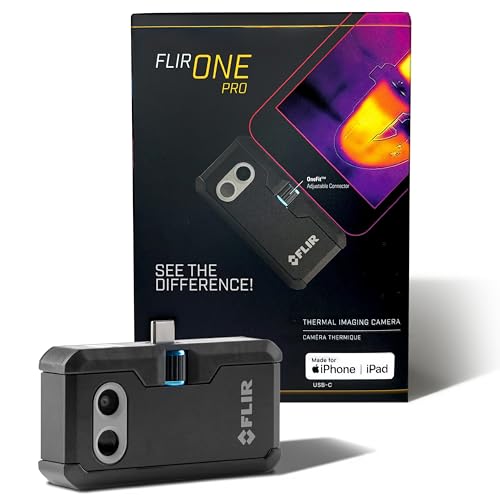 FLIR ONE Pro (phone) | Plugs into iPhone/Android; inspector favorite. | Amazon — $349.00 |
 Topdon TC001 | High-res phone module at a low price. | Amazon — $262.99 |
 FLIR C5 Compact | Standalone pocket camera with Wi-Fi. | Amazon — $649.00 |