Infrared Camera On Iphone: What Homeowners Need to Know
“Infrared camera on iPhone” describes a category that has grown significantly over the past several years — small detector modules that plug into an iPhone, use the phone’s screen and processor, and turn the device into a working thermal imager for a fraction of the price of a standalone handheld. The category includes FLIR ONE Pro variants, Seek Thermal CompactPRO and equivalents, and several smaller competitors. iPhone 15’s transition from Lightning to USB-C added complexity to a market that had standardized on Lightning. This guide covers the current product landscape, the app workflow, the transition implications, and the practical use cases for homeowners and inspectors.
Part of our Thermal Imaging for Homes guide — start there for the full picture →
What an iPhone-attached infrared camera actually delivers
An iPhone-attached IR camera is a sensor module — the actual infrared detector — that connects to the phone’s data port. The phone provides screen, processor, battery (initially), and storage. A dedicated app from the camera manufacturer renders the thermal image, allows adjustment of color palettes and temperature ranges, captures still images and video, and exports the imagery to cloud storage or report-writing software. The attachment usually adds two to three inches to the back of the phone and weighs under 100 grams, making it pocket-portable in a way that handheld thermal imagers are not.
The main iPhone-compatible thermal imagers in 2026
Three product families dominate the iPhone-attached market.
FLIR ONE Pro Lightning and FLIR ONE Pro for iOS
The FLIR ONE Pro line includes Lightning-connector versions for iPhone 14 and earlier, plus the newer USB-C version compatible with iPhone 15 and later. Detector resolution is 160×120 with MSX visible-light blending that adds edge detail from the phone’s standard camera. Thermal sensitivity around 70 mK. Temperature measurement range covers -20 to +400 degrees Celsius. Battery life from the integrated lithium-ion cell runs about an hour of continuous use. Price typically $400-450.
Seek Thermal CompactPRO and Seek ShotPRO
The Seek Thermal lineup includes the CompactPRO attachment for iPhone (Lightning and USB-C variants available) plus the standalone ShotPRO with its own screen. Detector resolution is 320×240 for the CompactPRO — significantly higher than the FLIR ONE Pro entry point — with thermal sensitivity around 70 mK. Temperature range similar to the FLIR products. Seek’s MSX-equivalent blending technology improves edge detail. Price typically $499 for the CompactPRO.
Hikmicro and other smaller players
Hikmicro, Topdon, and several smaller brands have entered the iPhone-attached category over the past two years. Detector resolutions in the 160×120 to 256×192 range. Pricing typically lower than FLIR and Seek by $50 to $150. Software quality varies widely; some manufacturers offer iOS apps with limited functionality compared to the established FLIR and Seek apps. Long-term software support is the variable that homeowners should weigh — a $300 attachment becomes useless if the manufacturer abandons iOS app updates after iOS 19 or 20.
The iPhone 15 USB-C transition impact
Apple’s switch from Lightning to USB-C with the iPhone 15 in 2023 disrupted a market that had standardized on Lightning. Lightning-equipped FLIR ONE Pro units do not work with iPhone 15 and later without a Lightning-to-USB-C adapter, and even with the adapter, performance has been inconsistent due to USB-C’s different power delivery profile. New purchases for iPhone 15 and later should specify USB-C variants. Existing Lightning-equipped units remain functional with iPhone 14 and earlier devices. Apple’s transition timeline means iPhone 15 and 16 are now the dominant supported devices, and Lightning-only camera inventory is gradually clearing the channel.
The app workflow
The typical workflow runs through five steps. Plug the camera into the phone’s data port and launch the manufacturer’s app. Allow the camera to perform its initial calibration — usually 10 to 30 seconds. Frame the target through the live thermal view on the phone screen. Capture still images or short video clips with a tap. Adjust color palette, temperature range, and emissivity in the app’s analysis screen. Export the imagery to cloud storage or directly into report-writing software. This workflow takes a few minutes to learn and produces useful imagery within the first inspection session.
Resolution adequacy for homeowner versus inspector use
The 160×120 detector resolution of the FLIR ONE Pro is adequate for homeowner DIY tasks — finding obvious cold spots from missing insulation, confirming HVAC register temperatures, scanning under sinks for water leaks. For working inspectors producing client reports, the 320×240 resolution of the Seek CompactPRO produces noticeably cleaner imagery that reads better in printed and PDF report formats. Either resolution is dramatically below the 640×480 of high-end commercial handhelds, which limits the iPhone-attached category to entry-level professional applications and homeowner use. The parent home inspection tools hub covers resolution requirements across categories.
Battery and thermal considerations for sustained use
Two thermal-related concerns affect sustained use. The iPhone itself heats during sustained app use, and the thermal imaging app is processor-intensive enough to push iPhone CPU temperatures upward measurably. This can affect detector calibration on cameras that share thermal coupling with the iPhone body. The camera’s own integrated battery — present on FLIR ONE Pro and most competitors — provides power independent of the phone, but typically runs out at 60-90 minutes of continuous use. Inspectors doing full-home thermal scans usually carry a portable USB power bank for the camera’s micro-USB or USB-C charging port. The FLIR ONE Pro iOS guide covers operational specifics.
When iPhone attachment makes sense, and when it does not
The iPhone-attached category fits specific use profiles well and others poorly. Good fit: occasional inspector use as a supplementary tool, homeowner DIY screening, real estate agent property documentation, contractor pre-job inspection for moisture and insulation work. Poor fit: full-time inspector primary tool, commercial building diagnostics, electrical PdM in industrial settings, expert-witness consulting. The handheld professional category — pocket pros around $1,500 and mid-range handhelds at $3,000 and above — replaces iPhone attachments for sustained professional work. A working inspector starting with an iPhone attachment typically migrates to a handheld within the first year of practice.
Software ecosystem and report integration
FLIR’s iOS app integrates with FLIR Tools desktop software for report generation, allowing inspectors to pull thermal images from the phone into formatted reports with measurement annotations and analysis notes. Seek’s app supports similar workflows with its own desktop integration. Hikmicro’s iOS support is less mature and varies by region. For inspectors building report-writing workflows around iPhone-attached imaging, the choice of camera often comes down to which manufacturer’s software ecosystem fits the inspector’s existing report templates and customer expectations.
Front Range use patterns for iPhone-attached imaging
Colorado inspectors using iPhone-attached imaging for residential work see consistent applications: winter heating-season scans for insulation gaps in attics and exterior walls, summer cooling-season scans for duct leaks in supply runs through unconditioned attic spaces, year-round moisture screening in bathrooms and around water-using appliances. The Front Range climate produces strong indoor-outdoor temperature differentials for several months of the year, making iPhone-attached imaging more diagnostic than it would be in milder coastal climates. Real estate agents in Denver, Boulder, and Douglas County metro areas increasingly carry iPhone attachments for quick pre-listing documentation, though they appropriately defer to certified inspectors for actual reporting.
Common iPhone-attached imaging mistakes
Three patterns reduce the value of iPhone-attached imaging in homeowner and inspector use. Scanning during direct sunlight on exterior walls produces solar gain artifacts that mask underlying anomalies. Holding the phone too close to the target wall reduces the field of view and forces the user to take many overlapping shots rather than a single contextual frame. Skipping the calibration interval after first connection produces inaccurate temperature readings for the first minute or two of use. Each of these reduces image quality and analysis accuracy in ways that the user often does not recognize as problems.
What homeowners can actually find with an iPhone-attached thermal imager
A homeowner with a $400 FLIR ONE Pro or $500 Seek CompactPRO can reliably find missing insulation in accessible attic spaces, confirm HVAC supply register temperatures across the home, detect wet patches under sinks and behind toilets, screen for window air leaks during heating season, and pre-document conditions before scheduling a professional inspection. The imager cannot reliably find small electrical hot spots, detect mold colonies (mold is not warmer than its substrate in most cases), or replace the diagnostic interpretation that a certified inspector brings to the imagery. Calibrating expectations to the screening tool category produces useful homeowner results.
Color palette choices and what they reveal
iPhone-attached thermal apps offer multiple color palettes — iron, rainbow, grayscale, white-hot, black-hot, and several variations specific to manufacturer apps. Each palette emphasizes different aspects of the underlying temperature data. Iron and rainbow palettes use color to indicate temperature ranges and read intuitively for non-technical viewers; useful for client-facing reports. Grayscale produces subtle temperature gradients that reveal small anomalies easily missed in colored palettes; preferred for technical analysis. White-hot and black-hot palettes maximize contrast between extremes; useful for finding the warmest or coolest point in a scene quickly. Working inspectors often switch palettes during analysis of the same image — iron for client report, grayscale for personal documentation.
Storage, sharing, and report integration
iPhone-attached thermal apps store images in the phone’s photo library with embedded thermal data metadata that allows post-capture analysis. Sharing with desktop report software typically goes through cloud storage — iCloud, Dropbox, or manufacturer-specific cloud services. FLIR Tools desktop integration allows direct import with full thermal data preserved. Generic photo sharing — text message, email, social media — typically strips the thermal metadata and converts the image to a standard JPEG, which loses the ability to post-analyze temperature points. Inspectors who plan to use imagery in reports should establish a workflow that preserves thermal data through the entire export pipeline.
Privacy and access considerations on client sites
iPhone-attached thermal imaging on a client’s property raises practical considerations that handheld thermal imagers also face but that the smartphone form factor amplifies. Always disclose to the client that thermal imaging will be performed and explain what the imagery shows — clients sometimes assume thermal imaging sees through walls in ways it does not. Avoid imaging in private spaces beyond the scope of the inspection unless explicitly requested. Manage the phone’s other functions — incoming calls, notifications — during imaging sessions to avoid the appearance of distraction. These small habits separate professional iPhone-attached thermal work from casual smartphone use and matter to the client experience even when the underlying imagery is identical between approaches. A dedicated inspection-only iPhone, kept in airplane mode during all client property scans, is a common solution among working inspectors who handle the privacy concern frequently across multiple jobs each week.
More Questions About iPhone-Attached Thermal Cameras
Can an iPhone thermal imager check for insulation gaps in winter?
Yes, an iPhone thermal imager is well suited to checking insulation gaps in winter, when cold patches show clearly on interior walls and ceilings.
Run the heat steadily for a few hours and scan when outdoor air is at least about 18 degrees Fahrenheit colder than inside. Missing insulation shows as cold rectangles between studs, and air leaks show as streaks around outlets, baseboards, and attic hatches. The federal 25C credit for insulation ended for work completed after December 31, 2025, so check utility and state rebates before upgrading.
Does an iPhone thermal imager work with a phone case on?
An iPhone thermal imager often does not fit with a thick phone case, because the attachment must seat fully in the Lightning or USB-C port.
Slim cases sometimes work, and some attachments include a short extension or adjustable connector for cases. Removing the case during scans is the simplest fix. A loose connection can cause the app to disconnect or show errors. Check the manufacturer’s notes on case compatibility before buying, especially with rugged cases.
Can an iPhone-attached thermal camera detect mold?
No, an iPhone-attached thermal camera cannot detect mold directly; it reveals temperature differences that may point to moisture where mold can grow.
Wet areas often appear cooler because of evaporation. Confirm suspect areas with a moisture meter, look for visible growth and musty odors, and call a qualified mold inspector when hidden mold is suspected. Mold cleanup starts with fixing the moisture source, whatever the species. Health concerns related to a damp home should be discussed with a doctor.
Does an iPhone thermal imager work outdoors in sunlight?
An iPhone thermal imager works outdoors in sunlight, but the phone screen is hard to read and the sun heats surfaces unevenly, creating misleading patterns.
Exterior wall and roof scans give cleaner results at night, early morning, or on overcast days. A screen-shading hood or turning screen brightness up helps with visibility. Avoid pointing the attachment at the sun, which can damage the thermal sensor. Shiny siding, glass, and metal reflect sky and sun heat and should be read cautiously.
Can you use an iPhone thermal imager on an electrical panel?
An iPhone thermal imager can safely screen a closed electrical panel cover, breakers, outlets, and switches for unusual heat, which is a reason to call an electrician.
Scan while circuits are carrying normal loads. A breaker noticeably warmer than similar breakers, or a warm outlet faceplate, needs attention. Keep the panel cover in place. Save the image with the breaker number so the electrician knows where to look. Scanning exposed conductors is a job for licensed electricians or qualified thermographers with protective equipment.
References
- ENERGY STAR: Seal and Insulate — U.S. Environmental Protection Agency (ENERGY STAR)
- Building Diagnostic Standards — ASHRAE
- Infrared Certified Course — InterNACHI
- NFPA 70B Electrical Equipment Maintenance — National Fire Protection Association
Frequently asked questions
Do iPhone-attached thermal imagers work with iPhone 15 USB-C?
Only USB-C-equipped versions work directly with iPhone 15 and later. Lightning-equipped older units require a USB-C adapter and may have inconsistent performance. New purchases for iPhone 15+ should specify USB-C variants.
What resolution is enough for homeowner DIY use?
160×120 (FLIR ONE Pro entry point) is adequate for finding obvious anomalies — missing insulation, wet patches, HVAC issues. 320×240 (Seek CompactPRO) produces cleaner imagery that reads better in saved photos and reports.
Can an iPhone thermal imager replace a handheld pro?
For occasional supplementary use and homeowner DIY, yes. For full-time inspector primary use, the handheld pro tier delivers better resolution, dedicated battery, and ruggedness that justifies the higher cost.
How long does the camera's own battery last?
Typically 60 to 90 minutes of continuous use on the integrated battery. Inspectors doing extended scans usually carry a USB power bank for the camera's charging port.
Can you record thermal video with an iPhone attachment?
Yes, most iPhone thermal attachments can record thermal video through their companion app, as well as still images. Video helps when scanning long walls or watching temperatures change. Some apps store full temperature data only in still images.
Is an iPhone thermal imager waterproof?
Most iPhone thermal imagers are not waterproof, though some offer splash or drop resistance. Keep them dry, avoid rain, and do not use them over standing water. Moisture inside the connector can damage both the attachment and the phone.
Can an iPhone thermal imager see through walls?
No, an iPhone thermal imager cannot see through walls. It reads the wall's surface temperature, so studs, pipes, and wet areas only appear when they change that surface. Glass also blocks thermal imaging, so windows show only reflections and the glass temperature.
Thermal imaging cameras
Infrared cameras reveal hidden moisture, missing insulation, and air leaks. Phone-attachment models are the budget entry point; standalone units have higher resolution.
| Product | Why | Buy |
|---|---|---|
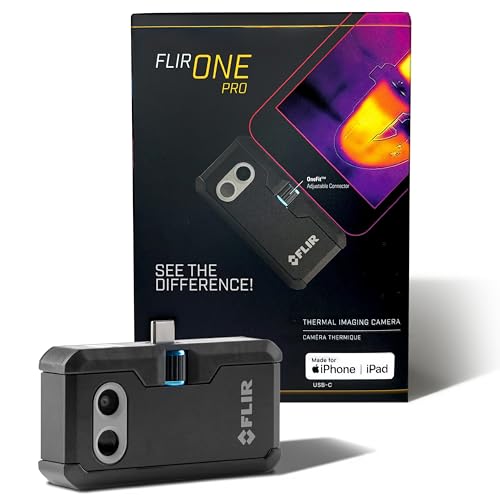 FLIR ONE Pro (phone) | Plugs into iPhone/Android; inspector favorite. | Amazon — $296.65 |
 Topdon TC001 | High-res phone module at a low price. | Amazon — $249.00 |
 FLIR C5 Compact | Standalone pocket camera with Wi-Fi. | Amazon — $593.99 |