Rent a Flir Camera: Action-Step Guide for Homeowners

Homeowners who decide to rent a Flir camera usually have one specific job in mind: chase a draft, find a missing return line, or document a wet ceiling before drywall comes down. The action of renting, rather than buying outright, makes financial sense because the typical use case lasts a single afternoon and the unit sits idle for the rest of the year. Flir is the dominant brand in residential thermal imaging, which means rental shelves at tool depots, hardware co-ops, and online ship-to-door services usually carry at least one Flir model. The hard part is not finding a unit. The hard part is knowing what to do with it once it lands on the kitchen counter.
Part of our Thermal Imaging for Homes guide — start there for the full picture →
How to actually rent a Flir camera step by step
Start with what model fits the job. A pin-scope Flir like the C-series handles a single-room moisture check at the lowest tier. A Flir Ex-series or T-series adds resolution and field of view, which matters when scanning a whole basement or a roofline from outside. National tool rental chains and inspection-tool specialty rental houses both stock Flir; specialty houses usually offer better-calibrated units and pre-rental orientation calls.
Once a model is chosen, the booking flow looks the same across providers: pick a date window, pay a security deposit (commonly 50 to 100 percent of the unit’s retail value, refunded on return), then choose pickup or ship-to-door. Shipping rentals usually charge two-way freight on top of the daily rate. Pickup is faster but adds a drive. Plan to inspect the unit on receipt, photograph any scuffs, and confirm the SD card and charger are in the case before leaving the counter.
What you will pay to rent a Flir camera in 2026
Pricing in 2026 has settled into three tight tiers. Consumer-grade Flir pin scopes and C-series rentals run roughly $30 to $60 per day. Professional handhelds in the Ex or E-series sit in the $80 to $200 per day band, with weekly rates that drop the per-day cost by 30 to 50 percent. Drone-mounted Flir thermal payloads start near $300 per day and climb to $800 per day for radiometric platforms designed for roof or solar work. Deposits scale with retail value: a $4,000 handheld typically requires a $2,000 to $4,000 hold on a credit card.
Hidden costs catch new renters off guard. Calibration certificates may carry a small fee. Late-return penalties usually equal one additional rental day per 24 hours past the due time. Damage waivers cost roughly 10 to 15 percent of the rental subtotal and only cover accidental drops, not water immersion or lens scratches. For a complete daily-rate breakdown across rental categories, the Flir camera rental daily rate guide shows current pricing tiers.
Choosing the right Flir model for your action plan
Match the model to the symptom. A homeowner chasing one drafty window can solve the problem with a pin-scope Flir One that clips onto a phone, and the rental rate stays under $40 per day. A buyer who wants to scan an entire house before closing needs an Ex or E-series handheld with higher pixel count and a wider field of view. Roof and solar diagnostics push the choice into drone-mounted payloads, which require an FAA Part 107 pilot if the operator is doing the work commercially.
Pin-scope tier
Flir One Pro clips into a USB-C or Lightning phone port. Resolution sits around 160 by 120 thermal pixels. Field of view is narrow. Good for single-room verification, missing insulation in one wall cavity, or a quick moisture spot-check before calling a remediator. Daily rates: $30 to $50.
Handheld pro tier
Flir E5, E6, or E8 handhelds bring 240 by 180 to 320 by 240 thermal resolution with a built-in 3-inch display. These are the units most home inspectors actually use during paid inspections. Rental rates: $100 to $200 per day. The right tool for a whole-house scan or a documented report a buyer plans to share with a seller during a negotiation.
Drone-mounted tier
Flir Vue or Boson payloads on a DJI Matrice are the rental category for roof, large commercial flat roofs, or solar arrays. These rentals come with a pilot service fee at most providers because untrained operators routinely crash the units. Daily rates: $300 to $800.
What a one-day Flir rental will and will not reveal
Thermal cameras show surface temperature differentials. They do not see through walls. A Flir held against drywall shows a cooler patch where a draft from a missing insulation batt is cooling the surface, or a warmer patch where a hot pipe runs behind it. The image is interpretation-dependent: a cold spot can be missing insulation, an active air leak, or simply a thermal bridge at a stud, and a rental afternoon does not give a homeowner the experience to tell those apart reliably.
Moisture detection is where most homeowners overestimate the tool. Wet drywall reads colder than dry drywall because evaporation pulls heat from the surface, but the same image can result from an exterior wall on a cold day with no moisture present at all. EPA guidance on indoor air and moisture investigation recommends pairing visual inspection with moisture meters and, when warranted, professional assessment rather than relying on a single instrument. A Flir rental is a screening tool, not a diagnostic verdict.
When the rental decision points back to hiring a pro
For Front Range buyers planning to use thermal imaging during a pre-purchase inspection contingency, the rental math rarely beats hiring an inspector who already owns a calibrated unit and carries errors-and-omissions insurance. A standard Front Range home inspection costs $400 to $600 and often includes a thermal scan as a bundled add-on for $75 to $150. A rental day plus shipping plus the homeowner’s time often exceeds that bundled add-on without producing a report a real-estate attorney can lean on.
The clearest case for renting is a post-close diagnostic on a home the owner already lives in: tracking a draft, verifying insulation work, or documenting a moisture event for an insurance claim. For broader context on residential thermal use and what a homeowner can realistically diagnose, the home inspection tools pillar covers the full instrument category, and the thermal imaging home applications guide walks through the residential use cases in depth.
How to return a Flir rental without losing your deposit
Photograph the unit on receipt and again before return. Wipe the lens with a microfiber cloth only, never paper or solvent. Confirm the SD card is empty if the rental terms require it; some providers wipe data themselves and others charge a fee for left-behind files. Return the unit in the same case it arrived in, with charger, lanyard, and any included accessories accounted for. Most damage disputes trace back to a missing accessory worth $40 that the renter forgot to repack, not to actual unit damage.
How to actually use the Flir camera once it lands on your counter
The first 30 minutes with a rented Flir camera should not involve any actual scanning. Power the unit on indoors and let it acclimate to room temperature for at least 10 to 15 minutes. A microbolometer sensor carried in from a cold winter car or a hot summer trunk produces thermal drift that throws off readings until the sensor equilibrates with the ambient interior temperature. Skipping this acclimation step is one of the most common reasons homeowners produce confusing images during the first hour of a rental.
Run the home’s HVAC system in either heating or cooling mode for at least 30 minutes before scanning interior surfaces. Thermal cameras need a temperature differential to show useful patterns. Without active conditioning, interior surfaces tend toward the same temperature as ambient air and the camera produces low-contrast images that reveal little. Winter scans in Colorado deliver dramatic results because the outdoor temperature drives a 30 to 60 degree differential across exterior walls. Summer scans require either cooling for cooler interior or running the heat briefly to create the differential.
Scan in a methodical pattern: start at the front door, work room by room in clockwise sequence, capture each wall, ceiling, and floor where accessible. For each scanned area, take a paired visible-light photo of the same angle. Most Flir handhelds include a built-in visible camera that captures both with a single trigger press, which preserves the pairing automatically. The paired images become essential two weeks later when interpreting the thermal data; a thermal image alone with no visible reference is nearly impossible to remember in context.
Common mistakes during the rental window
Three mistakes recur often enough to flag specifically. The first is scanning reflective surfaces (polished metal, glossy paint, windows) and treating the resulting images as accurate. Reflective surfaces show ambient radiation rather than their own emitted radiation, which produces misleading temperature readings. The second is scanning in mild-temperature conditions that produce insufficient differential. A 65-degree day with 70-degree interior temperature gives the camera nothing to work with.
The third common mistake is interpretation overreach. Every cold spot is not a defect; thermal bridging at studs, framing members, and corners is a normal building characteristic that shows on any thermal scan. EPA guidance on moisture investigation and Department of Energy thermography documentation both treat thermal imaging as a screening tool that flags areas worth investigating with other instruments, not as a standalone diagnostic. A homeowner who treats every thermal pattern as a problem ends up with a list of false positives and no clear action items.
What to do with the rental’s output after the unit goes back
Export the SD card files to a laptop before the unit ships out. Most modern Flir handhelds save both a JPEG image and a radiometric file (.seq, .img, or proprietary format) that preserves per-pixel temperature data. The JPEG is what most homeowners share with contractors or insurance adjusters. The radiometric file is what an inspector or thermographer would re-open in Flir Tools or comparable software to change the color palette, adjust the temperature span, or measure a specific spot on the image.
Save the files in a clearly organized folder with the inspection date, property address, and a brief description of the scan purpose. Annotate the JPEGs with arrows or callouts using any photo editor before sharing them. The goal is to make the images self-explanatory without requiring a verbal walkthrough. Pair every thermal image with its visible-light counterpart in a single PDF for sharing; a single document keeps the context together.
Front Range seasonal scheduling considerations
Colorado homeowners considering a Flir rental should weigh the seasonal window carefully. Winter scans in Denver, Boulder, and the broader Front Range deliver the most dramatic thermal images because outdoor temperatures of 10 to 30 degrees combine with 65 to 70 degree interior temperatures to create 35 to 60 degree differentials across exterior walls. These differentials make missing insulation, air leaks, and thermal bridging visible immediately. Schedule the rental between November and March for the best results on building-envelope diagnostics.
Summer scans work for HVAC-related questions because air conditioning creates the differential the camera needs, but exterior wall scans during mid-day in direct sun produce thermal patterns dominated by solar gain rather than building defects. A south-facing brick wall in afternoon sun retains heat for hours after sunset, masking the patterns that matter. Schedule summer scans for early morning or after sunset to avoid solar-gain interference.
More Questions About Renting a FLIR Camera
Can a rented FLIR camera find air leaks around windows and doors?
Yes, a rented FLIR camera can find air leaks around windows and doors when there is at least a 10 to 20 degree Fahrenheit difference between indoor and outdoor temperatures. Leaks show up as streaks or plumes of cold or warm air along frames, sills, and trim.
Leaks show more clearly when the house is depressurized, either by an energy auditor’s blower door or by running bathroom and kitchen exhaust fans with windows closed. Scan on a cold morning or hot afternoon, and photograph each leak so it can be caulked, weatherstripped, or sealed later.
Is it safe to scan an electrical panel with a rented FLIR camera?
Scanning an electrical panel with a rented FLIR camera is safe only from outside the closed panel cover, looking for warm breakers or a hot spot on the cover. Removing the dead front exposes live parts and should be left to a licensed electrician.
A breaker or wire that reads noticeably warmer than its neighbors under similar load can indicate a loose connection or overloaded circuit. Photograph any anomaly and have an electrician investigate. A thermal image is a reason to call a professional, not a diagnosis by itself.
What thermal resolution should you rent for a home inspection job?
For a home inspection job, rent a FLIR camera with at least 160 by 120 thermal resolution, and higher if budget allows. Smartphone attachments with lower resolution can spot obvious anomalies but blur small details like nail-line patterns or narrow wall leaks.
Higher-resolution handhelds, such as 320 by 240 and above, make it easier to scan whole walls from across a room and produce clearer images for contractors or insurers. Also look for thermal sensitivity of 0.1 degrees Celsius or better, since that matters for subtle moisture patterns.
Can you rent a FLIR camera online and have it shipped?
Yes, you can rent a FLIR camera online from equipment rental services that ship the unit and include a prepaid return label. Online rentals often offer a wider range of models than local stores, including high-resolution handhelds.
Shipping adds transit days, so the rental window may need to cover delivery and return. Read the damage, insurance, and late-return policies, and check that chargers, cases, and memory cards are included. Order early in winter, when demand for thermal cameras for energy audits typically peaks.
References
- Mold and moisture investigation methodology — U.S. Environmental Protection Agency
- ENERGY STAR: Seal and Insulate — U.S. Environmental Protection Agency (ENERGY STAR)
- Infrared thermography in home inspection — International Association of Certified Home Inspectors
- Standards of practice and inspector resources — American Society of Home Inspectors
Frequently asked questions
How much does it cost to rent a Flir camera for one day?
Consumer Flir pin scopes run $30 to $60 per day in 2026. Professional handhelds like the E-series sit at $80 to $200 per day, and drone-mounted payloads start at $300 per day. Deposits typically equal 50 to 100 percent of retail value.
Do I need training before renting a Flir camera?
Pin-scope and handheld models are designed for first-time users and most rental houses include a brief orientation call or PDF. Drone-mounted thermal payloads require an FAA Part 107 certificate if the work is commercial, and rental providers usually verify before releasing the unit.
Can a rented Flir camera detect moisture behind walls?
Thermal cameras show surface temperature differentials, not moisture directly. A wet patch often reads cooler because evaporation lowers the surface temperature, but the same image can come from a thermal bridge or exterior cold day. Pair the scan with a moisture meter and treat results as a screening, not a verdict.
Is renting cheaper than hiring an inspector with a Flir camera?
For a pre-purchase scan, hiring an inspector who bundles thermal imaging as a $75 to $150 add-on usually beats the rental cost once shipping and your time are counted. Renting makes sense for post-close diagnostics, draft chasing, or insurance documentation.
Can a rented FLIR camera see mold?
A rented FLIR camera cannot see mold directly. It shows temperature differences, which can point to damp areas where mold may grow. Follow up any cool, wet-looking area with a moisture meter, and if mold is suspected, a professional inspection.
Should you buy the damage waiver when renting a FLIR camera?
Buying the damage waiver when renting a FLIR camera is often worth it, because a dropped or cracked lens can cost far more than the rental fee. Check what the waiver excludes, such as loss, theft, or water damage, before declining it.
Do FLIR phone attachments work in cold weather?
FLIR phone attachments work in cold weather, but batteries drain faster and the phone itself may shut down in freezing temperatures. Keep the attachment and phone warm inside a pocket between exterior scans and limit long outdoor sessions.
Thermal imaging cameras
Infrared cameras reveal hidden moisture, missing insulation, and air leaks. Phone-attachment models are the budget entry point; standalone units have higher resolution.
| Product | Why | Buy |
|---|---|---|
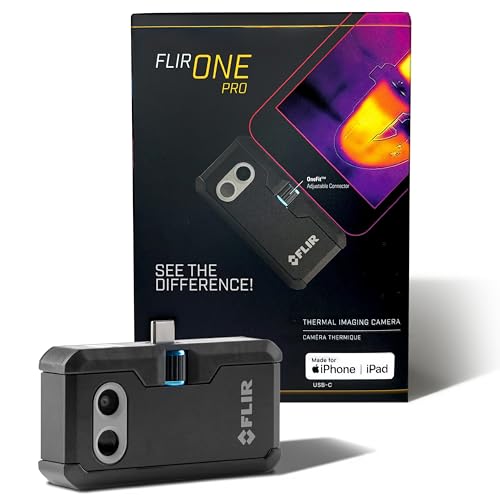 FLIR ONE Pro (phone) | Plugs into iPhone/Android; inspector favorite. | Amazon — $296.65 |
 Topdon TC001 | High-res phone module at a low price. | Amazon — $249.00 |
 FLIR C5 Compact | Standalone pocket camera with Wi-Fi. | Amazon — $593.99 |