Thermal Camera Phone Attachment: What Homeowners Need to Know

A thermal camera phone attachment is a physical hardware component that plugs into a phone’s data port and turns the phone into a thermal-imaging instrument. Most coverage of the category focuses on sensor specifications and software features, but the attachment side of the product — the connector, the housing, the mechanical interface — also matters for long-term reliability. This guide treats the attachment as a hardware component first: connector types, mechanical durability, replacement-tip availability, and what to expect over a five-to-ten-year service life. The aim is to help homeowners and working inspectors choose attachments that will hold up to repeated insertion cycles and field handling.
Part of our Thermal Imaging for Homes guide — start there for the full picture →
The attachment as a hardware component
A thermal camera phone attachment is roughly the size of a thick keyfob, weighing between 30 and 80 grams. The body contains the infrared sensor, lens optics, processing chip, and a short connector stub that plugs into the phone. Some attachments add an internal battery to supplement the phone’s power supply; others draw all power from the phone’s data port. The mechanical interface between attachment and phone is where most field failures occur, which is why connector quality is worth examining before purchase.
The four design trade-offs that drive long-term reliability are connector type (Lightning, USB-C, micro-USB), connector strain relief (whether the housing flexes under sideways force), connector replaceability (whether the tip can be swapped if it wears out), and waterproofing or IP rating (whether the attachment handles dust and humidity in field use).
USB-C connectors and their failure modes
USB-C is the dominant connector for current Android and iPhone-15-and-later thermal attachments. The connector design is more robust than micro-USB and supports higher power and data rates, but it is not failure-proof. The most common USB-C failures on phone-attached thermal cameras are connector tip bending or breakage under sideways load, internal pin contact corrosion in humid environments, and stress fractures at the housing junction after thousands of insertion cycles.
Working inspectors who use their thermal attachment 20 to 50 times per day typically see connector wear within two to three years of heavy use. The lifetime depends heavily on how the inspector handles the attachment — yanking the phone away with the attachment still seated is the most common cause of premature failure. A defensive habit is to support the attachment with one hand while pulling the phone away with the other, never letting the attachment hang on the connector alone.
Lightning connectors and their failure modes
Lightning is the legacy iPhone connector still found on iPhone 14 and earlier. Lightning has a robust mechanical design — the connector is small, symmetric, and mostly self-aligning — but the contact area is smaller than USB-C, which can lead to pin oxidation in humid environments. The most common Lightning failures on phone attachments are pin corrosion after exposure to high humidity, connector tip wear after thousands of insertion cycles, and housing crack propagation at the connector base.
Apple’s MFi (Made for iPhone) licensing program governs Lightning accessories, and licensed thermal attachments include a small authentication chip that the iPhone validates on connection. Unlicensed Lightning attachments may work intermittently or trigger software warnings, which is why most legitimate manufacturers carry MFi licensing for their Lightning SKUs.
Micro-USB legacy connectors
Micro-USB is the older Android connector phased out from new phones around 2017. Some Hti and Topdon entry-tier thermal attachments still ship with micro-USB SKUs for users with older phones. Micro-USB is the weakest connector type in this category — the connector tip is small, asymmetric, and prone to bending or breakage under sideways force. Heavy-use lifetimes for micro-USB thermal attachments are usually under two years.
The companion app support is also the most fragile on micro-USB. Many manufacturers have ended app updates for the older Android versions that micro-USB phones typically run, which means even working hardware may be stuck on legacy app versions. For occasional homeowner use, this may be acceptable; for working inspectors, USB-C or Lightning attachments are the better long-term investment.
Connector strain relief and housing design
Strain relief is the rubber or molded plastic transition between the connector tip and the main housing. Good strain relief uses a tapered, flexible material that bends gradually under sideways force rather than concentrating stress at one point. Poor strain relief uses a rigid plastic boot that transfers all sideways force to the connector base, where the internal solder joints live.
To evaluate strain relief on a thermal attachment before purchase, look at the transition between connector tip and main housing. A gradual taper with a slightly flexible material is the right design. A sharp 90-degree corner with rigid plastic is the wrong design. Working inspectors should pay particular attention to strain relief because field handling subjects the connector to more sideways force than typical consumer use.
Replacement tips and modular designs
A small but growing number of thermal attachments offer replaceable connector tips. The design separates the connector from the main housing with a mechanical latch or screw, allowing the user to swap a worn or damaged tip without replacing the entire attachment. Topdon and a few other manufacturers have introduced this design recently. Replacement tips typically cost $30 to $80 and extend the working life of the attachment significantly.
Most legacy designs do not offer replaceable tips. When the connector fails, the entire attachment becomes scrap, even though the sensor and optics are usually still fully functional. For working inspectors planning to use an attachment heavily for several years, replaceable-tip designs are worth seeking out. For our broader phone-attachment ecosystem coverage, see our thermal imaging camera phone attachment guide.
Waterproofing and IP ratings
Most consumer thermal attachments are not rated for water exposure. Heavy rain, snow, or direct splashes can damage the sensor or short the data connection. Some manufacturers offer IP54 or IP65 rated units (FLIR One Edge Pro is one example) that handle dust and light water exposure. The premium for waterproofing is typically $100 to $300 over the equivalent non-rated unit.
For most residential inspection work, indoor and dry-weather outdoor use is common, and IP ratings matter less. For roof inspection in marginal weather, crawlspace work in damp environments, or outdoor utility-line thermography, an IP-rated unit is the right choice. Working inspectors who frequently operate in humid or dusty conditions should prioritize waterproofing in their selection.
Cable extensions and pass-through options
Some thermal attachments support cable extensions that allow the attachment to sit a meter or two from the phone. This is useful for tight access work — looking into a soffit, reaching behind appliances, working in attics — where the phone screen needs to be visible while the camera is in an inaccessible position. The trade-off is cable durability (more failure points) and slightly reduced data integrity over the extended length.
Pass-through power options are also worth understanding. A phone running a thermal app at full frame rate can drain a battery within 60 to 90 minutes. Some attachments include a pass-through port that allows the phone to be charged while the camera is connected. This matters more for working inspectors doing all-day site work than for homeowners doing periodic diagnostics.
Mounting accessories and tripod compatibility
For static thermal imaging — long-exposure work, time-lapse monitoring, or precise framing — a tripod-mounted phone-and-attachment setup is more useful than handheld. Most phone holders for tripods accommodate phones with thermal attachments installed, but the attachment’s added weight and width may exceed the holder’s design specifications. Heavier-duty phone holders with adjustable jaws are usually a better choice when an attachment is permanently installed.
For broader inspection tool selection, our home inspection tools 2026 buyer’s guide covers thermal cameras alongside moisture meters, borescopes, and other diagnostic tools. ASHRAE technical resources on thermal imaging in building diagnostics provide additional context on equipment requirements.
Long-term mechanical reliability across the category
Typical service lifetimes for phone-attached thermal cameras under moderate use (one to five uses per week) run five to eight years before sensor degradation or connector failure ends the unit’s useful life. Heavy use (20+ uses per day) tends to shorten this to two to four years, dominated by connector wear rather than sensor degradation. Sensor degradation itself is rare; microbolometer arrays typically retain useful performance for a decade or more under normal handling.
The replacement cycle is therefore usually driven by connector wear, software discontinuation, or connector-type changes when the user upgrades phones (Lightning to USB-C being the biggest current driver). Planning ahead for a five-year replacement budget is reasonable for any working inspector. For more on the lifecycle considerations, see InterNACHI’s continuing-education resources on thermal-imaging equipment.
Storage and transport practices that extend lifetime
Several handling habits significantly extend the service life of a phone-attached thermal camera. Storing the attachment in a small padded case rather than loose in a tool bag prevents connector damage from impact. Keeping the connector capped when the attachment is not in use prevents dust and debris from accumulating in the contacts. Transporting the attachment separately from the phone, rather than connected while in transit, prevents stress on the connector during vehicle vibration.
Working inspectors often carry the attachment in a small zippered pouch with desiccant packets to control humidity, especially in damp climates or during crawlspace work. The desiccant is replaced every six to twelve months. For attachments with their own internal battery, periodic discharge-recharge cycles (rather than continuous topping-up) help maintain battery health over multi-year use. Most manufacturers recommend a full discharge-recharge cycle every two to three months for stored attachments.
Why phone choice affects connector longevity
The phone itself contributes to connector longevity in ways that are easy to overlook. A phone with a flexible case tends to absorb sideways force better than a phone in a rigid case, reducing stress on the attachment’s connector. A phone with a clean charging port (free of pocket lint) makes better electrical contact and reduces intermittent connection issues. A phone with a recent OS version handles the attachment’s USB-C alternate-mode signaling more reliably than an older phone running outdated drivers.
For working inspectors planning to use a thermal attachment heavily, choosing a phone with a clean port-aware case design pays off over the life of the attachment. Some phone cases now include thermal-attachment-specific cutouts that align the attachment with the connector for repeatable, low-stress insertion. These cases are not common but are worth seeking out for high-use applications.
References
- ENERGY STAR: Seal and Insulate — U.S. Environmental Protection Agency (ENERGY STAR)
- InterNACHI Infrared Thermography Certification — International Association of Certified Home Inspectors
- ASHRAE Standards and Guidelines — American Society of Heating, Refrigerating and Air-Conditioning Engineers
- ICC International Code Council Standards — International Code Council
Frequently asked questions
What is the most common failure point on a thermal camera phone attachment?
Connector wear is the most common failure point, especially under heavy field use. Sideways force during insertion and removal causes solder-joint stress at the connector base. Supporting the attachment with one hand while pulling the phone away with the other significantly extends connector life.
Can I replace the connector tip if it wears out?
A small number of thermal attachments now offer replaceable connector tips, often from Topdon and some newer manufacturers. Replacement tips typically cost $30 to $80. Most legacy designs do not support tip replacement, and a failed connector turns the whole attachment into scrap.
Do thermal camera phone attachments work in the rain?
Most consumer units are not rated for water exposure. Some manufacturers offer IP54 or IP65 rated units for an additional $100 to $300. Working inspectors who operate in humid or dusty conditions should prioritize an IP-rated attachment.
How long does a thermal camera phone attachment typically last?
Under moderate use (one to five uses per week), service lifetimes typically run five to eight years. Heavy use (20+ uses per day) usually shortens this to two to four years, dominated by connector wear. Sensor degradation is rare; microbolometers usually outlast the connector mechanically.
Thermal imaging cameras
Infrared cameras reveal hidden moisture, missing insulation, and air leaks. Phone-attachment models are the budget entry point; standalone units have higher resolution.
| Product | Why | Buy |
|---|---|---|
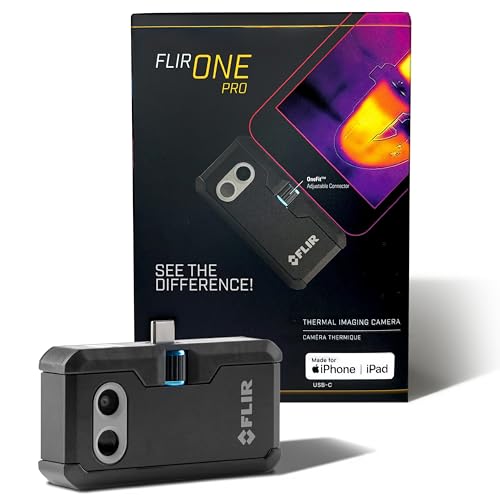 FLIR ONE Pro (phone) | Plugs into iPhone/Android; inspector favorite. | Amazon — $349.00 |
 Topdon TC001 | High-res phone module at a low price. | Amazon — $262.99 |
 FLIR C5 Compact | Standalone pocket camera with Wi-Fi. | Amazon — $649.00 |