Smart Lock Installation: Door Prep, Power and Lockout Risks
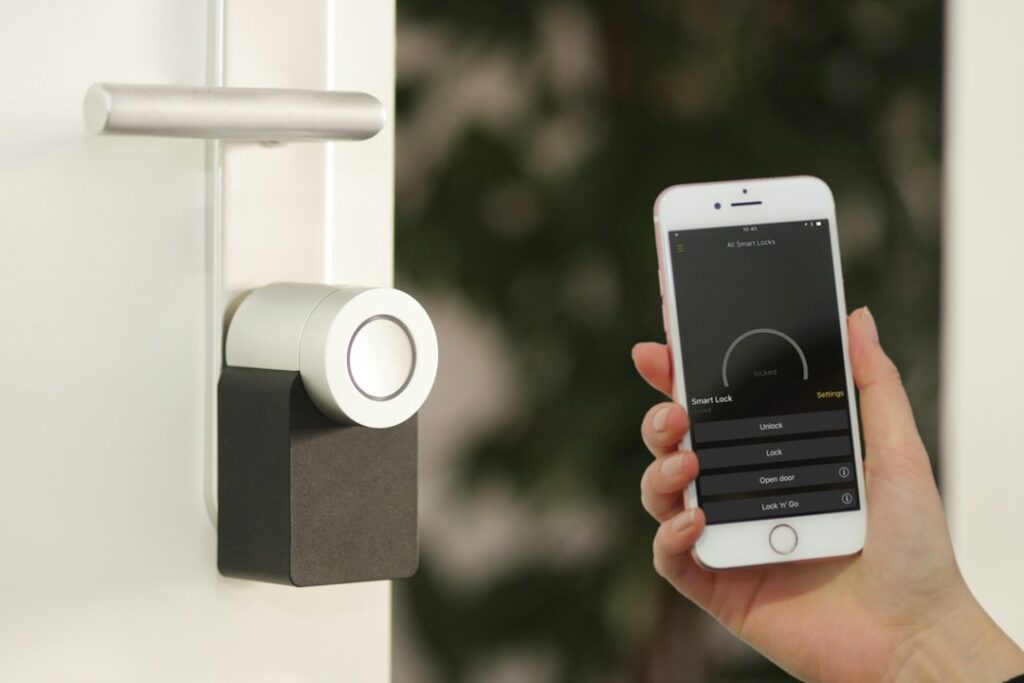
Keyless entry has moved from novelty to ordinary hardware-store item, and many buyers now walk into homes where the previous owner has already added a keypad or app-controlled deadbolt. A good smart lock installation looks simple from the outside: a new escutcheon, a keypad and a phone app. Behind that face plate, though, the lock still depends on the same things any deadbolt does: a properly bored door, a bolt that lines up with a reinforced strike and a frame that does not shift with the seasons. It also adds new dependencies, including batteries, wireless connections and account security. This guide walks through the choice between retrofit and full replacement, the door measurements that matter, alignment problems, power and lockout planning, hubs and Wi-Fi, fire-escape considerations and typical costs. It draws on public guidance from the National Fire Protection Association (NFPA), the U.S. Fire Administration (USFA) and the Federal Trade Commission (FTC); lock manufacturers’ instructions and local codes govern specific products.
Part of our Structure & Exterior guide — start there for the full picture →
What Smart Lock Installation Involves
Most residential smart locks are motorized deadbolts. Instead of turning a thumb-turn by hand, a small motor inside the interior housing throws and retracts the bolt on command. Commands can come from a keypad, a phone app over Bluetooth, a Wi-Fi bridge, a voice assistant or an automation routine. Nearly all models keep a manual thumb-turn inside, and many keep a keyed cylinder outside as a backup.
Installation usually takes one of two forms. A retrofit lock replaces only the interior thumb-turn assembly and leaves the existing deadbolt, exterior cylinder and keys in place. A full replacement lock replaces the entire deadbolt: exterior keypad or cylinder, bolt, strike and interior motor housing. A third category, smart handlesets and mortise locks, replaces both the deadbolt and the handle and can require more extensive door work.
On a door that is already in good shape, either style can often be installed in under an hour with a screwdriver. The time-consuming jobs are the ones where the door needs preparation, the bolt binds or the wireless setup fails.
Retrofit vs Full Replacement
Retrofit smart locks
Retrofit kits suit renters, condo owners with association-controlled exterior hardware and anyone who wants to keep existing keys. Because the outside of the door does not change, a retrofit is also inconspicuous. The trade-offs: the lock is only as good as the existing deadbolt, compatibility lists are model-specific, and some older or unusual deadbolts cannot be adapted. Retrofits also may not include a keypad, so entry without a phone or key may require a separate add-on.
Full replacement smart deadbolts
Full replacement locks bring a new bolt and strike, an integrated keypad and often a fingerprint reader. They are the more common choice when the existing deadbolt is worn, mismatched to other doors or missing. Some full replacement models eliminate the key cylinder entirely, which removes one avenue of attack but also removes the mechanical backup if the electronics fail. Owners choosing a keyless model should plan carefully for power loss.
Matching the rest of the door
If the door has a separate knob or lever below the deadbolt, many households also replace it so finishes match. Smart handlesets that combine the latch and deadbolt in one unit may need a larger cross-bore or a different hole pattern than the existing door has.
Door Prep: Bore Sizes, Backset and Thickness
Before buying any lock, measure the door. Smart deadbolts are designed around the same standard preparation as conventional deadbolts, and most installation problems trace back to a door that does not match.
- Cross-bore (face bore): the large hole through the face of the door. On most residential doors it is 2-1/8 inches in diameter, which most smart deadbolts expect.
- Edge bore: the smaller hole through the edge of the door for the bolt, commonly 1 inch.
- Backset: the distance from the door edge to the center of the cross-bore, usually 2-3/8 or 2-3/4 inches. Most locks ship with an adjustable bolt for both.
- Door thickness: exterior doors are commonly 1-3/4 inches thick; many locks accept a range around that, but thick custom doors may need an extension kit.
- Hole spacing: on doors with both a knob and a deadbolt, the distance between the two cross-bores matters if a combined handleset is planned.
Doors with oversized or damaged bores, previous lock holes, split edges or soft wood around the edge bore should be repaired before a new lock goes on. Steel and fiberglass doors with a thin skin may also need reinforcement plates. The guide to exterior door replacement cost helps when the door itself is the problem.
Deadbolt Alignment: The Most Common Failure
A manual deadbolt that drags a little still locks, because the person turning it simply pushes harder. A motorized lock cannot. If the bolt rubs the strike plate, binds in a misaligned hole or meets weatherstripping pressure, the motor may stall, report a jam, drain the batteries faster or leave the door unlocked while the app shows an error.
Typical causes include:
- A strike hole drilled slightly high or low, or a strike that was never deepened enough for the full bolt throw.
- A door that has sagged on its hinges so the bolt no longer centers on the strike.
- Seasonal swelling and shrinking. Along the Front Range, dry winters and occasional humid summer storms can move wood doors and frames enough to change alignment.
- Tight weatherstripping that forces the user to pull or push the door before the bolt will throw.
The test most manufacturers recommend is simple: with the door closed, the bolt should extend and retract smoothly by hand without pushing or pulling on the door. If it does not, the strike, hinges or frame need attention first. The deadbolt installation guide covers strike reinforcement, mortising and alignment in more depth, and the guide to door frame repair addresses split jambs and loose frames.
Batteries, Power Loss and Lockout Planning
Most smart locks run on AA batteries or a rechargeable pack. Battery life varies with model, temperature, how often the lock runs and how much friction the bolt meets. Cold weather can shorten battery performance, which matters for exterior-mounted keypads during a Colorado winter.
A sensible lockout plan answers four questions before the lock is ever relied on:
- What happens when the batteries die? Many models provide warnings in the app and on the keypad, and some have external terminals that accept a 9-volt battery or USB power to wake the lock temporarily.
- Is there a mechanical key? If so, where is it kept, and is it somewhere other than inside the house?
- What if the phone is lost or the internet is down? A keypad code that works locally, without the network, is a valuable backup.
- Who has codes? Temporary codes for cleaners, dog walkers and contractors should be time-limited and removed when no longer needed.
After a home purchase, the new owner should reset the lock to factory defaults, remove previous owners from the app account and change all codes. A lock that remains registered to a prior owner’s account is a common oversight.
Wi-Fi, Bluetooth and Hubs
Smart locks connect in several ways. Bluetooth locks talk directly to a phone at short range. Wi-Fi locks connect to the home router, either directly or through a plug-in bridge near the door. Other locks use Z-Wave, Zigbee, Thread or Matter and need a compatible hub or controller. Each approach involves trade-offs between battery life, range and remote access.
Because a lock is a door to the house as well as a network device, account and network security matter. The FTC’s consumer advice on securing internet-connected devices recommends:
- Changing default usernames and passwords, and not reusing passwords from other accounts.
- Using two-factor authentication when a device offers it.
- Updating firmware regularly and keeping the companion app current.
- Disabling features that will not be used, such as remote management, and disconnecting old devices from the network.
The FTC’s separate guidance on home Wi-Fi recommends encrypting the network with WPA3 Personal or WPA2 Personal and changing the router’s default administrative username, password and network name. Older routers that only offer WEP or WPA are described as outdated and not secure.
Placement matters too. A bridge plugged into an outlet near the door improves reliability; some owners add a USB outlet nearby for chargers and bridges.
Doorbells and cameras
Smart locks are often paired with video doorbells, so the person at the door can be seen before the door is unlocked remotely. Many doorbells run on the existing low-voltage doorbell transformer, which may need to be upgraded for some models. The guide to doorbell wiring explains transformers, chimes and common wiring faults. FTC guidance on internet-connected devices notes that many IP cameras are vulnerable to digital snooping and suggests checking camera access logs for unfamiliar activity.
Fire Safety: Egress Must Stay Simple
Smart locks are designed for convenience on the outside. On the inside, the priority is fast, simple escape. NFPA’s escape planning guidance advises households to walk through the home, check that escape routes are clear and make sure doors and windows can be opened easily. USFA recommends finding two ways out of every room and making sure doors and windows are not blocked.
For a smart lock, that means:
- The inside should open with a simple thumb-turn or lever, with no key, code, app or special knowledge required.
- Models that can be configured to require a code inside, or double-cylinder style setups that need a key from inside, deserve careful thought. Many local codes restrict key-operated locks on required exit doors in dwellings; the local building department can confirm what applies.
- Children, older adults and guests should know how to unlock the door in the dark.
- Automation routines that lock doors on a schedule should never interfere with a manual exit.
The guide to smoke detector placement covers the alarm side of escape planning.
Choosing Features That Fit the Household
Smart locks differ far more in their software than in their hardware. A few features are worth comparing before purchase, because they shape how the lock behaves day to day.
Auto-lock and door sensors
Auto-lock throws the bolt a set time after the door closes. It prevents the common problem of a door left unlocked, but on a lock without a door-position sensor it can also throw the bolt while the door is still open, leaving the bolt sticking out to hit the frame. Models with a door sensor, or a separate contact sensor, can confirm the door is closed before locking and can report a door left ajar.
Keypads and biometrics
Keypads let family members in without a phone. Fingerprint readers are convenient but can be affected by cold, wet or dirty fingers, which matters on an exposed Front Range porch in January. A keypad backup is useful even on fingerprint models.
Grades, weather ratings and warranties
Many lock makers publish a durability or security grade under industry standards, along with an operating temperature range and a weather-resistance rating for the exterior unit. Those details are worth reading on product sheets, especially for doors facing west or north that take direct sun or driving snow. Warranty length and the manufacturer’s track record of firmware updates also matter, because a lock may stay on the door for many years.
Integration and privacy
Locks that integrate with a broader smart-home platform can unlock for a guest, trigger lights or arm an alarm. Each integration is another account with access to the door. Reviewing which apps and services have permission, and removing those no longer used, is a reasonable periodic habit.
A General Installation Sequence
Exact steps differ by product, and the manufacturer’s instructions always take priority. A typical sequence for a full replacement smart deadbolt looks like this:
- Measure the door thickness, cross-bore, edge bore and backset, and confirm compatibility.
- Check the existing bolt for smooth travel with the door closed, and correct alignment problems first.
- Remove the old deadbolt and inspect the bore and strike area for splits or loose wood.
- Install the new bolt, set to the correct backset, then the exterior unit with its cable routed through the bolt opening.
- Mount the interior plate and motor housing, connect the cable and insert batteries.
- Install the new strike with long screws reaching the framing where the product allows.
- Run the calibration routine, pair the lock with the app and test locking by keypad, app and thumb-turn several times.
What a Home Inspector Will and Will Not Check
Home inspectors commonly operate a representative number of doors and note doors that bind, latch poorly or have damaged frames. They may note a deadbolt that does not fully extend into the strike. They typically do not program smart locks, test app connectivity, verify that codes have been reset or evaluate cybersecurity. Buyers usually handle those steps themselves at move-in, ideally on closing day. For an overview of inspection scope, see the guide to hiring a home inspector and the summary of exterior and structural inspection items, which include exterior doors. The guide to garage door locks covers smart garage openers.
Smart Lock Installation Costs
Costs depend on the lock type, door condition and whether a locksmith or handyman does the work. The figures below are broad industry estimates, not quotes.
- Retrofit smart lock: commonly in the low hundreds of dollars for the device.
- Full replacement smart deadbolt with keypad: often similar or somewhat higher, with fingerprint and Wi-Fi models at the upper end.
- Bridge or hub: sometimes included, sometimes a separate purchase.
- Professional installation: commonly a modest labor charge for a straightforward swap; door boring, strike mortising, frame repair or reinforcement adds to it.
- Door or frame repair: varies widely and can exceed the cost of the lock itself.
When requesting bids, ask the installer to confirm the bore, backset and alignment, test the bolt by hand and through the app, and leave written notes on reset procedures and backup access.
References
- Securing Your Internet-Connected Devices at Home — Federal Trade Commission
- How To Secure Your Home Wi-Fi Network — Federal Trade Commission
- Escape Planning — National Fire Protection Association
- Home Fire Escape Plans — U.S. Fire Administration
Frequently asked questions
Can a smart lock be installed on any door?
Most smart deadbolts fit standard residential doors with a 2-1/8 inch cross-bore, a 1 inch edge bore, a 2-3/8 or 2-3/4 inch backset and a thickness around 1-3/4 inches. Thick, damaged or non-standard doors may need repair, an extension kit or a different lock style.
Why does a smart lock keep jamming?
The most common cause is misalignment between the bolt and the strike, often from a sagging door, a shallow strike hole or tight weatherstripping. A motor cannot push past friction the way a person can. The bolt should throw smoothly by hand with the door closed before relying on the motor.
What happens to a smart lock when the batteries die?
Most locks warn of low batteries in the app and on the keypad. Many allow temporary power through external terminals, and many keep a mechanical key as a backup. A lockout plan should cover where the key is kept and how to reach the lock without the network.
Are smart locks safe for fire escape?
They can be, as long as the inside opens with a simple thumb-turn or lever and no key, code or app is needed to get out. NFPA advises making sure doors and windows on escape routes can be opened easily. Local codes may restrict key-operated locks on exit doors.
What should new homeowners do with an existing smart lock?
Reset the lock to factory defaults, remove previous users from the app account, change all codes and update the firmware. FTC guidance on connected devices also recommends changing default passwords and using two-factor authentication where offered.
If a Front Range home you are buying has keypads, smart locks or doors that bind, get in touch here and we can connect you with a local inspector who checks doors and frames as part of the visit.