Milwaukee Borescope M12: What Homeowners Need to Know
Seeing inside a wall cavity, a sewer line, or a ductwork run without opening anything is exactly what a borescope is built for, and the Milwaukee Borescope M12 is one of the better-known cordless options on that shelf. Built on Milwaukee’s M12 battery platform, it pairs a camera-tipped flexible cable with a display so an inspector or homeowner can navigate tight, dark spaces and record what they find. This article summarizes published manufacturer specifications and general inspection practice; it does not claim hands-on testing, and any finding inside a concealed space should be verified before acting on it. Understanding the M12 system’s specs, accessories, and limits helps set realistic expectations.
Part of our Home Inspection Tools guide — start there for the full picture →
What the Milwaukee Borescope M12 Is
The Milwaukee M12 borescope family includes corded camera cables that run from an M12-powered base or display, along with the M-Spector line of inspection cameras that share the same 12-volt batteries used across Milwaukee’s compact tools. The core idea is a waterproof camera head on a semi-rigid or flexible cable, feeding video to either an integrated screen or, on app-enabled models, a paired smartphone. Because it runs on the same M12 packs as the brand’s drills and drivers, owners already in that ecosystem avoid buying a separate battery.
The tool’s purpose is visual access, not measurement. It shows what is inside a cavity or pipe, letting the user judge condition, locate a blockage, or confirm the presence of moisture, pests, or damage. As with all inspection cameras, the image guides a decision; it does not by itself diagnose a structural or plumbing defect. The wider context for where a borescope fits among diagnostic gear is laid out in the home inspection tools buyer’s guide.
Key Specifications and Probe Options
Across the M12 inspection-camera range, the camera head diameter is the spec that decides where the tool can go. Milwaukee offers heads commonly around 17 millimeters on standard scopes, with thinner heads available on certain models for tighter access, and cable lengths that typically run about 3 feet on the base unit with extensions available to reach roughly 9 feet or more on expandable systems. The cable is semi-rigid, holding a shape so it can be pushed around bends without collapsing.
Image resolution on these cameras is generally VGA-class on older units and higher on newer app-connected models, with onboard LED lighting at the camera tip whose brightness is adjustable to suit dark cavities. The camera heads are rated water-resistant for inserting into drains and standing water, and many models include a magnetic, hook, and mirror accessory set that clips to the tip for retrieving dropped items or angling the view. Battery runtime depends on the M12 pack capacity, and the platform’s interchangeability is a practical advantage for anyone already invested in the system. Always confirm the exact head diameter, cable length, and resolution against the current spec sheet for the specific model number before buying.
Home-Inspection Use Cases
A borescope earns its place on jobs where opening a finished surface would be destructive or impossible. Inside wall cavities, it reveals insulation gaps, signs of water intrusion, pest activity, and the condition of concealed framing through a small drilled hole. In plumbing, a water-rated head pushed into a cleanout or drain shows blockages, root intrusion, and pipe condition without excavation. In HVAC, it inspects the interior of ducts and the back of equipment that hands and eyes cannot reach.
It is equally useful behind appliances, inside chimneys and vents, under vehicles, and in any confined void. The semi-rigid cable lets the operator steer the head, while the LED tip lights the scene and the screen or phone records evidence for a report. For moisture and pest findings, the visual confirmation from a borescope often complements a thermal scan that flagged the area first. The broader comparison of options in the guidance on the best inspection camera shows how borescopes line up against rigid scopes and articulating cameras for different access problems.
Milwaukee M12 Borescope Versus Two Alternatives
Against a budget USB or Wi-Fi endoscope, the Milwaukee M12 borescope trades a lower price for meaningfully better build quality, a steadier semi-rigid cable, brighter integrated lighting, and the durability expected of a jobsite tool. A cheap USB endoscope can cost a fraction as much and is fine for a one-time look, but its limp cable, weaker light, and fragile connector make repeated professional use frustrating. The M12’s battery-platform integration is a further advantage for existing Milwaukee owners.
Against a flexible articulating borescope, where the camera tip can be steered with a joystick, the standard M12 scope is simpler and cheaper but cannot actively bend the head to look around a corner; the operator relies on cable shaping and the mirror accessory. Articulating scopes from inspection-tool specialists cost considerably more and suit detailed mechanical work, such as engine internals, where precise tip control is essential. For general building and plumbing inspection, the M12’s fixed head is usually sufficient. The overview of a flexible borescope details where articulation justifies the added expense.
Limitations, Care, and Buying Criteria
The M12 borescope’s limits are inherent to the category. The fixed-focus camera has a sweet spot, so objects too close or too far appear blurry, and the field of view is narrow, requiring careful navigation. Without articulation on standard models, getting the head around a sharp bend can be difficult. Image quality on older VGA units is modest in fine detail, and as a visual tool it cannot measure moisture, temperature, or material thickness, so it confirms presence and condition but not quantity.
Maintenance is straightforward: rinse and dry the water-rated head after use in drains, keep the connector clean and dry, avoid forcing the cable around bends that exceed its bend radius, and store it coiled loosely to prevent kinks. When buying, prioritize head diameter for the access you need, cable length and reach, image resolution, lighting control, and whether you value an integrated screen or a phone-connected display. Confirm compatibility with your existing M12 batteries. Because the tool only shows what is there, pair its findings with the appropriate measuring instrument, such as a moisture meter, when condition matters, an approach explained in the guide to how a moisture meter works.
Display Options Across the M12 Inspection Line
How the M12 borescope presents its image varies across the range and meaningfully affects field use. Some models pair the camera cable with a dedicated handheld display unit powered by an M12 battery, giving a screen that works in bright sunlight where a phone washes out and that needs no pairing or app. Others, the app-connected M-Spector models, stream video to a smartphone or tablet over a wireless connection, leveraging the phone’s larger, higher-resolution screen and its storage for capturing photos and video to attach to a report.
Each approach has trade-offs. The dedicated display is rugged, reliable, and instantly ready, but its screen is smaller and lower-resolution than a modern phone. The app-connected approach offers a better viewing experience and easy sharing but depends on a stable wireless link that can lag in a basement or behind metal, and it ties up the user’s phone. For an inspector documenting findings for clients, the recording and sharing capability of the app models is convenient; for quick field checks in difficult lighting, the dedicated screen is faster. Matching the display style to how you work is as important as the camera specs themselves, a consideration that also applies across the broader category in the guide to the best inspection camera.
How the M12 Borescope Compares Within the Milwaukee Ecosystem
Milwaukee’s inspection-camera lineup is not a single product but a small family, and choosing within it is part of the decision. Entry M-Spector scopes prioritize a lower price and basic VGA-class imaging suitable for occasional cavity and drain checks. Higher models add better resolution, longer or interchangeable cables, and app connectivity with recording, aimed at tradespeople who document work. The shared M12 battery platform means any of them slots into a kit that already includes Milwaukee drills, drivers, and lights, so the battery investment carries across tools.
That ecosystem advantage is real but should not override fit. A homeowner who owns no M12 tools gains less from the platform than a contractor with a wall of M12 batteries, and for a single occasional use a cheaper standalone endoscope may suffice. The reverse is also true: a Milwaukee-equipped pro who needs a borescope for regular work avoids buying a separate charging system and gains the durability the M12 line is built for. Weigh the battery-platform benefit against your actual tool ownership and frequency of use. For the underlying decision between fixed and steerable camera tips that also shapes this choice, the overview of a flexible borescope is the natural companion read.
Accessories That Extend What the M12 Borescope Can Do
Much of a borescope’s versatility comes from its accessories, and the M12 system includes several that change what jobs it can handle. The magnetic, hook, and mirror attachments clip onto the camera head: the magnet and hook retrieve dropped screws, rings, and small metal parts from cavities and drains, turning the inspection tool into a recovery tool, while the mirror angles the view sideways so the operator can see around an immediate corner that the fixed forward-facing camera cannot. These are practical additions for the cramped, awkward spaces borescopes are used in.
Cable length is itself an accessory consideration. Expandable systems accept extension cables that increase reach from the base few feet to roughly nine feet or more, useful for longer duct and pipe runs, though longer cables are harder to control and push. Some users add a longer or thinner camera head for specific access needs. When assembling a kit, matching the head diameter to the tightest space, choosing a cable length that reaches without becoming unwieldy, and including the magnet-hook-mirror set covers most building and plumbing scenarios. The accessory question, how to extend reach and view without losing control, recurs across the inspection-camera category and is addressed comparatively in the guide to the best inspection camera.
Pairing the Borescope With Other Inspection Tools
A borescope answers the question “what is in there,” but condition often requires measurement the camera cannot provide, which is why it works best alongside other instruments. When a borescope reveals damp-looking material or staining inside a wall cavity, a moisture meter quantifies how wet the material actually is, distinguishing a harmless old stain from active wetting. When a thermal scan flags a cool or warm anomaly behind a surface, a small access hole and a borescope confirm visually what the infrared image suggested, and a moisture meter then measures it.
This layered approach is how working inspectors build defensible findings: thermal imaging or a pinless moisture sweep locates a suspect area non-destructively, a borescope inserted through a small hole confirms the condition visually, and a contact moisture meter quantifies the problem. No single tool does all three, and the borescope’s role is the visual confirmation in the middle. Recognizing that the M12 borescope is one instrument in a kit, rather than a standalone diagnostic, leads to better-supported conclusions and clearer client reports. The measurement side of that pairing is explained in the primer on how a moisture meter works.
References
- Standards of Practice for Home Inspectors — International Association of Certified Home Inspectors
- Standard of Practice — American Society of Home Inspectors
- Building Inspection Resources — International Code Council
Frequently asked questions
What can the Milwaukee Borescope M12 inspect?
It is built for visual access into wall cavities, drains, ducts, chimneys, and confined voids. A water-rated camera head on a semi-rigid cable, lit by LEDs at the tip, shows blockages, water intrusion, pests, and concealed framing condition without opening a surface.
Does the M12 borescope use the same battery as other Milwaukee tools?
Yes. It runs on Milwaukee's M12 12-volt battery platform shared across the brand's compact tools, so existing owners avoid buying a separate battery. Runtime depends on the pack capacity you use.
How is it different from a cheap USB endoscope?
The M12 offers better build quality, a steadier semi-rigid cable, brighter lighting, and jobsite durability, while a USB endoscope is cheaper but flimsier with weaker light. For repeated professional use the M12 holds up far better.
Can a borescope measure moisture or temperature?
No. It is a visual tool that confirms presence and condition, not quantity. Pair its findings with a moisture meter or thermal imager when you need to measure how wet or how hot something actually is.
Borescopes & inspection cameras
A borescope lets you see inside walls, ducts, drains, and crawlspaces without opening anything up.
| Product | Why | Buy |
|---|---|---|
 DEPSTECH Wireless Borescope DEPSTECH Wireless Borescope | Wi-Fi to your phone; semi-rigid cable. | Amazon — $34.99 |
 Teslong Dual-Lens Borescope Teslong Dual-Lens Borescope | Side + front view; good for ducts. | Amazon — $149.99 |
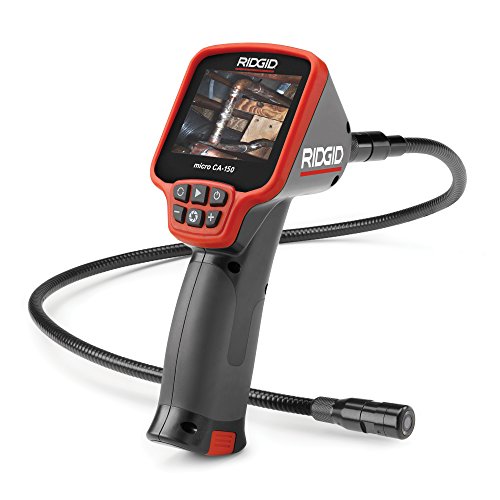 Ridgid micro CA-150 Ridgid micro CA-150 | Rugged handheld with screen. | Amazon — $281.00 |