Flexible Borescope: What Homeowners Need to Know
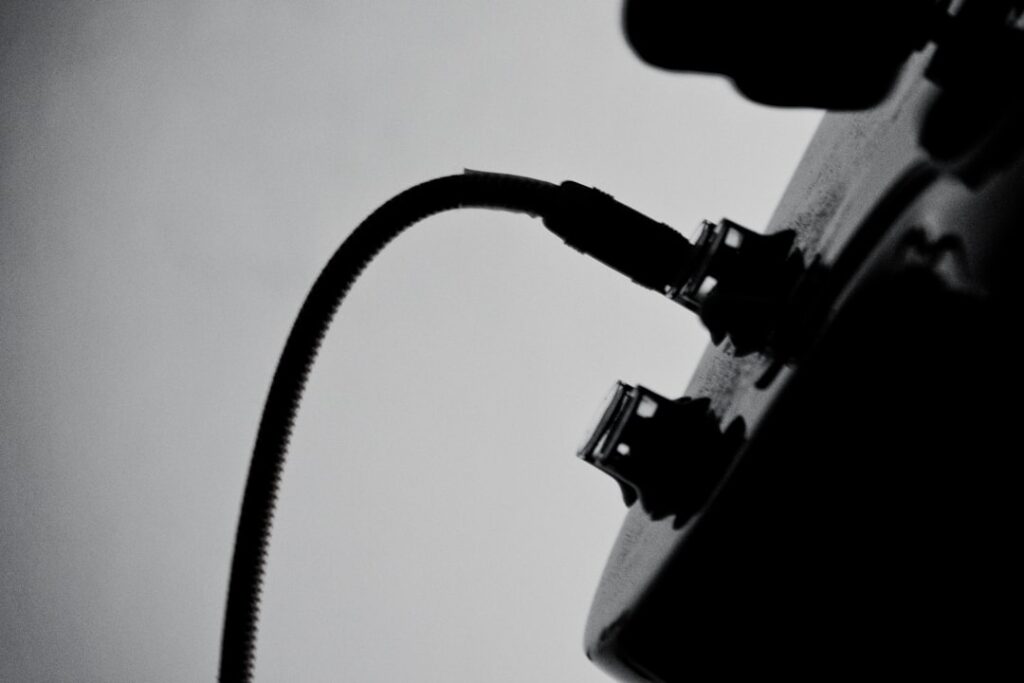
A flexible borescope is a slender camera on the end of a bendable cable, designed to slip into spaces the eye cannot reach: a wall cavity, a drain line, an HVAC duct, or the gap behind an appliance. For homeowners and working inspectors alike, it turns a guessing game about what is hidden inside a structure into a direct look. The category spans twenty-dollar phone attachments and multi-thousand-dollar articulating industrial units, so understanding the specifications that separate them is the difference between a useful tool and a frustrating purchase. This guide explains those specs, realistic price ranges, and how the inspection use differs from casual consumer use.
Part of our Home Inspection Tools guide — start there for the full picture →
What a flexible borescope is and what it does
A borescope (also called an inspection camera or snake camera) consists of a camera head with built-in LED lighting, a flexible insertion tube, and a display, which may be a built-in screen, a connected smartphone, or a separate monitor. “Flexible” refers to the insertion tube, which bends to follow a pipe or curve, as opposed to rigid borescopes used for straight-line viewing. The operator feeds the cable into an opening and watches the live feed to spot leaks, blockages, corrosion, pest activity, or, in a home-inspection context, hidden moisture and mold.
The first practical answer most buyers want: a flexible borescope is genuinely useful for confined-space viewing, but image quality, reach, and maneuverability vary enormously by price tier. A cheap unit shows you a blurry wall cavity; a mid-grade one with a decent sensor and a steerable tip lets you actually read what you are looking at. Matching the tool to the job matters more than buying the most expensive model. The parent guide to home inspection tools places the borescope alongside moisture meters and thermal cameras in a typical kit.
The specifications that actually matter
Several specs determine whether a flexible borescope is worth owning. Reading them before you buy avoids the most common regrets.
Probe diameter ranges roughly from 3.9 mm on slim units to 8 or 10 mm on general-purpose models. A smaller diameter fits tighter holes, useful for peering into a drilled inspection hole in drywall, while a larger tube is sturdier and easier to push down a drain. Probe length commonly runs from about 1 meter on consumer units to 5, 10, or 30 meters on plumbing-focused cameras; longer cables drop a meaningful amount of pushability unless the tube is semi-rigid.
Resolution spans 640×480 on budget cameras to 1080p or higher on better ones; higher resolution lets you distinguish a water stain from a shadow. Field of view is typically 60 to 120 degrees, and a wider angle shows more of a cavity at once. Articulation is the dividing line between consumer and professional units: a non-articulating borescope points wherever the tube happens to bend, while a two-way or four-way articulating tip lets the operator steer the camera head to look at a specific surface, such as the underside of a duct seam.
Also weigh waterproof rating (an IP67 head survives submersion in a drain), LED brightness and adjustability (cavities are dark, and glare off wet surfaces is a problem), and display type (a dedicated screen avoids tying up a phone, but app-based units are cheaper and record easily).
Typical price ranges by tier
Entry-level USB or wireless borescopes that plug into a phone run roughly $20 to $60, with a 5.5 to 8 mm head, 1 to 5 meters of cable, 720p to 1080p resolution, and no articulation. Mid-range standalone units with a built-in screen, brighter LEDs, and better sensors land around $80 to $300. Articulating and longer plumbing borescopes reach $300 to $1,000, and professional articulating industrial scopes used in aviation or HVAC service can run several thousand dollars. Most homeowners are well served in the $40 to $200 band.
Real home-inspection uses for a flexible borescope
In an inspection context, the borescope earns its place by confirming what other tools only suggest. After a moisture meter flags an elevated reading, a small access hole and a borescope can reveal whether there is active water intrusion, staining, or visible mold inside the cavity, the same hidden growth covered in our guide to mold behind drywall. Down a sink drain or sewer cleanout, a longer flexible scope locates clogs, root intrusion, or cracked pipe. Fed into a wall, it checks for missing insulation, gnawed wiring, or pest nests.
Other common uses include tracing HVAC ductwork for debris or disconnected sections, inspecting the interior of a chimney flue, viewing the back of a built-in appliance, and checking inside a vehicle engine bay or cylinder. The key inspection difference from consumer use is documentation: an inspector records stills and video to attach to a report, so recording capability and image clarity carry more weight than for a homeowner doing a one-time check.
How the inspection use differs from consumer use
A homeowner typically buys a borescope for a single problem, finding a dropped ring in a drain, checking why a sink is slow, or peeking at a suspected leak. For that, a cheap phone-connected unit is fine. A working inspector uses the tool repeatedly across varied conditions and needs reliable image quality, an articulating tip to examine specific surfaces rather than whatever the tube faces, durable waterproofing, and clean recording for client reports. The professional also pairs the borescope with a moisture meter and thermal imaging, treating it as the confirmation step rather than the first look. That workflow context is why an inspector spends more on a borescope than the problem-solving homeowner does.
Display options and how they affect use
How you view the image shapes the experience as much as the camera does. Three approaches dominate. Phone-connected units plug into a USB-C or Lightning port or link over Wi-Fi and use a companion app; they are the cheapest, record easily, and put a large screen in your hand, but they tie up the phone and depend on app quality and a charged battery. Built-in-screen units carry their own 4.3-inch to 7-inch display on the handle, so they work without a phone, survive job-site abuse better, and start instantly, at a higher price and more bulk. Monitor-tethered industrial scopes feed a separate display and target professional repeated use.
For a homeowner doing occasional checks, a phone-connected unit is usually the best value, since the phone already provides a good screen and storage. For an inspector running the tool daily, a built-in screen avoids the friction of pairing and frees the phone, and the ruggedness pays off. Recording capability deserves attention regardless of display type: an inspector needs to capture stills and clips for the report, so confirm the unit saves files in a usable format and that the resolution holds up when the image is exported rather than just viewed live.
Lighting, focus, and image quality factors
The single biggest determinant of a usable image inside a dark cavity is lighting, and it is where cheap borescopes disappoint. Most heads carry adjustable LEDs around the lens; the ability to dim them matters because wet or reflective surfaces throw glare that washes out detail at full brightness. Some better units add a side-view LED or a secondary camera so you can see the cavity wall rather than only straight ahead. Without enough light and the control to tune it, even a high-resolution sensor produces a murky picture.
Focus is the other quality factor. Many consumer borescopes use a fixed-focus lens with an optimal range of a few centimeters, so objects too close or too far blur. Knowing that working distance helps you position the head correctly rather than blaming the camera. Higher-end scopes offer adjustable focus and a higher-quality sensor that resolves fine detail, the difference between confirming a water stain and squinting at a smudge. When evaluating sample images from a model, look at how it handles a dark, textured surface at the edge of its focus range, since that is the realistic inspection condition, not a brightly lit close-up of a label.
Comparison to two common alternatives
Against a rigid borescope, the flexible version wins for following curves and drains but gives up the precise, repeatable positioning a rigid scope offers for straight-line jobs like checking a cylinder bore; the engine-focused use is covered in our engine borescope guide. Against a general inspection camera, the terms overlap heavily, and the practical distinction is articulation and probe diameter; our roundup of the best inspection cameras compares specific models. For surface-level moisture mapping rather than peering into a hole, a thermal camera or moisture meter is the better first tool, with the borescope confirming after a flag.
How an inspector integrates the borescope into a workflow
The borescope rarely works alone in a professional inspection; it is the confirmation step at the end of a chain. A typical sequence starts with a visual survey and a moisture meter flagging an elevated reading on a wall, or a thermal camera showing a cool anomaly that suggests dampness. Those tools say something is wrong but cannot show what is behind the surface. The inspector then drills a small access hole, often in an inconspicuous spot, and feeds the borescope in to see directly: active water, staining, visible mold, gnawed wiring, or missing insulation.
That ordering matters because it keeps the destructive step, drilling a hole, for the moment it is justified rather than guessing. It also produces documented evidence: the moisture reading, the thermal image, and the borescope still or clip together build a defensible finding for the report. A homeowner approaching the same problem benefits from the same logic, confirming dampness with a meter before drilling, so the access hole goes where the evidence points. Used this way, even a modest borescope earns its place, because it answers the one question other tools leave open: what is actually inside the cavity.
Limitations, maintenance, and buying criteria
Limitations are real. A borescope only sees what the light reaches and the lens faces, so a non-articulating unit can stare at a stud instead of the problem. Cheap sensors struggle in dark, wet cavities. Long cables lose pushability and tangle. The tool shows a symptom but does not measure it; pairing it with a moisture meter gives numbers a borescope cannot.
Maintenance is light: keep the lens clean, rinse and dry a waterproof head after drain use, avoid forcing the tube around tight bends that can kink the cable, and store it coiled loosely. When buying, prioritize probe diameter and length for your intended access points, adequate resolution and lighting, articulation if you need to examine specific surfaces, and a display type that fits your workflow. Buy for the access you actually need rather than the highest spec sheet.
References
- Standards of Practice — International Association of Certified Home Inspectors
- Standard of Practice — American Society of Home Inspectors
- International Residential Code Resources — International Code Council
- ENERGY STAR: Seal and Insulate — U.S. Environmental Protection Agency (ENERGY STAR)
Frequently asked questions
What is a flexible borescope used for?
It is a bendable camera on a cable used to view spaces you cannot otherwise see: wall cavities, drains and sewer lines, HVAC ducts, chimney flues, engine interiors, and the gaps behind appliances. In home inspection it confirms hidden moisture, mold, blockages, or pest activity after another tool flags a problem.
What probe diameter and length should I choose?
Match them to your access points. Smaller heads near 3.9 to 5.5 mm fit drilled inspection holes, while 8 mm and larger tubes are sturdier for drains. Length runs from about 1 meter for consumer units to 5, 10, or 30 meters for plumbing work, though longer cables lose pushability.
Do I need an articulating borescope?
Articulation lets you steer the camera tip to look at a specific surface rather than wherever the tube bends, which matters for professional inspection. Homeowners checking a single drain or cavity usually do not need it and can use a cheaper non-articulating phone-connected model.
How much does a flexible borescope cost?
Phone-connected entry units run roughly $20 to $60, mid-range standalone models with a screen about $80 to $300, and articulating or long plumbing scopes $300 to $1,000. Professional industrial articulating scopes can cost several thousand. Most homeowners are well served around $40 to $200.
Borescopes & inspection cameras
A borescope lets you see inside walls, ducts, drains, and crawlspaces without opening anything up.
| Product | Why | Buy |
|---|---|---|
 DEPSTECH Wireless Borescope DEPSTECH Wireless Borescope | Wi-Fi to your phone; semi-rigid cable. | Amazon — $34.99 |
 Teslong Dual-Lens Borescope Teslong Dual-Lens Borescope | Side + front view; good for ducts. | Amazon — $149.99 |
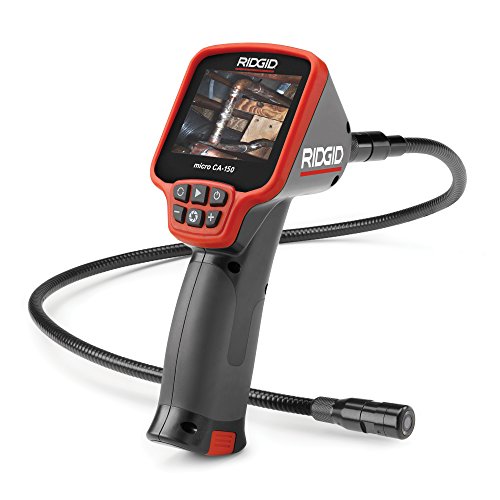 Ridgid micro CA-150 Ridgid micro CA-150 | Rugged handheld with screen. | Amazon — $281.00 |