Inspection Camera Guide: Types, Specs and Uses at Home

An inspection camera is a handheld tool with a tiny camera and LED lights on the end of a thin probe, so you can see inside walls, drains, ducts, engines and other spaces your eyes cannot reach, with live video on a built-in screen or a phone. For homeowners it answers questions like “is that pipe leaking behind the drywall?” through a hole smaller than a pencil, before anyone cuts, pulls or replaces anything. This guide covers the types of inspection camera, the specs that actually change what you see, borescope vs endoscope, articulating models, lighting, and the most common uses around a house. It draws on InterNACHI and ASHI inspector guidance and typical manufacturer specifications, and it focuses on how to choose rather than on specific brands.
Part of our Home Inspection Tools guide — start there for the full picture →
What Is an Inspection Camera?
An inspection camera is a small digital camera mounted at the tip of a probe, with a ring of LEDs around the lens and a cable that carries the image back to a display. The probe can be a flexible gooseneck, a semi-rigid cable that holds its shape, a fully rigid tube, or a steerable tip that bends on command. You push the probe through an opening, watch the screen, and record photos or video of what you find.
The whole point is non-destructive inspection. Instead of opening a ceiling to look for the source of a stain, you drill a 10 mm hole, feed the camera in, and look. Instead of pulling a toilet to check a slow drain, you push a waterproof probe down the line. A good inspection camera turns a guess into a picture, and a picture is much easier to show a plumber, an insurer or a seller.
The tool sits alongside moisture meters, thermal cameras and gas detectors in the kit that professional inspectors carry. Our home inspection tools buyer’s guide covers how those instruments fit together, and the inspection tools hub groups the camera guides in one place.
What Is an Inspection Camera Used For?
Most people buy an inspection camera for one stubborn problem and then keep finding uses for it. Around a home, the common jobs fall into a few groups.
Inside walls, floors and ceilings
This is the classic use. A homeowner drills a small hole, or removes an outlet cover or switch plate, and looks inside the cavity. Typical targets include a plumbing leak behind a shower, a wire run before drilling, missing or slumped insulation, pest nests and droppings, and a dropped item such as a phone or ring. Inspectors also use the camera to check wall cavities behind water stains for visible mold or rot without opening the wall.
Plumbing fixtures and short drain runs
A waterproof probe can look down a sink or tub drain, into a toilet trap, or behind a washing machine standpipe. For the first few feet of a line, a handheld unit is often enough to spot hair clogs, grease, a broken trap or a foreign object. For longer runs, a dedicated drain camera with a stiffer push cable is the better tool.
HVAC, appliances and vehicles
Duct runs, furnace heat exchangers, the back of a refrigerator, dryer vents, and the inside of a dishwasher all have hidden spaces where debris, disconnections, lint buildup or corrosion hide. Outside the house, mechanics use borescopes to look inside cylinders through the spark plug hole, behind dashboards, and into frame rails for rust.
Attics, crawl spaces and chimneys
When a crawl space or attic is too tight to enter safely, a camera on a long semi-rigid cable can show joists, sill plates, vapor barriers and ductwork from the access hatch. In a fireplace, a camera pushed up past the damper can reveal creosote, cracked flue tiles or a nest. It does not replace a chimney sweep’s inspection, but it tells you whether you need one sooner.
Home inspections and documentation
For working inspectors, the camera documents conditions in areas that would otherwise be “not inspected” in a report: inside a wall behind a suspicious stain, under a bathtub through the access panel, or inside a sealed soffit. InterNACHI’s standards of practice do not require invasive inspection, so a camera gives inspectors a way to see more without cutting. Saved images also back up a finding when a seller disputes it.
Types of Inspection Cameras
The category covers several form factors. Knowing which one fits the job matters more than any single spec on the box.
| Type | Probe | Best for | Limits |
|---|---|---|---|
| Semi-rigid handheld (most common) | Gooseneck cable that holds a bend, roughly 1 to 5 m | Wall cavities, under appliances, attics, short drains | Cannot steer once inside; long cables sag |
| Phone or tablet borescope | Semi-rigid or soft cable, USB or Wi-Fi to an app | Occasional DIY use, low budget | App quality varies; Wi-Fi lag; phone must be free to hold |
| Articulating inspection camera | Steerable tip, two-way or four-way | Looking around corners, engine cylinders, behind obstacles | Higher cost; articulating section is delicate |
| Rigid borescope | Straight metal tube | Machinery, straight bores, precise optics | Cannot follow bends |
| Dual-lens or triple-lens camera | Front lens plus side lens, switchable on screen | Inspecting pipe walls and cavity sides without articulation | Side lens image is often lower quality |
| Drain / pipe camera | Stiff push rod, 10 to 30 m or more | Drain lines inside the house | Too stiff for walls; bulkier |
| Sewer camera | Heavy push rod on a reel, self-leveling head, locator | Main sewer lateral to the street | Expensive; a specialist tool |
For general home use, a semi-rigid handheld unit with a built-in screen handles the widest range of jobs. If you mostly look at engines or around corners, an articulating unit earns its price. If the question is about the main sewer line, read our sewer camera guide rather than stretching a handheld camera past what it was built to do.
Borescope vs Endoscope
In the tool aisle, “borescope” and “endoscope” usually describe the same thing, and many listings use both words in one title. The difference is mostly historical:
- Endoscope began as a medical term for instruments used to look inside the human body. Medical endoscopes are regulated devices with sterilizable, precision-steered probes and are not what hardware retailers sell.
- Borescope comes from industry, where it described rigid optical tubes for looking down the bore of a gun barrel, engine cylinder or turbine. It now covers flexible and video models too.
- Videoscope is the trade name for a professional borescope with a camera chip at the tip and, usually, a steerable articulating section.
So when a product page says “USB endoscope,” it means a consumer inspection camera, not a medical device. In practice the meaningful differences are rigid vs flexible, fixed tip vs articulating, and screen vs phone. Our side-by-side endoscope vs borescope comparison goes deeper into the naming and the build differences between cheap and professional units.
Inspection Camera Specs That Matter
Spec sheets for inspection cameras list a dozen numbers, and several of them are marketing. These are the ones that change what you can actually see and where the probe can go.
Probe diameter
Probe (or tip) diameter decides which holes the camera fits through. Consumer tips commonly come in about 3.9 mm, 5.5 mm, 8 mm and 8.5 mm. A 3.9 mm tip slips into small fittings and spark plug holes but usually carries a smaller sensor and dimmer lights. An 8 mm tip gives brighter LEDs and often a better image, and it still fits a hole drilled with a common 3/8-inch bit. For drywall work, 5.5 to 8 mm is the sweet spot.
Cable length and stiffness
Handheld cables usually run from about 1 m (3.3 ft) to 5 m (16 ft), with some reaching 10 m or more. Longer is not always better: a long semi-rigid cable sags and becomes hard to aim, and coiling it back up gets tedious. For walls and appliances, 1 to 3 m is plenty. For short drain runs or crawl spaces, 3 to 5 m helps. Cable stiffness matters as much as length. A semi-rigid cable holds a hook shape so you can bend the last few inches and look sideways, which is the cheap substitute for articulation.
Resolution and image sensor
Listings quote 720p, 1080p or higher, but the tiny sensor and lens limit sharpness long before the pixel count does. A 1080p tip camera on a good-quality lens is enough to read a pipe label, see hairline cracks and spot early mold growth. Pay attention to the focal range too. Most tips focus best somewhere between about 2 cm and 10 cm, so objects pressed against the lens or far down a cavity both look soft. A screen with a higher resolution than the camera adds nothing.
Lighting: inspection camera with light
Nearly every inspection camera has a light, typically a ring of six to eight LEDs around the lens. What separates good units is adjustable brightness. Inside a white PVC pipe or against bright insulation, full-power LEDs wash the image out to white; in a dark crawl space or black ABS drain, you need every lumen. Look for several brightness steps rather than a single on/off switch. Some cameras add side LEDs for the side lens, and a few include a separate flashlight on the handle, which helps when you are positioning the probe in a dark cabinet.
Waterproof rating
Most probes are rated IP67, which under the IEC ingress-protection standard means dust-tight and able to survive immersion to about 1 m for 30 minutes. That covers drains, toilets and wet wall cavities. IP68 means the manufacturer rates it for longer or deeper immersion, with the exact limits set by the maker. The rating almost always applies to the probe and cable only, not the handle or screen, so keep the display out of the water.
Display and connectivity
A built-in screen (often 4.3 to 7 inches) means no app, no pairing and no tying up your phone. Phone-connected models plug in by USB-C or Lightning, or connect over the camera’s own Wi-Fi network. They are cheaper, and the phone screen is usually sharper, but app quality varies widely and Wi-Fi can lag. iPhone users have extra compatibility hurdles, which our guide to choosing a borescope for iPhone walks through.
Recording, rotation and extras
Useful extras include photo and video capture to an SD card, image rotation (so “up” on screen matches up in the cavity), zoom, and a dual-lens tip. Accessory kits often include a hook, a magnet and a side mirror that screw onto the tip. The magnet and hook are genuinely useful for retrieving dropped screws and earrings.
Articulating Inspection Camera: Is It Worth It?
An articulating inspection camera has a steerable tip controlled by a thumb lever or joystick on the handle. Internal wires pull the last few centimeters of the probe so the lens can turn and look around a corner without moving the whole cable.
- Two-way articulation bends the tip in one plane, up and down (or left and right). Consumer models commonly advertise up to about 180 degrees of total travel.
- Four-way articulation adds the second plane, so the tip can point in any direction. This is standard on professional videoscopes and less common on consumer units.
Articulation is worth paying for if you look inside engines, behind obstructions in wall cavities, or around elbows where a hook-bent semi-rigid cable cannot reach. It is less useful in drains, where the pipe controls direction anyway. The trade-offs: articulating probes usually cost several times more than a fixed-tip unit, the steering section is the most fragile part of the tool, and cable lengths tend to be shorter (often 1 to 1.5 m) because longer runs make the steering wires less responsive. A dual-lens camera that switches between front and side views is a cheaper middle ground for seeing pipe walls and cavity sides.
Inspection Camera for Home Use: What to Buy
The right inspection camera for home use depends on what you will point it at most often. These matches cover the typical homeowner jobs:
| Main job | Tip diameter | Cable length | Key features |
|---|---|---|---|
| Inside walls and ceilings | 5.5 to 8 mm | 1 to 3 m semi-rigid | Adjustable LEDs, built-in screen, hook/magnet kit |
| Sinks, tubs, toilets | 5.5 to 8 mm | 3 to 5 m | IP67 probe, dual lens, brightness control |
| Car engines and small engines | 3.9 to 6 mm | 1 to 1.5 m | Articulating tip, close focus |
| Attics and crawl spaces | 8 mm | 3 to 5 m stiff | Bright LEDs, video recording |
| Occasional DIY, tight budget | 5.5 to 8 mm | 1 to 5 m | Phone connection, IP67 |
As a rough guide to market prices, basic phone-connected borescopes usually sell for well under $50, handheld units with their own screen commonly fall in the $60 to $200 range, consumer articulating models often run a few hundred dollars, and professional videoscopes can cost thousands. Prices move constantly, so treat these as industry estimates rather than quotes.
Rather than recommend a single model here, we keep current, specification-based picks in our roundups of the best inspection cameras and the best borescopes, which compare tip size, cable length, articulation and screen across current listings.
How to Use an Inspection Camera Inside a Wall
Looking inside a wall cavity is the job most homeowners buy the tool for. Good technique saves drywall repairs and gets a clearer picture.
- Check for hazards first. Use a stud finder with AC detection, and turn off the circuit if you are working near outlets or switches. In older homes, remember that drilling may disturb lead paint or asbestos-containing materials.
- Pick the entry point. Use an existing opening when possible: an outlet box (power off), a switch plate, a return-air grille or a baseboard gap. Otherwise drill a hole just larger than the probe, ideally where it will be hidden behind furniture or a cover plate.
- Bend the cable. Put a gentle hook in the last 5 to 10 cm of a semi-rigid cable so you can rotate it and scan up, down and sideways.
- Start with low light. Insert the probe, then raise LED brightness until detail appears without glare on insulation or the back of the drywall.
- Move slowly and rotate. Fast movement blurs the image and makes it easy to lose orientation. Turn the probe a little at a time and use the image-rotation button to keep “up” consistent.
- Record what you find. Save photos and short video clips with the hole location noted, especially if a contractor, insurer or seller will need to see them.
- Withdraw carefully and patch. Pull the probe out straight to avoid snagging the tip. Patch the hole with spackle or a small drywall plug, or leave it behind a cover plate for future checks.
Afterward, wipe the tip and lens with a soft cloth and a little isopropyl alcohol, especially after drain work, and store the cable in loose coils. Tight kinks permanently deform semi-rigid cables and can damage the wiring.
Pipe, Drain and Sewer Cameras
A handheld inspection camera can look a few feet into a drain, but drain lines need a different tool beyond that. A pipe camera uses a stiffer push cable that can be fed through traps and bends for longer distances, and a sewer camera is built to travel tens of meters down the main line from a cleanout.
The key differences: sewer cameras use a self-leveling head so the image stays upright as the cable twists, a footage counter that shows how far the camera has traveled, and often a sonde transmitter so a locator above ground can pinpoint the depth and position of a break. Those features are what let a plumber or inspector say “there is a root intrusion 38 feet out, about 5 feet down.” Handheld cameras do not have them, and pushing a thin semi-rigid cable down a main line risks losing it in the pipe. If you are buying a house with an older clay or cast-iron sewer lateral, a professional sewer scope is the right call.
Inspection Camera vs Thermal Camera
Homeowners sometimes weigh an inspection camera against a thermal camera because both help find hidden problems. They answer different questions. A thermal camera reads surface temperatures from across the room, so it can show a cool, damp patch on drywall, a missing insulation bay, or an overheating breaker without making any hole. It cannot see inside the wall, though. Infrared energy does not pass through drywall, so the camera reads only the surface and infers what might be behind it.
The two work best together: a thermal camera shows where to look, and an inspection camera shows what is actually there. Inspectors often pair them with a moisture meter, so the workflow becomes scan, measure, then look. Our overview of the thermal camera for home inspection covers that side of the kit.
Limits of an Inspection Camera
An inspection camera shows you an image. It does not measure anything, and that matters when you are tempted to treat a picture as a diagnosis.
- No moisture readings. A wet stud can look dry on camera. Confirm with a moisture meter.
- No mold identification. Dark spots in a cavity may be mold, dirt or staining. A camera can tell you where growth appears to be; it cannot identify species or measure spores.
- Limited depth perception. Wide-angle lenses distort scale, so a crack can look larger or smaller than it is. Put a known object, such as a coin or tape measure, in frame when possible.
- Narrow field of view. You see what is in front of the lens. Missing a problem two inches to the side is easy without slow, systematic scanning.
- Not a structural assessment. A photo of a cracked joist or footing is a reason to call an engineer or contractor, not a substitute for one.
Safety limits matter too. Never push a probe into live electrical boxes, gas appliances, or rotating machinery, and do not use a consumer camera in fuel tanks or other areas where ignition could be a hazard unless the manufacturer explicitly rates it for that.
Caring for an Inspection Camera
A few habits keep an inspection camera working for years. Clean the tip after every use, especially after drain or crawl-space work, since grease and grit scratch the lens cover over time. Dry the probe fully before coiling it. Keep the handle and screen away from water even when the probe is IP67. Store the unit in its case with the cable in loose, wide loops, and avoid leaving it in a hot vehicle, where heat can degrade the battery and soften cable jackets. For articulating models, return the tip to straight before withdrawing it, and never force the steering lever against resistance. Check the battery before a job, because most handheld units run a few hours on a charge and dim LEDs are often the first sign of a weak battery.
References
- Inspection Tools — International Association of Certified Home Inspectors (InterNACHI)
- InterNACHI Home Inspection Standards of Practice — International Association of Certified Home Inspectors
- Home Inspection Resources — American Society of Home Inspectors (ASHI)
- International Code Council — International Code Council
- Electrical Safety — Occupational Safety and Health Administration
Frequently asked questions
What is the difference between a borescope and an endoscope?
For consumer tools, the names are used interchangeably. Endoscope originally referred to medical instruments for viewing inside the body, while borescope comes from industrial inspection of engines and machinery. A USB endoscope sold at a hardware store is simply an inspection camera.
What size inspection camera probe do I need?
For drywall cavities and plumbing fixtures, a 5.5 to 8 mm tip covers most jobs and fits a 3/8-inch drilled hole. Smaller 3.9 mm tips suit spark plug holes and small fittings but usually have dimmer lights and smaller sensors.
Can an inspection camera go down a toilet or drain?
Yes, if the probe is waterproof (IP67 or better) and long enough. Handheld cameras work for the first few feet of a drain or toilet trap; longer runs need a pipe or sewer camera with a stiffer push cable.
Do I need an articulating inspection camera?
Only if you regularly need to look around corners or behind obstructions, such as inside engines. For most wall and drain jobs, a semi-rigid cable bent into a hook, or a dual-lens camera, does the job at a fraction of the price.
Can an inspection camera find mold inside walls?
It can show visible growth or staining inside a cavity, which helps decide whether to open the wall. It cannot confirm that a spot is mold or identify the type, so pair it with a moisture meter and, if needed, lab sampling.
Are phone borescopes as good as models with a screen?
Phone models are cheaper and often show a sharper image on the phone display, but app quality and Wi-Fi lag vary. Built-in screen units are faster to use, more rugged, and free up the phone, which is why many inspectors prefer them.
How bright should an inspection camera light be?
Brightness control matters more than maximum output. Look for LEDs with several adjustable steps, so you can dim them against white pipe or insulation and turn them up in dark crawl spaces or black drain lines.
Borescopes & inspection cameras
A borescope lets you see inside walls, ducts, drains, and crawlspaces without opening anything up.
| Product | Why | Buy |
|---|---|---|
 DEPSTECH Wireless Borescope DEPSTECH Wireless Borescope | Wi-Fi to your phone; semi-rigid cable. | Amazon — $34.99 |
 Teslong Dual-Lens Borescope Teslong Dual-Lens Borescope | Side + front view; good for ducts. | Amazon — $149.99 |
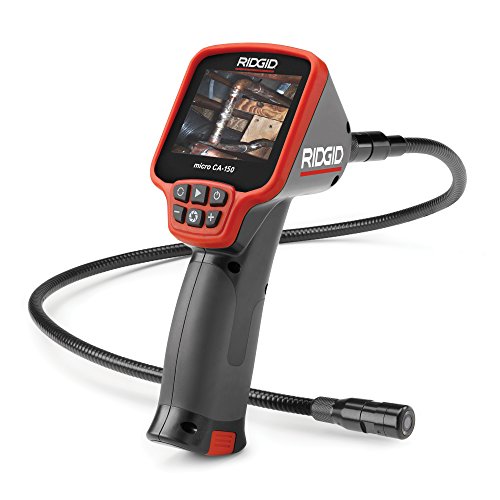 Ridgid micro CA-150 Ridgid micro CA-150 | Rugged handheld with screen. | Amazon — $281.00 |