USB Borescope: What Homeowners Need to Know

A USB borescope is the simplest way to turn a device you already own into an inspection camera. Instead of a built-in screen and battery, it relies on a laptop, tablet, or phone for power and display, plugging in through a USB-A or USB-C connector. That keeps the price low and the probe light, which is why USB borescopes are among the most popular entry points into visual inspection for homeowners. This guide explains how they work, the specifications worth checking, the apps that drive them, realistic price tiers, and where they fit in a home inspection.
Part of our Home Inspection Tools guide — start there for the full picture →
What is a USB borescope?
A USB borescope is a camera on a flexible probe that draws power and sends video over a USB connection rather than through a wireless link or a self-contained screen. You plug the connector into a host device, open viewing software, and the live image appears on that screen. Because there is no battery, radio, or display in the unit, USB borescopes are inexpensive and reliable, with no pairing step and no wireless lag. By offloading the screen, processor, and power supply to a device you already own, the manufacturer can sell a capable camera probe for the price of a meal, which is why the USB style is a common recommendation for a first inspection camera.
The probe carries a small image sensor surrounded by adjustable LEDs at the tip, on a semi-rigid gooseneck that holds a shape you bend by hand. Connectors vary: many ship with a USB-A plug plus a USB-C or micro-USB adapter, so a single unit can serve a laptop and a modern phone. The wired approach contrasts with Wi-Fi borescopes, which add wireless freedom at the cost of battery management and occasional dropouts.
One reason USB borescopes remain popular is their forgiving learning curve. There is no app to pair, no battery to charge, and no firmware to update; you plug in and the image appears. For a homeowner who reaches for the tool only a few times a year, that simplicity is a genuine advantage, since a Wi-Fi unit left in a drawer for months often greets you with a dead battery and a forgotten pairing process. The wired connection also tends to outlast wireless electronics, giving these inexpensive tools a long, low-maintenance service life.
USB borescope specifications that matter
Probe diameter and length
Common probe diameters run from about 5.5 mm to 8 mm, with 8 mm being the most widespread for general use because it houses a larger sensor and brighter LEDs. Slimmer 5.5 mm probes reach tighter spots. Cable length typically ranges from 1 to 5 meters, with 2 to 3 meters being a practical default; very long cables are harder to push and steer.
Resolution and field of view
Resolution commonly spans 640 x 480 up to 1920 x 1080 (1080p), with 1080p widely available on 8 mm USB models. Field of view usually falls in the 60 to 70 degree range. Higher resolution sharpens detail but does not overcome poor lighting in a large void.
Focus, lighting, and waterproofing
Most USB borescopes are fixed-focus with a close working sweet spot around 2 to 6 cm, so distant objects blur. Adjustable LED brightness, usually a small dial on the cable, is important for matching the light to the cavity. Camera heads frequently carry an IP67 rating, meaning dust-tight and protected against brief immersion to roughly 1 meter, suitable for damp cavities but not extended submersion.
Connector and compatibility
Check the connector type against your devices. A USB-A plug fits most laptops; a USB-C or micro-USB adapter is needed for phones and newer machines. Android phones generally need USB OTG support, which most modern models have. Apple devices historically required a Lightning or USB-C model rather than plain USB-A.
Apps and software for USB borescopes
On a Windows or Mac laptop, a USB borescope appears as a generic webcam, so it works with built-in camera apps or free tools that capture stills and video. On Android, third-party apps such as the widely bundled camera viewer software read the USB video stream once OTG is enabled. On iPhones and iPads with a compatible connector, manufacturer apps from the App Store handle viewing.
Useful app features include still capture, video recording, brightness control, on-screen zoom, and the ability to flip or mirror the image. Because the hardware is standardized around USB video class in many cases, software choice is flexible on computers, though phone apps are more dependent on the specific unit. For the wireless and Apple side of this category, our guide to the iPhone borescope covers app and connector considerations in more detail.
USB versus Wi-Fi borescopes
The main alternative to a USB borescope is a Wi-Fi model, and the comparison helps clarify when the wired approach wins. A USB borescope draws power from the host, never needs charging, has no pairing step, and delivers a low-latency image because video travels over a cable rather than a radio link. Those traits make it dependable and cheap. The cost is the tether: you must keep a laptop or phone close, and a long cable is awkward to manage.
A Wi-Fi borescope frees you from the tether and lets the screen sit anywhere within range, which is handy when the probe must snake far from where you can comfortably hold a device. The trade-offs are a battery to keep charged, a pairing process, and occasional latency or dropouts that can be frustrating mid-inspection. For most homeowner tasks where the access point and the viewer are close together, a USB borescope is the simpler, more reliable choice. For inspectors working at a distance from their screen, Wi-Fi can earn its keep.
Reading USB borescope specs on a product page
Listings emphasize different numbers, and a few matter more than others. Probe diameter comes first: 8 mm suits general use and lighting, 5.5 mm reaches tighter spots. Resolution is next; a 1920 x 1080 sensor beats 720p for detail, though lighting in the cavity matters as much. Confirm the connector type and any included adapters against your devices, since a USB-A-only plug will not fit a phone without a USB-C or micro-USB adapter, and Android phones need OTG support.
Also weigh cable length against how far you need to reach, the IP rating for damp work (IP67 covers most home cavities), and whether the unit has a single front lens or adds a side-view lens for examining pipe walls. Dual-lens models cost a little more but save you from rotating the probe to see sideways. Be cautious of inflated megapixel claims on small sensors; physical sensor size limits real detail no matter the marketing figure. An honestly specified 1080p 8 mm USB borescope handles the great majority of homeowner inspections.
USB borescope price tiers
- Budget (roughly $15–$40): Basic 8 mm probes, 720p sensors, fixed focus, semi-rigid 1 to 2 meter cables, USB-A with a phone adapter. Fine for occasional homeowner use.
- Mid-range (roughly $40–$90): 1080p sensors, dual lenses (front and side view), brighter adjustable LEDs, longer cables, and sometimes a slimmer 5.5 mm option. A solid pick for regular use.
- Higher-end (roughly $100+): Better optics, semi-rigid steerable-style probes, and rugged cabling that overlaps with professional inspection cameras.
For a homeowner deciding between a tethered camera and a self-contained tool with its own screen, the cordless option in our M12 borescope guide offers a useful comparison point. Where all of these sit in a complete kit is laid out in the broader home inspection tools guide.
Single-lens versus dual-lens USB borescopes
Many USB borescopes now offer a side-view lens in addition to the forward-facing one, and the distinction is genuinely useful for inspection work. A single front lens looks straight ahead, which is fine for advancing down a pipe or duct but awkward for examining the wall of a cavity beside the probe. A dual-lens model adds a second camera on the side of the tip, letting you switch views without rotating the whole probe, which is hard to do precisely once the gooseneck is bent inside a wall.
For pipe and duct interiors, the side view reveals cracks, scale, and joints along the wall that the front lens would skim past. For general cavity inspection, the front lens is usually enough. Some premium units add a third lens or a magnetic and hook accessory set for retrieving dropped items. The dual-lens feature adds modestly to the price and is worth it for anyone who expects to inspect the inside walls of pipes or ducts regularly; for occasional peeks into wall cavities, a single front lens keeps the tool simpler and cheaper.
Lighting, focus, and image-quality trade-offs
Image quality on a USB borescope is governed as much by lighting as by sensor resolution. The LED ring around an 8 mm head is larger and brighter than the one on a slim micro probe, which is a real advantage in larger cavities, but it still fades in a sizable void. Adjustable brightness, usually a thumbwheel on the cable, is important because too little light produces a dark, grainy frame while too much causes glare on close surfaces. Matching the light to the working distance is the single biggest lever on usable image quality.
Fixed focus is the other constraint. Most USB borescopes are optimized for a close working range, often 2 to 6 cm, so objects farther down a duct blur. There is no autofocus to compensate, which means you position the head at the focal sweet spot rather than zooming in. A higher-resolution sensor helps with detail at that sweet spot, but a well-lit 1080p frame at the correct distance outperforms a poorly lit one at any resolution. Understanding these trade-offs sets realistic expectations: a USB borescope is excellent for confirming conditions a few centimeters from the lens and weaker for surveying a large, dim space at a distance.
Home inspection use cases
InterNACHI and ASHI frame the home inspection as a non-invasive, primarily visual examination. A USB borescope extends that visual reach into spaces the eye cannot see without becoming destructive. Common uses include:
- Inspecting wall and ceiling cavities through small access holes for moisture, insulation, or pest signs.
- Viewing the interior of ducts, vents, and chases.
- Checking behind appliances, cabinets, and built-ins.
- Examining the inside of drains, traps, and accessible pipe interiors.
- Looking into crawl space corners and sill areas that are hard to reach by eye.
The camera documents conditions; it does not interpret them. The inspection standards still rely on professional judgment to decide what an image means and whether further investigation is warranted.
Limitations and care
A USB borescope is an observational device, not a measuring instrument, so it has no calibration requirement; its limits are practical rather than metrological. The tether is the main constraint: you must keep a host device close, and very long cables are awkward to steer. Fixed focus blurs distant objects, the small light source struggles in large voids, and the narrow field of view makes scale hard to judge from a single frame.
Care is simple. Wipe the lens after use, avoid submerging the connector or any non-rated section, do not force the probe around sharp bends, and store the gooseneck loosely coiled rather than kinked. Treat images as confirmation that a condition exists rather than proof of its full extent; assessing severity still calls for opening the area or bringing in a specialist. Within those limits, a USB borescope is one of the best-value tools a homeowner can add to a visual inspection kit.
References
- Standards of Practice for home inspections — International Association of Certified Home Inspectors
- Standard of Practice and visual inspection scope — American Society of Home Inspectors
- Building inspection codes and standards — International Code Council
Frequently asked questions
What is a USB borescope?
A USB borescope is an inspection camera on a flexible probe that draws power and sends video through a USB connection to a laptop, tablet, or phone. With no battery, radio, or screen of its own, it is inexpensive, reliable, and free of wireless lag.
Does a USB borescope work with a phone?
Yes, with the right connector. Many ship with a USB-A plug plus a USB-C or micro-USB adapter, and Android phones generally need USB OTG support, which most modern models have. Apple devices need a Lightning or USB-C model rather than plain USB-A.
What resolution should a USB borescope have?
1080p is widely available on 8 mm USB models and gives clearer detail than 720p, though lighting matters as much as resolution in larger cavities. For most homeowner tasks, a 1080p 8 mm probe is a good balance of image quality and brightness.
What can a USB borescope inspect in a home?
It is useful for viewing wall and ceiling cavities through small holes, ducts and vents, spaces behind appliances and cabinets, accessible drains and pipes, and crawl space corners. It documents conditions but does not interpret them, so professional judgment still applies.
Borescopes & inspection cameras
A borescope lets you see inside walls, ducts, drains, and crawlspaces without opening anything up.
| Product | Why | Buy |
|---|---|---|
 DEPSTECH Wireless Borescope DEPSTECH Wireless Borescope | Wi-Fi to your phone; semi-rigid cable. | Amazon — $34.99 |
 Teslong Dual-Lens Borescope Teslong Dual-Lens Borescope | Side + front view; good for ducts. | Amazon — $149.99 |
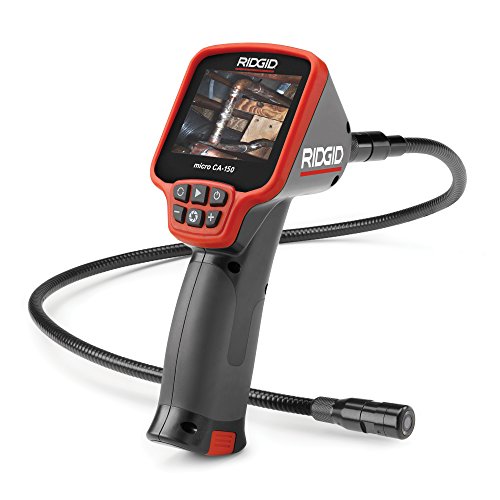 Ridgid micro CA-150 Ridgid micro CA-150 | Rugged handheld with screen. | Amazon — $281.00 |