Reading a Borescope Camera Spec Sheet, Line by Line
The probe length and the articulation get the marketing attention, but the part that decides whether a wall-cavity inspection produces evidence or a blurry smear is the camera at the tip. This is a spec-sheet guide: how to read a borescope camera’s resolution, sensor, LEDs, optics, and file output well enough to know, before you buy, whether it will resolve a mold colony from cavity dust or a serial number behind a panel at typical 4-to-12-inch working distance.
Part of our Home Inspection Tools guide — start there for the full picture →
What the camera at the tip has to do
A borescope camera is a small CMOS image sensor ringed by LEDs, sealed inside a probe head a few millimeters wide, feeding a screen or a phone over wire or Wi-Fi. It works in the worst imaging conditions in the house: no ambient light, a subject inches away, reflective pipe walls or damp drywall, and a lens that has to survive being pushed against masonry. Every spec below matters only insofar as it helps the camera clear shadow without blowing out the surface, and hold detail at the distance you actually inspect from. For where the borescope fits among moisture meters and thermal cameras, see the home inspection tools guide.
How much resolution do you actually need?
720p (1280×720) is the working floor. It is enough to spot a mold colony, tell wood rot from dust, read a large label, and document plumbing condition at close range. 1080p (1920×1080) is the practical ceiling for residential work: the extra pixels pay off when you crop into a captured still, shoot past 12 inches, or need fine texture like scale on copper or a hairline crack.
Treat “2K” and “4K” claims on a 5-to-8 mm probe with suspicion. Native 4K microcameras at that tip diameter exist only in expensive industrial endoscopes; on consumer and prosumer borescopes the figure is almost always interpolated upscaling of a 1080p or 2MP sensor, which adds file size and no real detail.
| Resolution | Native sensor? | Best for |
|---|---|---|
| 720p | Yes, entry tier | Close-range condition checks, mold spotting |
| 1080p | Yes, mid tier and up | Standard residential inspection, cropping stills |
| 2K / 4K | Usually upscaled | Marketing; verify “native” before paying more |
Why two 1080p cameras don’t look the same
Resolution is necessary but not sufficient. The probe diameter caps sensor size: a 5.5 mm tip holds a smaller sensor, with smaller pixels, than an 8 mm tip. Smaller pixels gather less light, so a slim 3.9-to-5 mm probe often produces visibly noisier images than a thicker one at the same nominal 1080p. If image quality outranks access, the slightly fatter probe is usually the better buy.
Manufacturer firmware does the rest. Two cameras built on the same sensor part number can differ noticeably once each maker’s noise reduction, color pipeline, and any lens-distortion correction are applied. Because vendors rarely publish pixel size or low-light figures, side-by-side samples from working users tell you more than the headline megapixel count. Color rendering is the spec that quietly decides diagnostic value: warm-tinted LEDs and a weak color pipeline flatten a black, green, or white colony into the same beige-brown as the drywall around it.
The lighting spec buyers underrate
Adjustable LED brightness matters more than LED count. The standard ring of 6 to 8 LEDs already lights a 4-to-12-inch working envelope; adding 10 or 12 helps only at long reach and can wash out close surfaces. What actually saves the image is dimming. Full brightness on wet drywall or a polished pipe interior blows out exactly the detail you came to document, so three to six brightness levels is closer to a requirement than a luxury for regular use.
Color temperature is the other half. White LEDs run from 3000 K (warm) to 6500 K (cool daylight); daylight-balanced 5000 K to 6500 K output renders mold, rust, and discoloration far more accurately than warm-white, which is why nearly all inspection-grade units sit in that cool band.
Field of view, focus, and distortion
Field of view runs 60 degrees (narrow, for pipe interiors) to 120 degrees (wide, for cavity overview), with 70 to 90 degrees the common residential compromise. Focus is almost always fixed, optimized for a 4-to-12-inch band that covers most cavity and duct work; verify the range if your job runs closer than 2 inches or deeper than 18. Autofocus adds cost and a failure mode and rarely earns its keep outside industrial use. The wide lenses also bend straight edges into barrel distortion near the frame border, which can mislead you about the size of something at the edge; onboard distortion correction, standard at the pro tier, straightens that out.
How you get the files off it
Stills save as JPG, video as MP4 with H.264 encoding, both universal and both accepted by every inspection-report tool. Anything proprietary only makes sense if you have committed to that manufacturer’s ecosystem. Integrated-screen units record to internal microSD, commonly 32 GB in the box with 128 GB or more supported; phone-tethered units write to the phone. Cameras that stamp captures with a timestamp and drop them into a report template align cleanly with the documentation conventions in the InterNACHI Standards of Practice and the ASHI Standards of Practice, which govern how condition findings are recorded.
Where borescope cameras fail
The tip is the most failure-prone part of the tool. Expect LED dimming or burnout after heavy use, sensor flicker from connector wear, lens scratches from abrasion against masonry and pipe, and water intrusion once the seal is nicked. IP67-rated probes cleaned after each use typically reach three to five years; unrated entry-tier probes commonly fail at one to two. Pro units (FLIR VS-series, higher Klein ET models) let you swap just the camera head when the rest of the system is fine; replacement tips run roughly $100 to $400 by length and resolution. Some heads carry a second side-view lens so you can look at cabinet undersides or behind fixtures without a mirror attachment, though the side camera is sometimes lower quality, so check its spec separately.
What to prioritize
For working inspection, rank the specs in this order: IP rating of the probe head, adjustable LED brightness, native 1080p, 70-degree-or-wider field of view, and timestamped JPG output. Probe length and articulation are body decisions; the tip seal and the light control decide whether the image is usable at all. If you inspect only occasionally, renting is often the smarter path than owning a tool whose tip degrades on the shelf, covered in the borescope rental guide, and the tool-category distinction is spelled out in borescope vs. endoscope.
One Front Range note
Denver-metro crawlspaces drop below freezing in winter and attic peaks clear 100°F in summer. Most cameras rate operation from 14°F to 122°F (-10°C to 50°C), which covers the year except deep-winter crawlspace work that can graze the low end. The operating range is on the spec sheet; check it before a cold-weather deployment.
Frequently asked questions
Is 1080p enough for home-inspection work?
Yes. At the typical 4-to-12-inch working distance, 1080p covers nearly all residential needs, and 720p is a usable floor. Higher numbers on small-diameter probes are usually upscaled rather than native, so confirm the sensor is truly native before paying for it.
Does a higher LED count mean a better camera?
No. Beyond the standard 6 to 8 LEDs, more diodes mainly help at long reach and can wash out close surfaces. Adjustable brightness matters far more than raw count, because dimming is what keeps wet drywall and polished pipe from blowing out.
Why does a slim probe look noisier than a thicker one at the same resolution?
Probe diameter caps sensor size. A 3.9-to-5 mm tip holds a smaller sensor with smaller pixels that gather less light, so it produces noisier images in dark cavities than an 8 mm tip at the same nominal 1080p.
What file formats should the camera produce?
JPG for stills and MP4 with H.264 for video. Both are universal and integrate with standard inspection-report software. Avoid proprietary formats unless you are committed to one manufacturer's ecosystem.
How long does a borescope camera last?
IP67-rated probes cleaned after each use typically last three to five years. Unrated entry-tier probes often fail within one to two. The tip is the first thing to go, which is why swappable heads are valuable on pro units.
This guide summarizes documentation conventions from the InterNACHI and ASHI Standards of Practice; it is general buying guidance, not an endorsement of any specific model.
Borescopes & inspection cameras
A borescope lets you see inside walls, ducts, drains, and crawlspaces without opening anything up.
| Product | Why | Buy |
|---|---|---|
 DEPSTECH Wireless Borescope DEPSTECH Wireless Borescope | Wi-Fi to your phone; semi-rigid cable. | Amazon — $34.99 |
 Teslong Dual-Lens Borescope Teslong Dual-Lens Borescope | Side + front view; good for ducts. | Amazon — $149.99 |
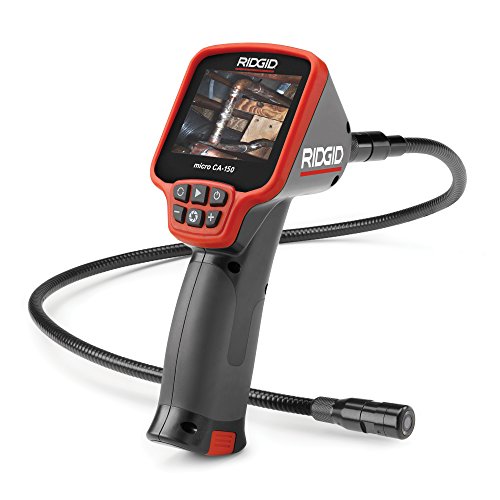 Ridgid micro CA-150 Ridgid micro CA-150 | Rugged handheld with screen. | Amazon — $281.00 |