Best DIY Alarm Systems (2026): 6 Self-Monitored Kits Compared

The best DIY alarm system is one you can install in an afternoon and then monitor yourself, with phone alerts, a loud siren and a way to keep working when the Wi-Fi drops. That is the real dividing line in this category: self-monitoring, where you get the alert and decide what to do, versus professional monitoring, where a paid call center does. Most DIY kits on Amazon are built for self-monitoring with no monthly fee, and a few, like Ring Alarm, add optional professional monitoring on a plan. This guide compares six kits on how they alert you, what happens in a power or internet outage, and how far they expand. For the broader category, including professionally monitored picks, start with our best home security system roundup.
Part of our Home Electrical guide — start there for the full picture →
As an Amazon Associate we earn from qualifying purchases.
How we compared: we compared 12 current Amazon listings for DIY wireless alarm kits on what each listing states: monitoring model, network (Wi-Fi, cellular SIM or both), alert methods such as app, SMS or auto-dial calls, backup power, sensor counts and expansion limits, and control options. Four listings are tolviviov W2-family kits in different sizes. We did not install, test or monitor any of these systems. Prices, plan terms and availability change, so check the current listing before buying.
Quick picks: the best DIY alarm systems by use case
| Product | Best for | Key features | Price | Buy |
|---|---|---|---|---|
| PGST A103 Kit | Self-monitoring with call and SMS |
| $139.56as of Nov 11, 2026 7:46 pm GMT+0000 | Buy now →Check current price |
| Hapippofa GEN 2 16-Piece | Touchscreen hub with an SOS button |
| $169.99as of Nov 11, 2026 7:46 pm GMT+0000 | Buy now →Check current price |
| Ring Alarm 8-Piece | Optional pro monitoring later |
| $249.99as of Nov 11, 2026 7:46 pm GMT+0000 | Buy now →Check current price |
| PGST A107F-E 21-Piece | Silent alarm mode |
| — | Buy now →Check current price |
| TUGARD ZASD-G30 12-Piece | Most zones and wired inputs |
| $53.59as of Nov 11, 2026 7:46 pm GMT+0000 | Buy now →Check current price |
| tolviviov W2 8-Piece | Apartments and renters |
| $59.99as of Nov 11, 2026 7:46 pm GMT+0000 | Buy now →Check current price |
Prices are Amazon’s listed prices as of the time shown and change often; check Amazon for today’s price. As an Amazon Associate we earn from qualifying purchases.
The six picks, compared listing by listing
1. PGST A103 Kit — Best Self-Monitored Alarm With Call and SMS Alerts

Wi-Fi and 4G alarm kit with app alerts, auto-dial calls and SMS to up to five numbers, expandable to 99 sensors.
Check price on Amazon$139.56 as of Nov 11, 2026 7:46 pm GMT+0000 — prices change; see Amazon for current price.Why we like it
- Calls and texts up to five numbers
- Switches between Wi-Fi and a 4G SIM
- Expands to 99 sensors
- Scheduled and delayed arming built in
| Specification | Details |
|---|---|
| Monitoring | Self-monitored; no monthly fee stated |
| Network | 2.4 GHz Wi-Fi or 4G SIM card (SIM not included); no 5 GHz |
| Alerts | Smart Life or Tuya app, auto-dial and SMS to up to 5 numbers, two-way voice call, 120 dB siren |
| Expansion | Up to 99 PGST sensors total |
| Extras | Tamper alarm, delayed arm and disarm, scheduled arming; Alexa voice control |
| Kit count / warranty | Title says 24 pieces, item count field says 21; 1-year warranty |
PGST A103 — Wi-Fi + 4G, app + auto-dial + SMS to 5 numbers, two-way call, 120 dB, up to 99 sensors, 1-yr warranty
The Most Complete Call-and-Text Toolkit Among the Cellular Kits
Six listings on this shelf support a cellular SIM in addition to Wi-Fi. Among those, the PGST A103 states the most complete self-monitoring toolkit, along with room for up to 99 sensors: app alerts, auto-dial calls and SMS messages to as many as five phone numbers, plus a two-way voice call through the hub. For a self-monitored system, being able to reach a spouse, a neighbor and an adult child at once is the closest thing to a monitoring center without a plan.
The cellular option matters for a simple reason. A Wi-Fi-only alarm depends on your router and internet service, and both go down in a power outage unless they are on backup. With a SIM installed, the hub can still send calls and texts. You need to supply the SIM and a cellular plan.
Two cautions from the listing itself. It does not state backup battery runtime for the hub, and it gives two different kit counts, 24 in the title and 21 in the item-count field, so confirm the contents before you plan sensor placement.
Pros
- Calls and texts up to five numbers
- 4G SIM keeps alerts going without Wi-Fi
- Up to 99 sensors
- No monthly fee for listed features
Cons
- Hub backup battery not stated
- Kit count stated two ways
- SIM and plan are extra
Check PGST A103 Kit price on Amazon
2. Hapippofa GEN 2 16-Piece — Best Touchscreen Hub With an SOS Button

Touchscreen Wi-Fi and 4G hub with Stay, Away, Disarm and SOS modes, pre-paired sensors and a wired 120 dB siren.
Check price on Amazon$169.99 as of Nov 11, 2026 7:46 pm GMT+0000 — prices change; see Amazon for current price.Why we like it
- Arm and disarm from a wall touchscreen
- Dedicated SOS button in the kit
- Separate wired siren for louder coverage
- Sensors arrive already paired
| Specification | Details |
|---|---|
| Kit | Touchscreen hub, 6 door and window sensors, 3 PIR motion detectors, 2 remotes, 2 RFID fobs, 1 SOS button, 1 wired 120 dB siren |
| Monitoring | Self-monitored through Smart Life app; no monthly subscription |
| Network | 2.4 GHz Wi-Fi; 4G SIM enables alarm calls and SMS (SIM and plan sold separately) |
| Modes | Stay Arm, Away Arm, Disarm and SOS from the panel |
| Setup | Pre-paired sensors; hub mounts on a wall or sits on a desk |
Hapippofa GEN 2 — touchscreen hub, 6 contacts, 3 PIR, SOS button, wired 120 dB siren, Wi-Fi + 4G, pre-paired, no monthly fee
The Only Kit Here That Includes a Dedicated SOS Button
The Hapippofa GEN 2 is the only listing on the shelf that mentions an SOS function at all, and it includes a separate one-press SOS button in the box, alongside a wired siren that can mount away from the hub. For an older relative living alone, a button by the bed that sets off the siren and sends alerts is a practical feature.
Its three PIR motion detectors are more than most kits here include (only the Hapippofa 24-piece lists more, with five), which suits a two-level home or a basement walkout. Pre-paired sensors take the most tedious step out of setup.
The listing does not state a backup battery runtime for the hub or an expansion limit. Like all self-monitored alarms, the SOS button alerts you and your contacts, not emergency services.
Pros
- SOS button and wired siren included
- Three motion detectors
- Touchscreen plus Wi-Fi and 4G
Cons
- Hub backup runtime not stated
- Expansion limit not stated
- SOS reaches contacts, not dispatch
Check Hapippofa GEN 2 16-Piece price on Amazon
3. Ring Alarm 8-Piece — Best for Adding Professional Monitoring Later

Self-installed alarm with free mobile notifications and optional 24/7 professional monitoring on a Ring Protect plan.
Check price on Amazon$249.99 as of Nov 11, 2026 7:46 pm GMT+0000 — prices change; see Amazon for current price.Why we like it
- Free phone notifications without a plan
- Pro monitoring available when you want it
- Range extender included
- Ties into other Ring cameras and doorbells
| Specification | Details |
|---|---|
| Kit | Base station, keypad, 4 contact sensors, 1 motion detector, 1 range extender |
| Best fit | 1 to 2 bedroom homes per listing |
| Free | Mobile notifications through the Ring app |
| With a Ring Protect plan | Arming from anywhere, staying online when Wi-Fi goes down, 24/7 professional monitoring for police, fire and medical response |
| Voice control | Alexa arming and disarming requires the plan |
Ring Alarm 8-piece (2nd gen) — base, keypad, 4 contacts, motion, extender; free notifications; pro monitoring with Ring Protect
The Only Kit on the Shelf That Offers Professional Monitoring
Ring’s two kits are the only listings here that offer 24/7 professional monitoring, with emergency police, fire and medical response, through a paid Ring Protect plan. Every other kit is self-monitored by design. That makes the Ring the right pick for someone who wants to start DIY and keep the option to hand off monitoring later, for example before a long trip.
The listing is clear about what the free tier covers: mobile notifications when the system is triggered. Arming from anywhere, keeping the system online when Wi-Fi goes down and Alexa voice control are all tied to the plan. Without one, this is a self-monitored system that needs you to be home to arm it, so read the plan terms closely.
The eight-piece kit is sized for one- or two-bedroom homes. It is one of the picks in our parent roundup, where its larger 14-piece sibling covers bigger houses.
Pros
- Optional pro monitoring
- Range extender for larger floor plans
- Fits a wider Ring setup
Cons
- Remote arming needs the paid plan
- Outage backup tied to the plan
- Sized for smaller homes
Check Ring Alarm 8-Piece price on Amazon
4. PGST A107F-E 21-Piece — Best Kit With a Silent Alarm Mode
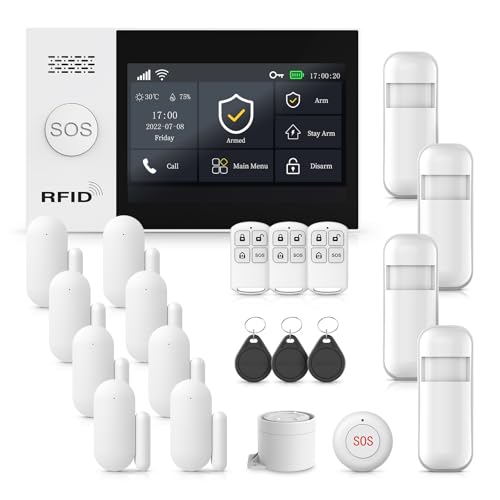
4.3-inch touchscreen alarm hub on Wi-Fi or 4G with a silent alarm mode and control by screen, app, remote or RFID.
Check price on AmazonWhy we like it
- Silent alarm alerts you without warning intruders
- Large 4.3-inch color touchscreen
- Four ways to arm and disarm
- No pairing needed at setup
- 2-year warranty stated
| Specification | Details |
|---|---|
| Hub | 4.3-inch color touchscreen showing the status of all accessories |
| Network | 2.4 GHz Wi-Fi or SIM card (GSM/4G) |
| Alerts | App alerts, hub siren over 120 dB, phone notifications; silent alarm mode |
| Control | Touchscreen, Smart Life or Tuya app, remote, RFID card; Alexa and Google |
| Kit / warranty | 21 pieces; 2-year warranty |
PGST A107F-E — 4.3-inch touchscreen, Wi-Fi + 4G, silent alarm mode, 120 dB, app/remote/RFID/screen, 21 pieces, 2-yr warranty
The Only Listing That Describes a Silent Alarm Mode
Every kit on the shelf can sound a 120 dB siren. The PGST A107F-E is the only listing that also describes a silent alarm mode, where the system alerts you without sounding the siren, so you can respond without tipping off whoever tripped it. That can be useful for a detached garage or a basement entrance you want to check quietly, though for most break-ins a loud siren is the better deterrent.
Its 4.3-inch touchscreen is the largest screen stated among the kits, and the listing says it shows the status of every accessory at a glance. Four control methods, screen, app, remote and RFID card, mean everyone in the house can use the method they prefer.
The listing does not state an expansion limit or backup battery runtime. Its two-year warranty is longer than the one year on the A103.
Pros
- Silent alarm option
- Largest touchscreen stated
- 2-year warranty
Cons
- Expansion limit not stated
- Backup runtime not stated
- SIM and plan extra
Check PGST A107F-E 21-Piece price on Amazon
5. TUGARD ZASD-G30 12-Piece — Best for Many Zones and Wired Inputs

Wi-Fi and 2G alarm with a color status screen, 100 wireless zones, 3 wired zones, RFID cards and call or SMS alerts.
Check price on Amazon$53.59 as of Nov 11, 2026 7:46 pm GMT+0000 — prices change; see Amazon for current price.Why we like it
- 100 wireless zones plus 3 wired zones
- Calls or texts preset numbers
- Color screen shows armed status
- Batteries included for all devices
| Specification | Details |
|---|---|
| Kit | Alarm host, 1 PIR motion detector, 4 door and window sensors, 2 remotes, 2 RFID cards, 1 siren, 1 adapter |
| Network | 2.4 GHz Wi-Fi and 2G SIM (SIM not included); 433 MHz sensors |
| Capacity | 100 wireless zones, 10 remotes, 10 RFID cards, 3 wired zones |
| Display | 2.4-inch color TFT screen; menus in 11 languages |
| Alerts | App push, call or SMS to preset numbers, siren |
TUGARD ZASD-G30 — Wi-Fi + 2G, 100 wireless + 3 wired zones, color TFT, call/SMS alerts, RFID, 433 MHz, batteries included
The Only Kit That Lists Wired Zones Alongside Wireless Sensors
Older Front Range homes sometimes still have wired door contacts from a decades-old alarm. The TUGARD is the only listing that states wired zones, three of them, alongside 100 wireless zones. That gives a path to reuse a few existing hardwired contacts, or to connect a wired sensor in a spot where a battery sensor is inconvenient.
The listing says the system falls back to a 2G SIM when Wi-Fi is off. Before counting on that, confirm with your carrier that its network supports a 2G SIM where you live; the 4G kits above are the safer bet for cellular backup.
It includes batteries for every device and supports 11 menu languages, a helpful detail for multilingual households.
Pros
- Wired and wireless zones
- 100 wireless zones
- Call and SMS alerts
Cons
- Cellular backup is 2G
- Small 2.4-inch screen
- Only one motion detector included
Check TUGARD ZASD-G30 12-Piece price on Amazon
6. tolviviov W2 8-Piece — Best for Apartments and Renters

Compact Wi-Fi alarm station with five door and window sensors, two remotes, an 8-hour backup battery and app alerts.
Check price on Amazon$59.99 as of Nov 11, 2026 7:46 pm GMT+0000 — prices change; see Amazon for current price.Why we like it
- Installs without tools or wall damage
- 8-hour backup battery stated
- Grows to 20 sensors and 5 remotes
- Away, Home and Disarm by voice
| Specification | Details |
|---|---|
| Kit | Alarm siren station, 5 door and window sensors, 2 remotes |
| Monitoring | Self-monitored app alerts; no contracts or subscription fees |
| Network | 2.4 GHz Wi-Fi only |
| Power | Station must stay on its AC adapter; 8-hour emergency backup battery |
| Expansion | Up to 20 sensors and 5 remotes or keypads; motion detectors, doorbells and water detectors available |
| Voice | Alexa and Google Assistant |
tolviviov W2 8-piece — Wi-Fi station, 5 contacts, 2 remotes, 8-hr backup, up to 20 sensors, Alexa/Google, no fees
One of the Few Kits That States a Backup Battery Runtime
Only five listings on the shelf give a backup runtime for the hub: the four tolviviov kits at 8 hours and the Hapippofa 24-piece at 48 hours. The 8-piece is the smallest tolviviov kit, with five contacts and two remotes, sized for an apartment or a small rental where doors and windows are the only entry points. The listing stresses that the station should always stay on its AC adapter, with the battery as an emergency reserve.
It is Wi-Fi only, so during an outage the station’s siren keeps working on battery, but phone alerts depend on whether your router and internet stay up. The listing says the system installs without tools and without damaging walls, which matters for renters.
The system expands to 20 sensors, including water detectors, a handy add-on near a water heater or washer.
Pros
- Stated 8-hour backup
- Renter-friendly installation
- Expands to water detectors
Cons
- Wi-Fi only, no cellular
- No motion detector in this kit
- 20-sensor ceiling
Check tolviviov W2 8-Piece price on Amazon
Self-monitoring vs professional monitoring
How self-monitoring works
With a self-monitored alarm, the system alerts you and whoever you add: an app push, a text or an automated call. You decide whether to call the police, check a camera or phone a neighbor. There is no monthly fee for that model on any of the self-monitored kits here, but the response is only as good as your attention. If you sleep through a text or your phone is on silent, nothing else happens.
When paid monitoring is worth it
Professional monitoring adds a call center that sees the alarm, tries to reach you and dispatches help. On this shelf, only Ring offers it, as an optional paid plan. It is worth considering if you travel often, own a second home, live alone or have someone in the house who may not be able to respond. The parent home security system roundup covers more monitored options.
A middle path
Kits that call and text several numbers, like the PGST A103, spread the response across a few trusted people. Agree in advance who responds and how, and test the alerts after setup.
Outages: power, Wi-Fi and cellular
A burglar alarm that goes silent when the power or internet drops is not much of an alarm. Check three things in any listing:
- Hub backup battery. Only a few listings state runtime. Without a stated figure, assume the hub may not last a long outage.
- Router and internet. Wi-Fi alerts need both. A small battery backup for the modem and router keeps app alerts flowing through short outages.
- Cellular SIM. Kits with a 4G slot can send calls and texts without your internet. Ring offers a similar backup through its plan.
Battery backup also means lithium-ion or other rechargeable cells in the hub. The U.S. Fire Administration advises stopping use of any lithium-ion battery that shows an odor, a change in color or shape, too much heat or leaking, and not leaving batteries in direct sunlight or hot spaces. Keep the hub off sunny windowsills.
Burglar alarms are not smoke alarms
None of these kits is a smoke or carbon monoxide alarm. The U.S. Fire Administration recommends smoke alarms inside and outside each bedroom and on every level, interconnected so when one sounds they all sound. NFPA advises choosing smoke alarms that carry the label of a recognized testing laboratory. Some alarm hubs can pair with add-on detectors from the same brand, but those add-ons do not replace a listed smoke alarm system. For fuel-gas concerns specifically, our gas leak detection system guide covers the options.
Installation and placement
Put contact sensors on every exterior door, including the door from the garage, and on ground-level and basement windows that can be reached from outside. Place motion detectors in hallways that an intruder would have to cross, such as the path from the back door to the bedrooms. Many Front Range homes have walkout basements and window wells, which are common entry points worth covering.
Mount the hub centrally, near an outlet and within good Wi-Fi range. NFPA notes extension cords are intended for temporary use, so plug the hub directly into a receptacle. If you want to tie a kit into existing wired contacts, or the old panel has a transformer and battery you want removed, that is a job for an electrician; our electrical hiring hub covers what to ask. To add a voice link at the door, see the intercom system guide.
Front Range notes
A few local patterns shape how a DIY alarm should be laid out here. Detached garages and workshops are common on larger lots in Douglas, Elbert and El Paso counties, and they are often out of Wi-Fi range of the house. A contact sensor on a detached building only helps if its signal reaches the hub, so check range before buying, or choose a kit with a range extender like the Ring, or with a hub you can place near that side of the house.
Mountain and foothills cabins used part of the year are where self-monitoring is weakest. Nobody is nearby to respond to a phone alert, internet service may be spotty, and winter outages can last longer than a backup battery. For those homes, a cellular-capable hub, a trusted neighbor on the alert list and serious thought about professional monitoring all make sense. Finally, test every sensor after a cold snap and at least twice a year, and replace sensor batteries before they fail rather than after.
When to bring in a professional
A self-installed alarm is a good fit for most homes, but bring in help when an old hardwired panel is still powered, when wiring is unknown, or when doors and windows do not latch properly, which is a building issue no sensor fixes. If you are buying a home, an inspection is the right time to find failing locks, damaged frames and window wells that collect water. Our hiring process pillar explains how to choose an inspector, and Front Range buyers can connect with a vetted local inspector here.
Frequently asked questions
What is the difference between a DIY alarm and a monitored alarm?
A DIY self-monitored alarm sends alerts to you and your chosen contacts, and you decide how to respond. A professionally monitored alarm adds a call center that can dispatch help. Most DIY kits here are self-monitored with no monthly fee, while Ring Alarm offers optional professional monitoring on a paid plan.
Do DIY alarm systems work without Wi-Fi?
Wi-Fi-only kits can still sound their siren on backup power, but phone alerts stop when the router or internet is down. Kits with a 4G SIM slot, such as the PGST and Hapippofa models, can send calls and texts over the cellular network. You supply the SIM and plan.
Can a burglar alarm kit replace smoke detectors?
No. These kits detect doors, windows and motion, not smoke or carbon monoxide. The U.S. Fire Administration recommends interconnected smoke alarms in and outside each bedroom and on every level. Keep listed smoke and CO alarms even if your alarm hub accepts add-on sensors.
How many sensors does a DIY alarm system need?
Start with a contact sensor on every exterior door, including the garage entry, and on reachable ground-floor and basement windows. Add a motion detector in each main hallway. Choose a kit whose expansion limit leaves room to add more later.
Is a DIY alarm hard to install?
Most wireless kits install in an afternoon with adhesive pads or screws, and several ship with sensors pre-paired. Plug the hub directly into an outlet, test each sensor, and set up alert contacts. Call an electrician only if you are reusing an old hardwired system.
References
- Smoke Alarms — U.S. Fire Administration
- Installing and Maintaining Smoke Alarms — National Fire Protection Association
- Battery Fire Safety — U.S. Fire Administration
- Electrical Safety in the Home — National Fire Protection Association