Endoscope Camera: What Homeowners Need to Know

Some of the most useful diagnostic work happens in spaces too small or too dark for a human eye: inside a wall cavity, down a clogged drain, behind a dishwasher, or into an engine cylinder. An endoscope camera, sometimes called a borescope or inspection camera, threads a tiny lens on a flexible cable into those spaces and streams the view to a screen or phone. For homeowners and working inspectors on the Front Range, the right unit turns a guessing game into a clear picture, often saving a hole in the drywall or a needless repair bill. This guide explains the types, the specs that matter, and how to pick one.
Part of our Home Inspection Tools guide — start there for the full picture →
What an endoscope camera is and what it does
An endoscope camera is a small camera mounted at the tip of a long, slim, usually flexible probe, paired with a light source so the lens can see in dark cavities. The image travels back up the cable to a handheld display, a smartphone, or a computer. The whole idea is non-destructive visual access: you inspect a hidden space without cutting, dismantling, or disassembling anything around it.
The terms endoscope, borescope, and inspection camera overlap heavily in the consumer market. Strictly, a borescope is the rigid or semi-rigid industrial instrument used to inspect machinery and bores, while an endoscope is the flexible medical-style instrument; in everyday product listings the words are used interchangeably for the same flexible inspection cameras. What matters for a buyer is not the label but the specifications, because those determine whether the tool can reach the space, see clearly once there, and survive the conditions inside.
Around the home, an endoscope camera answers questions that otherwise require destructive investigation. Is there a blockage in this drain line, and how far down? What is rattling inside the wall? Is the insulation in the wall cavity wet or moldy? Where did that ring slip when it fell behind the cabinet? The camera converts those unknowns into a view you can act on.
The main types of endoscope cameras
Inspection cameras split into a few categories by how they connect and how the probe is built. Choosing the category first narrows the field before you compare individual specs.
USB and Wi-Fi smartphone endoscopes
The most common consumer type plugs into a phone’s USB port or connects over Wi-Fi and uses an app as the display. These are inexpensive, light, and convenient because the phone you already own becomes the screen. The tradeoff is dependence on a phone and an app that may lag or drop the connection. They suit occasional homeowner use: checking a drain, peeking behind an appliance, or finding a dropped object.
Standalone units with a built-in screen
A self-contained inspection camera has its own display on a handle, so there is no phone or app to fuss with. These tend to be more rugged, more reliable in the field, and easier to use one-handed, which is why working inspectors and tradespeople often prefer them. They cost more and add bulk, but the reliability is worth it when the tool is used daily.
Rigid borescopes and articulating probes
Rigid borescopes inspect straight bores such as engine cylinders and machined parts. Articulating models add a steerable tip the operator can aim around corners and obstructions, which is valuable inside complex cavities or ductwork. Articulation raises the price substantially and is overkill for simple home tasks, but it is the difference between seeing and not seeing in tight, branching spaces.
Key specifications to compare
Once the type is chosen, a handful of specs decide whether the camera does the job. Marketing leans on megapixels, but several other numbers matter more in practice.
Probe diameter determines what the camera can fit into. Common sizes run from about 3.9 mm up to 8 mm or more. A slim 5.5 mm probe slides into tight spaces a fat one cannot, while a larger probe is sturdier and easier to push through a long drain. Match the diameter to the smallest opening you expect to inspect.
Cable length and stiffness set the reach. A short cable cannot get down a long drain line; a cable that is too soft will coil and refuse to push forward, while one that is too stiff will not bend around a turn. Semi-rigid cables, which hold a shape you bend into them, offer a useful compromise for steering without articulation.
Resolution and the lens control image clarity. Useful resolution for home work is commonly in the range that produces a clear, readable image rather than the inflated interpolated numbers on the box. Lighting is just as important, since the cavity is dark; adjustable LED brightness around the lens prevents both a black image and washed-out glare on shiny surfaces.
Waterproof rating matters whenever the probe enters a drain, a wet wall, or any damp space. Look for an ingress protection rating, often IP67, that confirms the camera tip and cable tolerate submersion. Field of view and focus distance affect how much you see and how close the subject must be; a fixed-focus lens has a sweet spot, and objects much closer or farther blur.
Practical home and inspection uses
The endoscope camera earns its place by replacing destructive investigation with a quick look. Several uses recur across homes and inspections.
Drains and pipes are the classic application: feed the waterproof probe down a slow drain to find the clog, spot a collapsed section, or confirm a snake reached the blockage. Wall and ceiling cavities open up through a small drilled hole, letting you check for wet insulation, pest activity, wiring, or the source of a stain without removing a sheet of drywall. Behind and under appliances, the camera finds dropped items, inspects connections on a dishwasher or washer, and checks for corrosion or a slow leak at a fitting.
HVAC and duct inspection is another fit, where a long flexible probe reveals dust buildup, disconnected sections, or moisture inside ductwork. Automotive work uses rigid or articulating borescopes to inspect cylinder walls and valves through the spark-plug hole. For a working inspector, the endoscope complements other diagnostic gear; the full kit, including moisture and thermal tools that pair naturally with visual inspection, is covered in the home inspection tools guide.
How to choose and use an endoscope camera
Start by listing the tasks. If the goal is occasional drain and behind-appliance checks, an affordable Wi-Fi or USB phone endoscope with a waterproof tip and a moderate cable length is plenty. If the camera will see frequent use in the field, a standalone unit with its own screen pays for itself in reliability. Only step up to an articulating borescope if you genuinely need to steer around corners in complex spaces.
Prioritize probe diameter and waterproofing for the smallest, wettest space you expect to inspect, then make sure the cable reaches and that the lighting is adjustable. Treat megapixel claims with skepticism and weigh real image clarity and a usable focus distance more heavily. A semi-rigid cable that holds a bend is more useful for most home tasks than the highest sensor resolution.
In use, feed the probe gently and never force it past resistance, which can damage the camera or the surface it is inspecting. Clean and dry the tip after entering a drain. When inspecting inside a wall, drill the smallest hole that admits the probe, and confirm there is no live wiring at the spot before drilling. The tool is a window, not a repair device, so what it reveals still has to be interpreted and acted on.
Reading the image and recording your findings
Capturing a clear shot inside a dark cavity takes a little technique. Adjust the LED brightness until detail appears without glare, which on shiny or wet surfaces usually means dimming the light rather than maxing it. Keep the subject within the lens’s focus range, since most affordable endoscopes use a fixed-focus lens with a sweet spot a few centimeters out; pull back or push in slightly until the image sharpens. Move slowly, because a fast-moving probe produces a smeared, hard-to-read picture on a small sensor.
Most units let you snap stills or record video, and using that feature pays off. A saved image documents what you found behind a wall or down a drain, which helps when explaining the problem to a plumber, an inspector, or an insurer. Date the files and note the location. For a homeowner building a case for a repair claim, a clear recorded image of a corroded fitting or a separated duct is far more persuasive than a verbal description.
Orientation can be confusing at first, since the image flips and rotates as the cable twists. Some apps add an on-screen orientation aid or let you rotate the view. Practicing on an open, familiar space, such as looking into a cabinet or a section of visible pipe, builds the hand-eye coordination needed before tackling a blind cavity where you cannot see the probe at all.
Accessories and add-ons worth considering
Many endoscope kits include small accessories that clip onto the camera tip, and a few genuinely expand what the tool can do. A side-view mirror attachment redirects the lens ninety degrees, letting you look at the wall of a pipe or the side of a cavity rather than straight ahead, which is essential for inspecting the inner surface of a bore. A magnetic or hook attachment turns the probe into a retrieval tool for dropped screws, rings, and other small metal objects that fall into gaps.
Cable guides and centering devices help keep the lens away from pipe walls so it does not smear against debris, and a longer extension cable extends reach for deep drain runs. For frequent users, a hard case protects the delicate lens and prevents the cable from kinking, since a kink can crack the internal wiring and kill the image. None of these are mandatory, but a side-view mirror in particular changes the camera from a forward-only device into a true inspection instrument.
One caution applies to cheap multi-tip kits. The forward-facing camera is the workhorse, and gimmicky attachments can loosen and fall off inside a cavity or drain, creating a new problem. Use add-ons that seat firmly, and check that nothing detached before withdrawing the probe. Losing a small magnetic tip inside a drain line or wall cavity turns a simple inspection into a retrieval job that may itself require opening the very space you were trying to keep intact.
Limits of an endoscope camera and when to call a pro
An endoscope shows a surface; it does not measure, diagnose moisture content, or detect what the eye cannot recognize. A camera can show staining inside a wall, but it cannot tell you whether the material is currently wet or whether a stain is active or old. That is where a moisture meter and a trained inspector come in, reading the cavity in ways a picture alone cannot. When the concern is hidden moisture rather than a visible object, pairing the camera with a dedicated water leak detector gives a fuller picture of whether a cavity is actually wet.
The camera also has reach and angle limits. It cannot see through standing water clearly, around tight branching turns without articulation, or into fully sealed cavities with no access point. And interpreting what shows up, distinguishing harmless dust from active mold, or normal wear from a developing failure, takes experience. When an endoscope reveals something concerning behind a wall or in a drain and the cause is unclear, a professional inspection turns the image into a decision. Combining a visual probe with proper moisture and structural assessment is how hidden problems get correctly identified rather than guessed at.
References
- Standards of practice and the role of visual inspection tools — International Association of Certified Home Inspectors
- Home inspection scope and diagnostic equipment guidance — American Society of Home Inspectors
- Workplace guidance on confined-space and equipment inspection — Occupational Safety and Health Administration
Frequently asked questions
What is the difference between an endoscope and a borescope?
Strictly, a borescope is the rigid industrial instrument for inspecting bores and machinery, while an endoscope is the flexible probe. In consumer product listings the terms are used interchangeably for flexible inspection cameras, so focus on the specs rather than the name.
What probe diameter should I get?
Match it to the smallest opening you expect to inspect. A slim 5.5 mm probe fits tight spaces, while a larger probe is sturdier for long drains. Common sizes range from about 3.9 mm to 8 mm or more.
Can an endoscope camera go down a drain?
Yes, as long as it carries a waterproof rating such as IP67 and the cable is long and stiff enough to push down the line. Clean and dry the tip afterward, and never force the probe past a hard blockage.
Will a camera tell me if a wall is wet or moldy?
It can show staining or discoloration but cannot measure moisture or confirm active mold. Distinguishing wet from dry or active from old growth requires a moisture meter and a trained inspector to interpret what the camera reveals.
Borescopes & inspection cameras
A borescope lets you see inside walls, ducts, drains, and crawlspaces without opening anything up.
| Product | Why | Buy |
|---|---|---|
 DEPSTECH Wireless Borescope DEPSTECH Wireless Borescope | Wi-Fi to your phone; semi-rigid cable. | Amazon — $34.99 |
 Teslong Dual-Lens Borescope Teslong Dual-Lens Borescope | Side + front view; good for ducts. | Amazon — $149.99 |
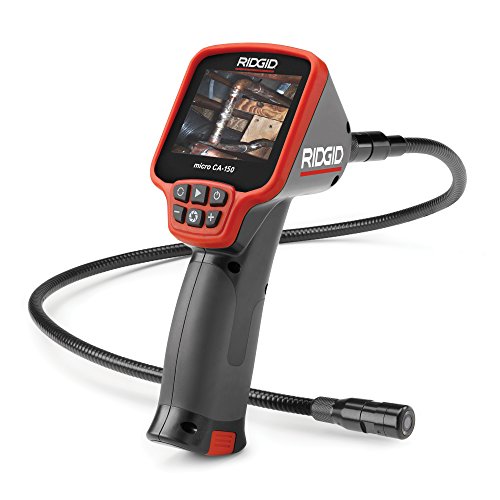 Ridgid micro CA-150 Ridgid micro CA-150 | Rugged handheld with screen. | Amazon — $281.00 |