Digital Hygrometer: What Homeowners Need to Know
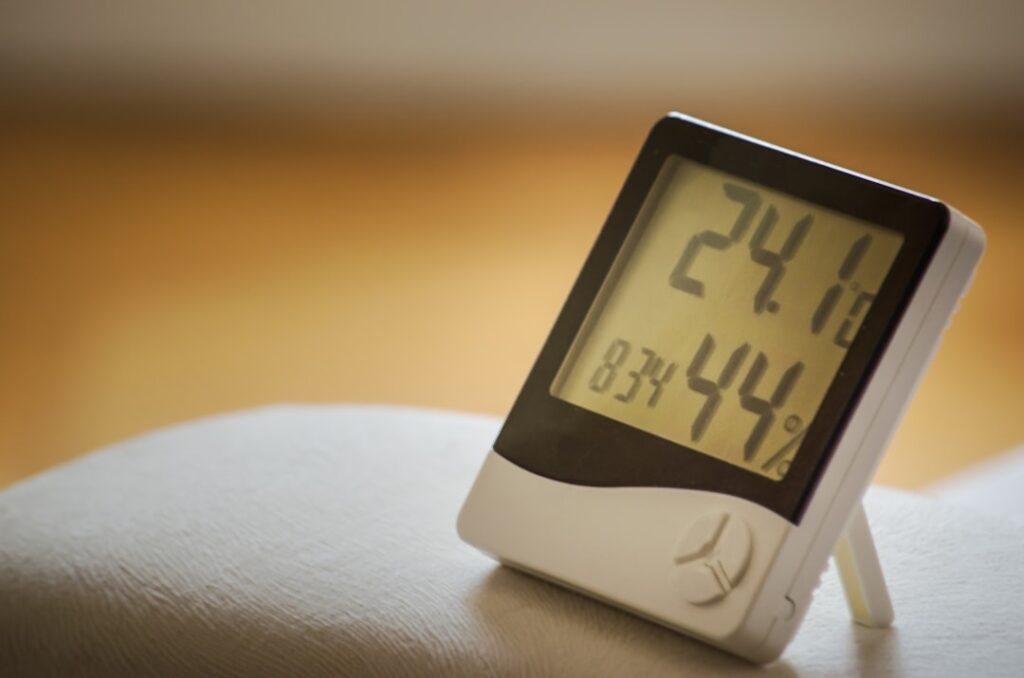
Humidity is invisible until it leaves a mark—fogged windows, a musty closet, cupped hardwood, the first dark speck of mold in a corner. A digital hygrometer makes that invisible variable a number on a screen, and that number is the difference between guessing and managing the air in a home. Inspectors carry one because relative humidity is a leading indicator of moisture problems long before damage appears. This guide explains how the sensor works, what readings to aim for, and how the tool fits alongside the rest of an inspection kit, citing ASHRAE comfort guidance and trade-association sources.
What Does a Digital Hygrometer Measure?
A digital hygrometer measures relative humidity, the amount of water vapor in the air expressed as a percentage of the maximum the air can hold at its current temperature. A reading of 50 percent means the air holds half the moisture it could at that temperature. Most units also display air temperature, and many add a dew point calculation, the temperature at which that air would start to condense.
Relative humidity matters because it ties directly to comfort, building durability, and biological growth. Air that holds too much moisture invites mold and dust mites; air that is too dry cracks wood and irritates airways. The single percentage on the display is a window into all of those outcomes, which is why the tool punches above its modest cost.
How the Sensor Works
Inside a digital hygrometer is a capacitive or resistive humidity sensor. The most common type is capacitive: a thin polymer film sits between two electrodes and absorbs water vapor in proportion to the surrounding humidity. As the film absorbs moisture, its electrical capacitance changes, and the device converts that change into a humidity percentage.
This is a meaningful upgrade over the old analog dial hygrometers that used a coiled strip or human hair to move a needle. Digital capacitive sensors respond faster, drift less, and read to a tenth of a percent. They still drift over years, though, which is why better units support recalibration. The temperature sensor sits alongside the humidity element so the device can compute dew point, the figure that predicts condensation on cold surfaces like single-pane windows or basement walls.
What Humidity Levels Should a Home Hold?
Guidance from ASHRAE and public-health sources converges on a comfortable, durable indoor range of roughly 30 to 50 percent relative humidity, with many sources extending the upper edge to 60 percent in warmer conditions. The practical takeaway is a target band, not a single magic number.
The risks sit at both ends:
- Above 60 percent — sustained high humidity feeds mold, mildew, and dust mites, and encourages condensation. The EPA recommends keeping indoor humidity below this threshold specifically to limit mold growth.
- Below 30 percent — very dry air shrinks and cracks wood flooring, trim, and furniture, raises static, and aggravates dry skin and respiratory passages.
Front Range homes face a particular challenge. Colorado’s climate is naturally dry, so winter indoor air can fall well below 30 percent, while a poorly ventilated bathroom or a humidifier set too high can spike a single room past 60. A hygrometer reveals those swings room by room, which a whole-house thermostat reading never shows.
How Inspectors and Homeowners Use It
During an inspection, a digital hygrometer provides context for moisture findings. A musty basement reading 68 percent humidity explains a mildew smell and flags conditions ripe for growth. A bathroom that stays above 60 percent hours after a shower points to inadequate exhaust ventilation. The number turns a subjective impression into a documented condition.
Homeowners use the same tool to manage problem areas. Placing a hygrometer in a finished basement, a crawlspace, or a closet on an exterior wall reveals whether a dehumidifier is keeping up or a humidifier is overshooting. Because relative humidity rises as temperature drops, the cold corner behind a dresser can sit far wetter than the room average—exactly where condensation and mold start. Tracking those microclimates is the practical payoff.
Hygrometer vs. Moisture Meter
The two instruments are often confused because both deal with moisture, but they measure entirely different things. A digital hygrometer measures water vapor in the air. A moisture meter measures water content inside a material like wood, drywall, or subfloor.
Air vs. Material
A hygrometer might read 65 percent humidity in a room, signaling conditions that could lead to damage over time. A moisture meter pressed against a baseboard tells whether that wood is already wet right now. One is a leading indicator of the environment; the other is a direct measurement of a material’s current state.
Inspectors use them together. High air humidity plus high material moisture is a strong signal of an active problem, while high humidity with dry materials suggests a developing risk worth ventilating before it becomes damage. The full home inspection tools guide places both in the broader moisture-diagnosis kit, where each answers a different half of the question.
Accuracy, Calibration, and Placement
A hygrometer is only useful if its reading is trustworthy. Two factors determine that: sensor accuracy and where the device sits. Consumer units typically claim accuracy within a few percentage points of relative humidity, which is fine for spotting problem ranges but not for precision lab work.
Calibration drifts over time, so periodic checks matter. The standard home method is the salt test: seal the device in a container with a saturated salt-and-water slurry, which holds a known 75 percent relative humidity, and compare the reading after several hours. Some digital models then allow a calibration offset.
Placement also shapes the reading. Keep the device away from direct sunlight, supply registers, exterior doors, and appliances that throw heat or moisture, all of which create a local microclimate that misrepresents the room. For a true room reading, mount it on an interior wall at roughly chest height, away from those disturbances.
Humidity, Mold, and Condensation
The link between humidity and mold is the reason inspectors care about the number. Mold spores are present in virtually every indoor environment; what they need to grow is moisture. When relative humidity climbs above 60 percent for sustained periods, surfaces and materials can absorb enough moisture to support growth, even without a visible leak. The EPA’s recommendation to keep indoor humidity below 60 percent is aimed squarely at denying mold that moisture.
Condensation is the other failure mode, and dew point explains it. When humid indoor air contacts a surface colder than its dew point—a single-pane window in January, an uninsulated basement wall, a cold-water pipe—water condenses out of the air onto that surface. A hygrometer that displays dew point lets a homeowner predict where condensation will form before it does. In a tightly sealed modern home, trapped moisture from showers, cooking, and breathing can push humidity up fast, which is why monitoring matters as much in new construction as in old.
Managing Humidity in a Dry Colorado Climate
The Front Range presents a split personality for indoor humidity. The regional climate is arid, so winter heating drives indoor air very dry, often well below the 30 percent comfort floor, cracking hardwood and trim and irritating airways. Yet individual rooms can swing the opposite way: a bathroom without a working exhaust fan stays above 60 percent long after a shower, and an over-used humidifier can saturate a bedroom.
A hygrometer reveals these microclimates that a single thermostat reading hides. Placing one in a basement, a bathroom, and a main living area shows where to add moisture and where to remove it. The goal is to nudge each space into the 30-to-50 percent band: running exhaust fans and dehumidifiers where readings run high, and using a humidifier sparingly where winter air runs dry. Whole-house humidification tied to the furnace can help, but only if a hygrometer confirms it is not overshooting into the condensation range.
Reading Trends, Not Just Snapshots
A single reading captures a moment, but moisture problems often live in the swings. A basement that reads a comfortable 45 percent on a dry afternoon may spike to 70 percent after a rainstorm or during spring snowmelt, when groundwater rises. Catching that pattern requires either repeated checks or a logging hygrometer that records min and max values and, in connected models, plots humidity over time.
Trend data turns diagnosis into something concrete. An intermittent musty smell that no one can pin down often resolves once a logging hygrometer shows humidity climbing overnight or after weather events. The same data confirms whether a newly installed dehumidifier actually holds the space in range or merely runs constantly without keeping up. For chronic or seasonal moisture concerns, the trend matters more than any one number on the display.
Choosing a Digital Hygrometer
For most homes, a few features separate a useful unit from a frustrating one. A clear display showing both humidity and temperature covers the basics. Min/max memory captures overnight spikes the user never sees. Dew point readout helps predict condensation on cold surfaces. And recalibration capability extends the tool’s accurate life.
Connected models that log data to a phone add trend tracking, which is valuable for diagnosing intermittent problems like a basement that only gets damp after rain. As with any instrument, the right choice matches the task: a homeowner watching one humidor-dry room needs less than an inspector documenting conditions across an entire house, and a sibling hygrometer guide breaks down the analog-versus-digital trade-offs in more detail.
Acting on the Readings
The number only helps if it drives action. Persistent readings above 60 percent call for source control—running bath and kitchen exhaust fans, fixing leaks, adding a dehumidifier, or improving crawlspace ventilation. Readings below 30 percent in a dry Colorado winter may justify a humidifier, but only enough to reach the comfort band, not past it.
The goal is to hold a home in that 30-to-50 percent range where wood stays stable, mold lacks the moisture it needs, and the air feels comfortable. A digital hygrometer is the inexpensive instrument that lets a homeowner steer toward that target instead of reacting to damage after it appears.
Relative Humidity and Temperature: The Connection
The “relative” in relative humidity is the source of much confusion, and understanding it sharpens how a homeowner reads the number. Warm air can hold more water vapor than cold air. So the same absolute amount of moisture produces a low relative humidity in a warm room and a high one in a cold room. This is why a heated living space can feel dry at 35 percent while the cold corner behind a dresser, holding the same air, sits near saturation and grows mold.
Dew point cuts through this by expressing the actual moisture content as the temperature at which condensation begins, independent of the current room temperature. A hygrometer that shows dew point lets a homeowner compare moisture across rooms of different temperatures on equal footing. It also predicts trouble: if the dew point is 55 degrees and a basement wall sits at 52, that wall will sweat. Reading both relative humidity and dew point together gives a far more complete picture than the percentage alone, and it explains why moisture problems cluster on the coldest surfaces in a home.
Analog vs. Digital Hygrometers
Before digital sensors, hygrometers used mechanical means—a coiled bimetallic strip or a strand of organic material that changed length with humidity, moving a needle on a dial. These analog units still appear in cigar humidors and weather stations, but they drift badly, respond slowly, and are hard to calibrate, which limits their usefulness for diagnosing home moisture problems.
Digital capacitive sensors improved on every front: faster response, tighter accuracy, readout to a tenth of a percent, and the ability to compute dew point and store min/max values. The trade-off is that the electronics need power and the sensor still drifts over years, which is why recalibration capability matters. For a homeowner trying to track humidity in a problem basement or confirm a bathroom dries out after showers, the digital unit’s speed and precision are decisive. The analog dial is a rough indicator; the digital sensor is a measurement tool, and the difference shows when the readings drive real decisions about ventilation, dehumidification, or humidification.
References
- Thermal comfort and indoor humidity ranges (Standard 55) — ASHRAE
- Indoor humidity guidance for mold prevention — U.S. EPA
- Moisture measurement in inspections — InterNACHI