Flir One Pro Ios: What Homeowners Need to Know
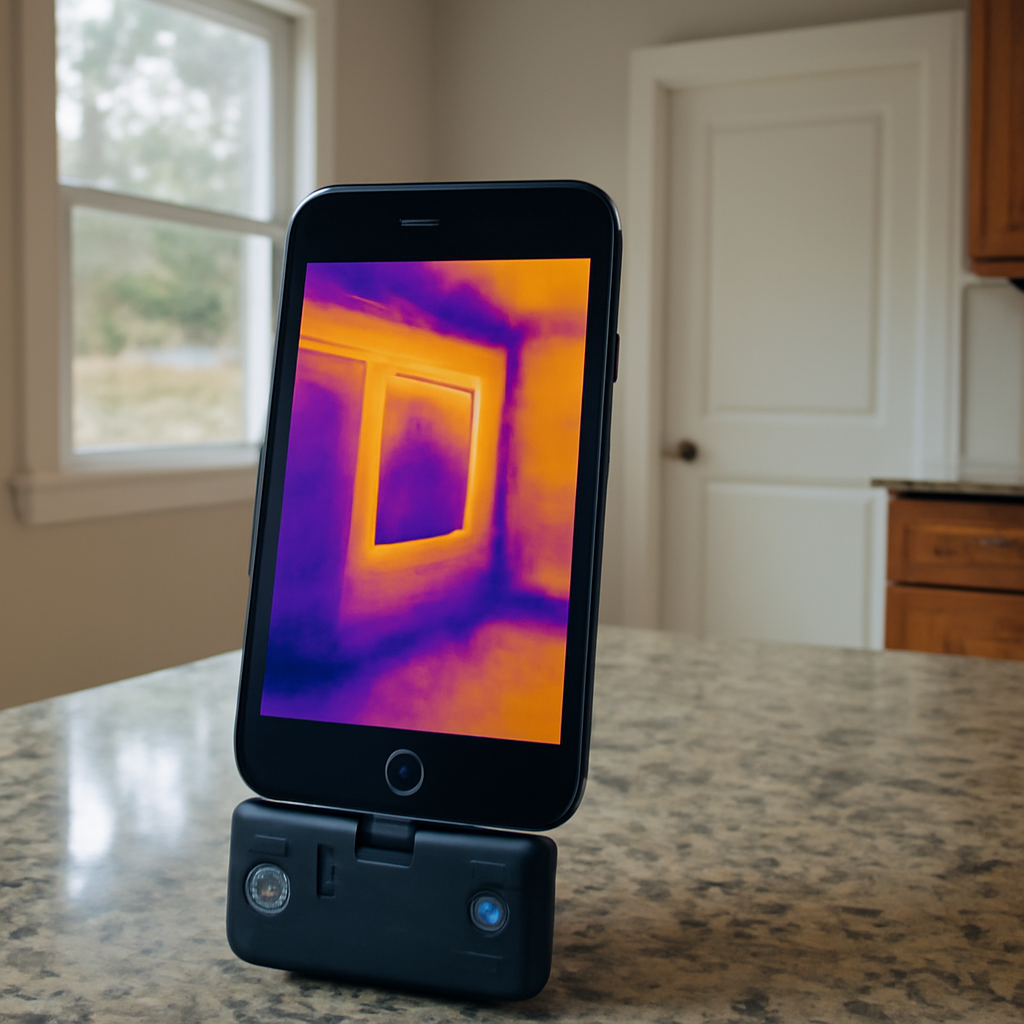
The Flir One Pro iOS workflow combines the smartphone attachment, the Flir mobile app, and the iPhone itself into an integrated thermal imaging system that has set the standard for consumer-tier thermal cameras since 2017. The iOS integration is genuinely useful but has several quirks that homeowners and inspectors should understand before relying on it for serious diagnostic work. This guide covers what the iOS workflow actually delivers, where it falls short of standalone handhelds, and how to get the most value from the attachment-plus-iPhone combination.
How the Flir One Pro Connects to iOS Devices
The Flir One Pro for iOS attaches to the iPhone via the Lightning or USB-C port depending on the iPhone generation. iPhone 14 and older use the Lightning variant; iPhone 15 and newer use the USB-C variant. The attachment is a small block that extends about an inch past the bottom of the phone with the thermal lens facing the same direction as the iPhone’s primary cameras. Power is drawn from the iPhone, and data flows back to the iPhone over the connector.
The physical fit allows most cases and bumpers to remain on the phone during attachment, though some thicker cases require removal. The attachment includes a small adjustment slider that accommodates different case thicknesses, which most users discover only after their first attempt at attaching with a heavy case. Once connected, the Flir app launches automatically on most iOS configurations and begins streaming the thermal image to the iPhone display in real time.
What the Flir iOS App Actually Does
The Flir Mobile app for iOS is more capable than the typical accessory app and includes features designed for both casual users and working inspectors. The core feature set:
- Live thermal preview with adjustable color palettes (iron, rainbow, grayscale, and several others)
- Image and video capture with simultaneous storage of the thermal frame and the visible-light photo
- MSX edge-blending overlay that combines the visible-light edges with the thermal frame for clearer image interpretation
- Temperature spot measurement by tapping anywhere on the live image to display the temperature at that pixel
- Image annotation for adding text, arrows, and measurement boxes to saved images
- Direct sharing to Flir’s reporting software and to standard iOS share targets including email and cloud storage
- Calibration management including the periodic internal shutter recalibration the camera performs automatically
The feature set is mature compared with most consumer-attachment apps. Inspectors who use the camera daily can build presentable client reports without leaving the iPhone, though the workflow becomes more efficient on a tablet or computer for high-volume report generation.
iOS-Specific Workflow Strengths
The iOS integration has several advantages over Android equivalents and over standalone handhelds. iOS’s tight control over USB-C and Lightning ports means the Flir attachment reliably enumerates and powers up when connected, with fewer “device not recognized” errors than Android users sometimes experience. iCloud Photo Library integration means thermal captures sync automatically across the user’s Apple devices, which streamlines review on a Mac or iPad after the fieldwork.
The iPhone’s processor handles the real-time image processing comfortably even on older models. The camera works on iPhones going back to the iPhone 8 and SE generations with the Lightning variant, which means users with older phones do not need to upgrade hardware to use the attachment. AirDrop sharing of thermal images directly from the field to colleagues’ iPhones works smoothly and is useful during inspections where two team members need to review the same image.
iOS-Specific Workflow Limitations
A few quirks affect the iOS workflow specifically. The Lightning port on older iPhones is a known wear point for the attachment, and repeated insertion cycles can degrade the connection over multi-year use. The USB-C variant on newer iPhones is sturdier but newer enough that long-term wear data is still limited. Apple’s thermal management can throttle the iPhone if it gets too warm during extended scanning sessions, which interrupts the camera at exactly the wrong moments — typically during summer attic crawls when the iPhone is already heat-stressed.
The Flir Mobile app has occasional iOS version compatibility issues that lag behind major iOS releases by a few weeks. Users who upgrade iOS aggressively sometimes find the app temporarily unstable until Flir ships an update. Sticking with the previous iOS version for a week or two after a major release is a common workaround in the inspector community.
Capturing and Exporting Images on iOS
The Flir Mobile app saves captured images as a combined file that contains both the thermal data and the visible-light reference image. When exported, the user can choose to share the thermal image with MSX overlay (the most common choice for reports), the raw thermal frame without MSX, or the underlying visible-light photo. The combined file format also embeds the temperature data for every pixel, which allows post-capture analysis in Flir’s desktop software.
Direct export to email, Messages, AirDrop, and cloud storage works as expected. The Flir reporting workflow uses a dedicated app called Flir Tools or Flir Thermal Studio for desktop report generation, with mobile-to-desktop sync via Flir’s cloud services. For working inspectors, the cloud sync is a meaningful workflow advantage; for homeowners doing one-off diagnostics, basic email or AirDrop sharing is usually sufficient.
MSX Edge-Blending and Why It Matters on iOS
The MSX feature deserves specific attention because it is the single feature most often cited as differentiating the Flir One Pro from competing smartphone attachments. The implementation uses the iPhone’s primary camera in parallel with the Flir’s thermal sensor to capture a high-resolution visible-light image at the same moment as the thermal frame. The app then extracts the visible-light edges and etches them onto the thermal image in real time, producing a composite where temperature data appears against a clearly visible structural outline.
On iOS, the MSX feature works particularly smoothly because the integration between the Flir app and the iPhone’s camera APIs is well-developed. The Flir on Android equivalent works but with slightly more processing latency on some phones. For real-time thermal scanning where the user is moving through a room and watching the live preview, the iOS smoothness is a genuine workflow advantage.
Our companion read on Flir One Pro resolution and what the specs actually mean covers how MSX interacts with the underlying thermal data.
iOS Battery Considerations During Thermal Work
The Flir One Pro draws power from the iPhone battery during operation, which is the single largest practical limitation of the smartphone-attachment workflow. Continuous scanning over an hour can consume thirty to fifty percent of a fully charged iPhone battery. Cold-weather use accelerates the drain because lithium batteries lose effective capacity below freezing. Working inspectors typically carry a portable battery pack with USB-C output to extend field time without committing to a separate handheld.
One workaround that some Flir One Pro users adopt is keeping a dedicated older iPhone as a “thermal imaging device” rather than running the camera on their primary phone. This separates the camera’s battery drain from the user’s normal phone use and avoids the risk of running out of phone battery during an important call. The dedicated phone does not need cellular service — WiFi is sufficient for the Flir app and cloud sync.
iOS Camera Roll Integration
The Flir app gives the user a choice about how to save captured images: in the Flir app’s own library, in the iOS Camera Roll, or both. For working inspectors building reports, the dedicated Flir library makes the most sense because images stay grouped with their thermal data and metadata. For homeowners doing casual diagnostics, saving to the Camera Roll alongside other photos can be more convenient.
Images saved to the Camera Roll retain the MSX-blended visible appearance but lose the underlying thermal data — they become standard JPEG files rather than the radiometric format that allows post-capture analysis. This is fine for sharing and reference but limits future analysis options. For images that might need detailed review later, keeping the original in the Flir library is the right choice.
Common iOS Workflow Mistakes
A few patterns recur among new Flir One Pro iOS users that diminish the camera’s usefulness. Holding the phone too far from the target, which the 160×120 resolution penalizes more than higher-resolution cameras would. Scanning during mild weather without strong interior-exterior temperature differentials, which produces ambiguous images and leads new users to assume the camera is defective when really the conditions are wrong. Forgetting to remove a thick iPhone case before attempting to attach the camera.
Skipping the MSX overlay in favor of pure thermal display, which makes images harder to interpret. Failing to recalibrate by running the internal shutter cycle when transitioning between very different ambient temperatures — for example, going from a warm interior into a cold attic. Each of these mistakes is easily fixed once the user knows about them, and the Flir manual addresses most of them, though users often skip the manual.
How the iOS Workflow Compares With Standalone Handhelds
The Flir One Pro iOS experience has clear strengths and clear limits relative to standalone handheld cameras at similar or slightly higher prices. The smartphone attachment wins on portability, on the breadth of the app ecosystem already in the user’s pocket, and on the option to share thermal images using standard iOS sharing flows. The standalone handheld wins on battery independence, on durability under harsh conditions, on faster image refresh rates in some models, and on the dedicated grip-and-trigger ergonomics that make hours of continuous scanning easier on the hands.
For occasional homeowner use, the iOS attachment is usually the better choice. For working inspectors doing daily inspections, a standalone handheld becomes the primary camera with the iOS attachment as a backup or secondary unit. Our broader comparison of home inspection tools across the spectrum covers when each form factor earns its place.
The Practical Bottom Line on Flir One Pro iOS
The Flir One Pro iOS workflow is mature, capable, and matched to the needs of homeowners doing occasional diagnostic work or inspectors who want a portable secondary camera. The iOS integration is genuinely smoother than Android equivalents on most use cases. The MSX implementation is the best in the smartphone-attachment category. The connector and battery quirks are real but manageable for users who understand them.
Buyers who match the attachment to use cases its resolution and form factor can handle get a satisfying tool at a reasonable price. Buyers who expect standalone-handheld performance from a four-hundred-dollar phone attachment will find the iOS experience falling short of those expectations. Setting expectations correctly at purchase prevents most of the disappointment that occasionally surfaces in user reviews.
iOS Workflow Tips From Long-Term Users
Several iPhone-specific habits make the Flir One Pro experience meaningfully better in practice. Charging the iPhone to full before any extended scanning session, because the battery drain is steep enough that starting at sixty percent often leaves the user with no battery before the work is done. Using a slim case rather than a thick one to avoid having to remove the case before each attachment session. Storing the Flir attachment in a small padded pouch rather than loose in a bag, because the germanium lens scratches more easily than standard camera glass.
Pre-launching the Flir app before attaching the camera produces a faster startup than attaching the camera and waiting for the app to launch automatically. Some iOS configurations have a brief delay between attachment and app launch that frustrates users until they learn to launch first. Keeping the iPhone display brightness at maximum during outdoor or bright-environment scanning makes the thermal preview much more visible.
For users who plan to share thermal images frequently, enabling iCloud Photo Library sync ensures captures are immediately available on the user’s Mac or iPad for review and report building. The cross-device workflow this enables is one of the genuine advantages of using the Flir One Pro on iOS rather than on Android.
References
- Infrared Thermography for Home Inspectors — International Association of Certified Home Inspectors
- Infrared Inspection Standards — American Society of Home Inspectors
- Insulation Diagnostics and Energy Efficiency — U.S. Department of Energy
- Building Envelope Performance Standards — ASHRAE
Thermal imaging cameras
Infrared cameras reveal hidden moisture, missing insulation, and air leaks. Phone-attachment models are the budget entry point; standalone units have higher resolution.
| Product | Why | Buy |
|---|---|---|
 FLIR ONE Pro (phone) FLIR ONE Pro (phone) | Plugs into iPhone/Android; inspector favorite. | Amazon — $349.00 |
 Topdon TC001 Topdon TC001 | High-res phone module at a low price. | Amazon — $199.99 |
 FLIR C5 Compact FLIR C5 Compact | Standalone pocket camera with Wi-Fi. | Amazon — $449.00 |