FLIR Thermal Camera Android: USB-C Compatibility Guide 2026
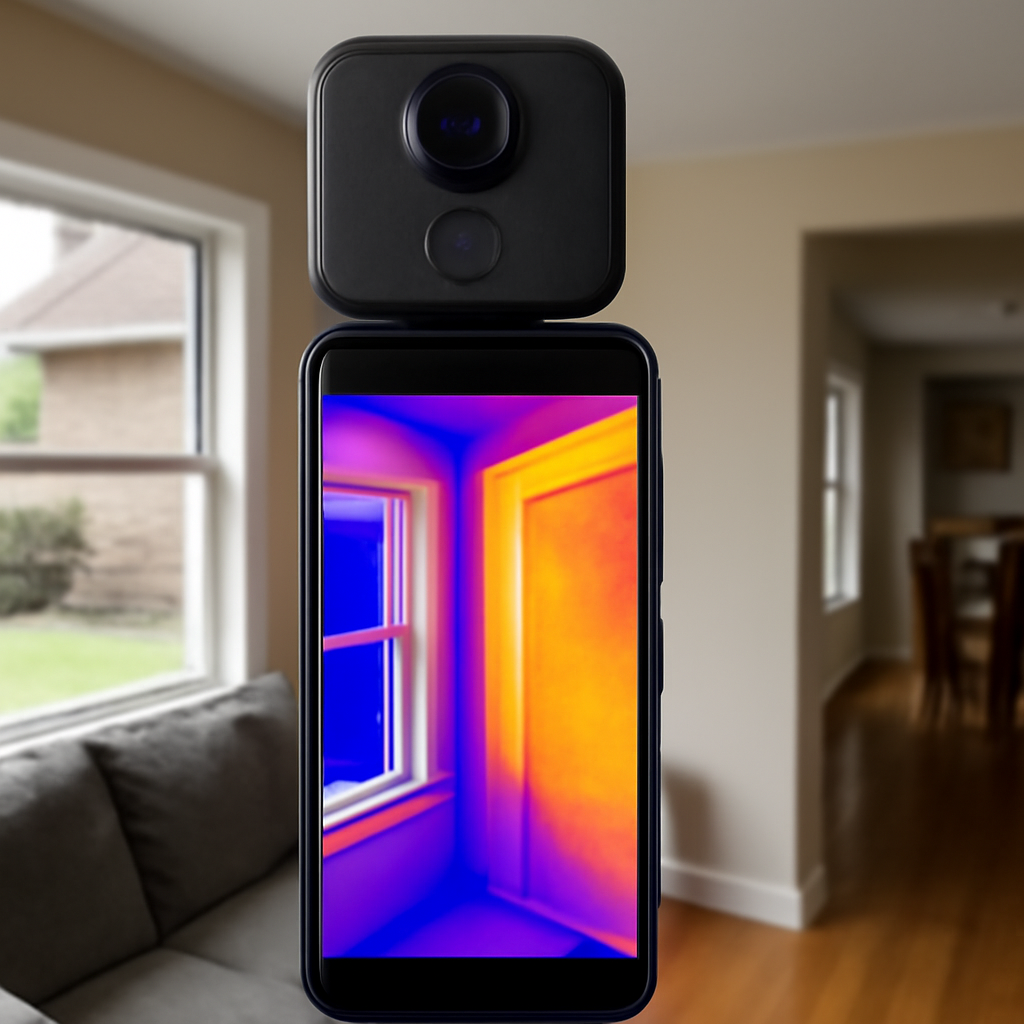
“FLIR thermal camera Android” returns a mix of USB-C attachments, Micro-USB legacy models, and several generations of resolution tiers. The right choice depends on your phone, your intended use, and where you fit on the spectrum from occasional homeowner curiosity to inspector-grade documentation. This guide walks through compatibility, resolution, and the limits versus a standalone handheld imager — drawing on Department of Energy and InterNACHI guidance for context.
How smartphone thermal attachments work
A microbolometer sensor inside the attachment detects long-wave infrared radiation (8 to 14 microns) emitted by surfaces at room temperature. The Android phone provides power through USB-C OTG, display the live thermal image, and stores captured files. The attachment provides the actual thermal sensing.
USB-C with OTG: the compatibility requirement
USB On-The-Go (OTG) lets a phone act as USB host and supply power to external devices. Most current Android flagships and mid-range phones support OTG, but some manufacturers disable specific power modes. Verify your specific phone model against the attachment manufacturer’s compatibility list before purchasing.
Why Micro-USB attachments are obsolete
Older thermal attachments shipped with Micro-USB connectors. In 2026, virtually all current Android phones use USB-C. Buying a Micro-USB attachment limits you to specific older phones and risks app discontinuation. Stick with USB-C for current and future compatibility.
Resolution tiers in the current market
Three resolution tiers cover most consumer Android attachments: 80×60, 160×120, and 320×240 pixels. The differences materially affect what tasks each attachment can complete. Choosing the right tier is the most consequential purchase decision.
What 80×60 attachments deliver
Entry-tier 80×60 imagers detect gross temperature differentials at close range. Useful for finding obvious air leaks, checking one breaker against another, or identifying a clearly cold wall section. Not adequate for documenting subtle anomalies or surveys at distance.
What 160×120 enables
The middle tier resolves enough detail for most homeowner tasks: insulation gap location, air-leak tracing, electrical panel surveys with readable individual breakers, radiant floor zone identification, and early-stage moisture detection. This is the practical floor for shareable documentation.
What 320×240 adds
Pro-tier 320×240 resolution approaches entry-level professional imager territory. Useful for inspectors using a phone-based imager as a backup, homeowners planning extended use, and anyone documenting subtle anomalies at moderate distance. The price premium versus 160×120 is significant.
NETD: how subtle a difference can be seen
Noise Equivalent Temperature Difference measures the smallest temperature difference an imager can resolve. Consumer attachments typically achieve 50 to 150 millikelvin NETD. Professional handheld imagers achieve 30 to 50 mK. Lower NETD reveals finer anomalies.
App workflow on Android
Each attachment ships with a dedicated app handling live view, capture, palette selection, and basic analysis. App quality and Android version compatibility vary significantly. Check recent Google Play reviews for stability with your phone’s Android version before purchasing.
Department of Energy thermography guidance
The Department of Energy publishes guidance noting thermal imagers help identify insulation gaps and air-leakage paths during controlled temperature differentials of approximately 18°F or more between interior and exterior. Front Range winters routinely provide such conditions naturally.
InterNACHI Infrared Certified credential
InterNACHI offers an Infrared Certified credential for home inspectors who complete training on thermal imaging interpretation. The credential signals understanding of what thermal anomalies mean, not just how to capture them. The Android USB-C buyer guide covers practical interpretation considerations.
ASHRAE technical resources
ASHRAE publishes technical resources on thermography for HVAC and building envelope diagnostics. The guidance emphasizes appropriate temperature differentials, emissivity correction, and reporting format. While the depth applies primarily to commercial work, the underlying methods apply equally to residential thermography.
Battery considerations
Thermal sensors draw 200 to 500 mA during active scanning, reducing phone battery by 20 to 40 percent per hour. Carry a USB-C battery pack for extended sessions, or choose an attachment with an integrated internal battery to reduce phone drain.
Calibration and accuracy expectations
Consumer attachments typically claim ±2°C or ±2 percent of reading absolute accuracy. This supports relative temperature comparison (finding the cold spot, locating the hot wire) but not absolute measurements requiring NIST-traceable calibration. Professional thermographers use imagers with documented annual recalibration.
Pricing context in 2026
Entry-tier 80×60 attachments: $200 to $300. Mid-tier 160×120: $350 to $500. Pro-tier 320×240: $600 to $900. Standalone handheld professional imagers: $1,000 entry to $10,000+ for high-resolution units used in commercial thermography.
Tradeoffs versus a handheld imager
Android attachments win on portability and price. Handheld imagers win on resolution, dynamic range, optical zoom, ergonomics during long surveys, integrated laser pointer, and battery life. For professional work, handheld units produce materially better deliverable images. The home inspection tools hub covers this tradeoff across the buyer spectrum.
Common use cases for Front Range homeowners
Pre-winter attic insulation surveys, basement rim-joist air-sealing audits, electrical panel checks for warm breakers, radiant floor heating diagnostics, and frozen pipe location during cold snaps. Colorado’s wide diurnal temperature swings make thermal imaging particularly useful here.
Verifying compatibility before purchase
Check the attachment manufacturer’s compatibility list for your exact phone model. Generic “USB-C compatible” claims aren’t enough — some manufacturers disable specific OTG power modes. The compatibility list is authoritative; user reviews of your phone model are confirmatory.
When to upgrade to a handheld imager
Sustained professional use, energy audits requiring rebate documentation, electrical infrared surveys for commercial properties, mold investigations requiring detailed moisture mapping, and any thermography for legal documentation justify a handheld unit with documented calibration.
How to test USB-C OTG on your phone
USB-OTG support varies by phone. Test by plugging in a USB flash drive with the appropriate adapter — if the file manager recognizes the drive, OTG is enabled. Some phones require enabling OTG in the developer settings. Verifying OTG before purchasing a thermal attachment avoids a return.
Image stabilization during capture
USB-bandwidth limits thermal attachments to 8 or 9 frames per second, well below smartphone visible-light camera frame rates. Hold the phone steady for half a second before capturing to avoid motion blur. A small tripod or phone clamp helps for extended surveys.
How emissivity adjustments work in Android apps
Most attachment apps default to emissivity 0.95, correct for typical painted surfaces. Polished metal surfaces (breaker-panel busbars, copper plumbing) have emissivity below 0.10 and require adjustment. Apps usually offer a slider or a preset list of common materials. Adjust per capture when imaging shiny metals.
Palette selection for documentation
Rainbow palette draws attention to differences but compresses subtle detail. Ironbow shows finer gradations and is widely understood across the trade. Grayscale removes color bias and forces interpretation based on intensity. Choose one palette per session for consistency.
Outdoor thermography conditions
Avoid direct sunlight on the target during capture; solar heating creates apparent hot spots that aren’t building-related. Front Range high-altitude sunlight is especially strong. Early morning before sunrise or evening after sunset provides cleaner outdoor thermography conditions.
Spotting moisture versus air leaks in residential thermography
Air leaks typically show as elongated linear cool patterns following framing or penetrations. Moisture intrusion shows as broader irregular cool patches that don’t follow framing lines. A moisture meter confirms the difference — wet drywall reads high moisture; air-leak-cooled drywall reads dry.
How to handle Android permission prompts
Thermal attachment apps request permissions for USB access, storage, and sometimes location. Grant what’s needed for the use case. Some apps over-request permissions (microphone, contacts) — review permission requests and decline unnecessary ones. Apps that won’t function without unrelated permissions are warning signs.
Phone storage and capture volume management
Thermal captures range from 200 KB to 1 MB each. A serious multi-room survey can produce 100+ images per session, consuming hundreds of megabytes monthly. Plan storage strategy: export to cloud regularly, delete on-device after backup, or move to external storage. Devices with smaller internal storage (under 128 GB) fill quickly otherwise.
Establishing a consistent capture workflow
Use a consistent palette, consistent emissivity setting (or note when adjusted), consistent capture distance, and consistent annotation format across sessions. Workflow consistency makes images comparable across time and supports diagnostic continuity. Inconsistent workflows produce data that’s hard to interpret later.
How to share thermal images for remote interpretation
Some manufacturer apps support cloud upload for remote viewing by team members or professional thermographers. For paid remote interpretation, confirm with the consultant whether they need the raw thermal data (with temperature metadata) or flattened images. The two formats serve different purposes and require different export settings.
How to evaluate attachment durability claims
Marketing language like “rugged” and “field-ready” doesn’t mean IP-rated or shock-tested. Look for specific ratings: IP54 or IP67 for dust and water, drop-test specifications in meters. Honest manufacturers publish these numbers; vague claims usually indicate ordinary consumer-grade construction.
How over-the-counter accessories compare to professional kits
Consumer Android thermal attachments compete in a different market segment than professional handheld kits. The price differential reflects manufacturing volume, calibration depth, and target user expectations. Both work; the appropriate choice depends on use frequency, deliverable requirements, and professional credibility needs.
Special considerations for renting versus buying
Rental of a smartphone thermal attachment is uncommon because the unit cost is low enough that rental economics don’t make sense. Rental of a professional handheld imager is common at tool yards for single-project use. For frequent residential troubleshooting, owning a smartphone attachment is more cost-effective than renting handhelds repeatedly.
How to evaluate community resources for learning
YouTube channels, manufacturer training videos, InterNACHI free webinars, and Department of Energy publications all provide learning material. Quality varies; cross-reference claims from individual content creators against authoritative sources like DOE and InterNACHI. Self-paced learning over months produces capable hobbyist users.
How to integrate thermal imaging with home maintenance scheduling
Quarterly thermal surveys catch issues early. Schedule an attic insulation check before winter heating ramps up, a crawl-space moisture check after spring snowmelt, an electrical panel scan when seasonal load changes, and a roof survey after major storms. Routine use builds pattern recognition over time.
How to compare thermal performance between similar attachments
When comparing two Android attachments at similar price points, look at sensor pitch, NETD, frame rate, and lens field-of-view in addition to pixel count. Two 160×120 attachments can perform quite differently depending on these supporting specifications. Manufacturer datasheets disclose these numbers; marketing pages usually emphasize only pixel count.
How to call a professional thermographer
Look for inspectors holding InterNACHI Infrared Certified, ASNT NDT Level I or II in infrared, or ITC certification. Verify the imager has documented annual calibration. Request sample reports from previous work to evaluate documentation quality before committing.
References
- Department of Energy: Using Infrared Thermography — U.S. Department of Energy
- InterNACHI Infrared Certified credential — International Association of Certified Home Inspectors
- ASHRAE technical resources on building thermography — American Society of Heating, Refrigerating and Air-Conditioning Engineers
- Department of Energy home energy audit guidance — U.S. Department of Energy
Front Range homeowners choosing between a smartphone thermal attachment and a certified thermographer can get in touch here.
Thermal imaging cameras
Infrared cameras reveal hidden moisture, missing insulation, and air leaks. Phone-attachment models are the budget entry point; standalone units have higher resolution.
| Product | Why | Buy |
|---|---|---|
 FLIR ONE Pro (phone) FLIR ONE Pro (phone) | Plugs into iPhone/Android; inspector favorite. | Amazon — $329.00 |
 Topdon TC001 Topdon TC001 | High-res phone module at a low price. | Amazon — $199.99 |
 FLIR C5 Compact FLIR C5 Compact | Standalone pocket camera with Wi-Fi. | Amazon — $610.06 |