FLIR One iOS: What Homeowners Need to Know
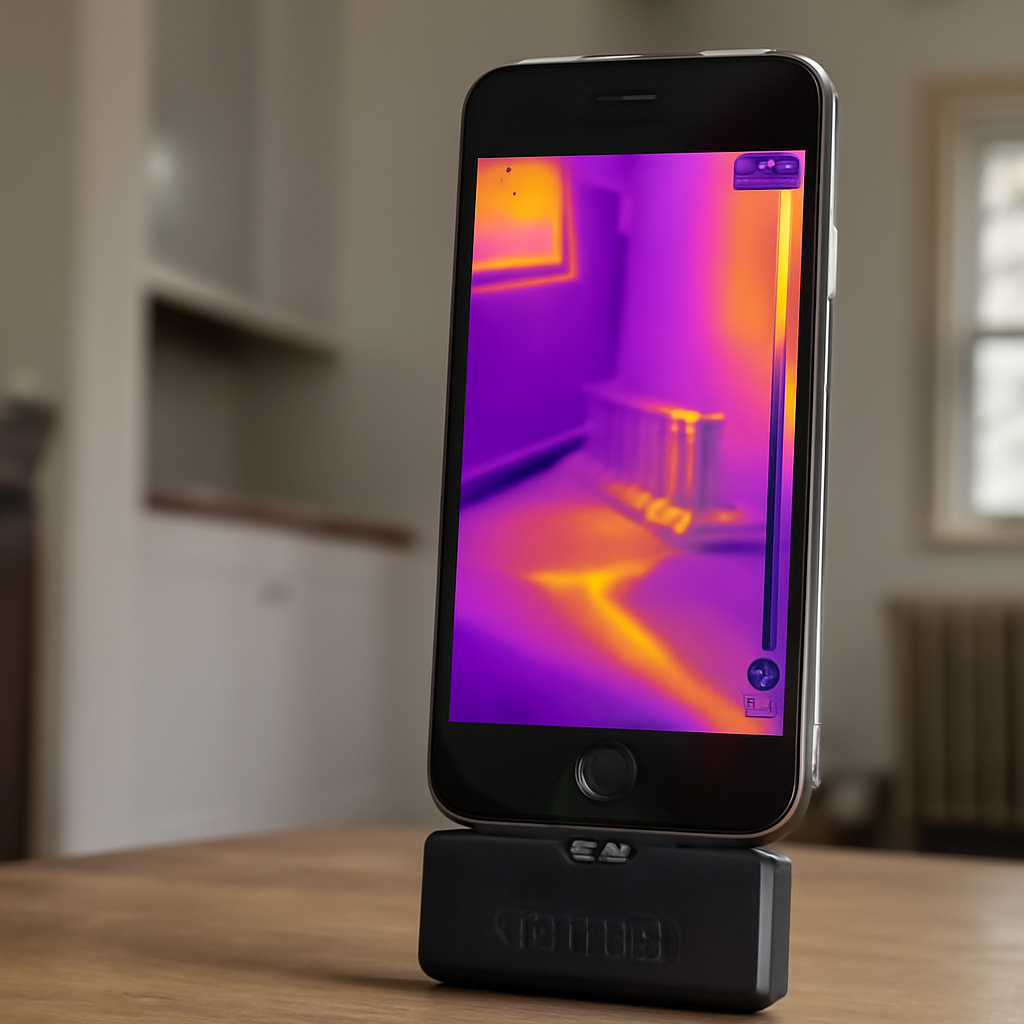
The FLIR One for iOS is the iPhone-compatible version of FLIR’s consumer thermal-camera lineup. It is the most widely recognized phone-attached thermal camera on the market and the default starting point for many iPhone-owning homeowners and inspectors exploring thermal imaging. This guide covers the connector variants (Lightning for older iPhones, USB-C for iPhone 15 and later), the model differences (FLIR One basic, FLIR One Pro, FLIR One Edge Pro), and the iOS-specific software ecosystem. The aim is to help iPhone users select the right FLIR One configuration for their use case.
What FLIR One for iOS actually is
FLIR One for iOS is a small thermal-imaging attachment that plugs into an iPhone’s data port and uses the iPhone’s screen, processor, and storage to display, capture, and share thermal images. The attachment houses an uncooled microbolometer infrared sensor (the same class of detector used in most consumer thermal cameras), a visible-light camera for MSX overlay, processing electronics, and (in most models) a small internal battery that supplements iPhone power.
The FLIR One ships with a Lightning or USB-C connector depending on the SKU, and is paired with the FLIR One companion app available in the iOS App Store. The app handles image capture, palette selection, temperature spot measurement, video recording, and PDF report export. The attachment is licensed under Apple’s MFi (Made for iPhone) program, meaning iOS recognizes it as an authorized accessory and does not display third-party warnings on connection.
Connector versions: Lightning versus USB-C
The two current FLIR One iOS variants differ only in connector type. The Lightning version fits iPhones from the iPhone 5 series through iPhone 14, which are the iPhones produced before Apple’s switch to USB-C in late 2023. The USB-C version fits iPhone 15 and later, plus iPads with USB-C. Both versions are otherwise identical in sensor, lens, app, and pricing.
Users upgrading from a Lightning iPhone to a USB-C iPhone cannot carry over their existing FLIR One — the Lightning attachment does not work on USB-C iPhones, and FLIR does not currently offer an adapter that converts one to the other. The upgrade requires purchasing the new USB-C SKU. This is one of the most common pain points iPhone users encounter, and it is worth budgeting for when planning an iPhone upgrade.
The FLIR One model lineup
FLIR has historically segmented the FLIR One into three tiers, though the lineup changes periodically as FLIR introduces new generations.
FLIR One basic (entry tier)
The entry FLIR One offers 80×60 native thermal resolution with MSX overlay and the FLIR One app. Pricing typically runs $200 to $300. It is suitable for homeowners doing occasional energy diagnostics, finding water-pipe runs, or identifying overheating electrical components. Resolution is the main constraint — fine detail on small components is harder to resolve.
FLIR One Pro (mid tier)
The FLIR One Pro is the most popular model in the consumer lineup. It offers 160×120 native thermal resolution with MSX overlay, a wider temperature range (up to 752°F / 400°C), and the same companion app. Pricing typically runs $400 to $600. The Pro is the right choice for serious DIY users and entry-level home inspectors who want resolution sufficient for component-level diagnostics.
FLIR One Edge Pro (upper tier)
The FLIR One Edge Pro is a wireless version that connects to the iPhone over Wi-Fi rather than the physical connector. It offers higher native resolution (often 160×120 with upscaling features), an extended temperature range, and IP54-rated weatherproofing. The wireless connection allows the camera to be positioned remotely from the phone, which is useful for tight access work. Pricing typically runs $700 to $1,000.
For broader phone-attachment comparison, see our FLIR One iPhone connector and generation guide.
The FLIR One companion app
The FLIR One app is the iOS companion software that handles all interaction with the attached camera. The current app supports live thermal preview, still capture, video recording, palette selection (rainbow, iron, gray, arctic, lava, and others), temperature spot measurement and crosshairs, MSX overlay toggle, and cloud upload to FLIR Ignite for report generation.
App quality has generally been considered strong relative to other phone-attachment ecosystems. The app supports landscape orientation, includes a built-in tutorial for new users, and integrates with iOS sharing for direct email, AirDrop, or messaging export. The FLIR Ignite cloud service is a separate optional subscription that adds team report management, organization templates, and AI-assisted anomaly tagging — useful for professional inspectors, less relevant for occasional homeowner use.
MSX overlay and image readability
MSX (Multi-Spectral Dynamic Imaging) is FLIR’s branded feature that overlays visible-light edge detail onto the thermal image. The visible-light camera mounted alongside the thermal sensor captures the scene in conventional photography, and the app extracts edge information that is superimposed on the thermal display. The result is a thermal image with sharp visual context — door frames, outlet covers, ceiling fixtures, and structural lines all appear as recognizable shapes against the temperature-mapped background.
MSX makes the thermal image significantly more readable for users who are still learning to interpret thermal data, and it makes report imagery much clearer for clients who do not regularly view thermal images. Working inspectors sometimes prefer thermal-only views for analysis because the overlay can mask subtle thermal patterns, but for client-facing reports, MSX-on imagery is usually the default.
Battery and runtime considerations
The wired FLIR One models include a small internal battery that powers the attachment without drawing heavily from the iPhone. Typical battery life is 60 to 90 minutes of continuous use, recharged via the attachment’s own USB-C charging port (separate from the connector that attaches to the iPhone). The iPhone’s battery is also depleted during active use because the screen and processor run at higher load than baseline.
For all-day field use, a small power bank can extend session length significantly. Working inspectors often carry one power bank for the iPhone and a small cable for the FLIR One charging port. The wireless FLIR One Edge Pro has its own larger battery and works similarly — recharge time runs one to two hours from a standard charger.
FLIR One iOS for home-energy diagnostics
Several residential applications are well-served by the FLIR One Pro. Missing or compressed insulation in attics shows as warm or cool patches depending on the season and outdoor temperature. Air leakage around windows, doors, and rim joists appears as linear thermal traces. Water-pipe runs inside walls are visible under load (warm hot lines, cold cold lines after running water). Radiant-floor heating coverage maps directly to thermal patterns on the floor surface.
For these applications, the FLIR One Pro’s 160×120 native resolution with MSX overlay is sufficient. Front Range homeowners doing winter-time energy audits typically find air-leakage patterns most striking when outdoor temperatures are below 20°F and indoor temperatures are above 70°F — the larger the indoor-outdoor temperature differential, the more visible the leakage signature. Energy.gov’s professional home energy assessment overview provides additional context on thermal imaging as a diagnostic tool.
Where the FLIR One stops being the right tool
Several applications stretch the FLIR One past its design center. High-temperature industrial process monitoring above the 752°F upper range exceeds the sensor’s spec and requires purpose-built industrial thermography units. Calibrated radiometric measurement for regulated trade work requires documented calibration chains that consumer FLIR One units do not provide. Long-range outdoor surveillance and search-and-rescue work require cooled-sensor cameras with longer focal lengths. Aerial thermal imaging on drones requires payload-specific FLIR cameras integrated with flight platforms.
For most residential and small-commercial diagnostic work, none of these limits matter. The FLIR One iOS is well-matched to the inspection use cases iPhone-owning users typically need. For broader tool-selection context, see our home inspection tools 2026 buyer’s guide.
FLIR One iOS pricing and lifecycle
Current FLIR One iOS pricing across the lineup runs $200 to $1,000 depending on model and connector. Discounts and bundles surface periodically through FLIR direct and through major electronics retailers. The expected service life is five to eight years under moderate use, with connector wear being the most common failure point. Lightning users planning to upgrade to USB-C iPhones in the next two to three years should weight the timing of their attachment purchase carefully.
For working inspectors needing to budget for replacement cycles, a five-year planning horizon is reasonable. The FLIR One app is generally well-maintained across iOS version transitions, so software obsolescence is less of a concern than for less-supported manufacturers. InterNACHI’s infrared thermography continuing-education materials are useful for inspectors evaluating their tool choices and certification options.
Common FLIR One iOS user mistakes
Several user habits reduce image quality or shorten attachment life. The most common is leaving the attachment connected to the iPhone in a pocket or bag during travel — the sideways force on the connector during walking and driving accelerates connector wear. Storing the attachment separately and connecting it only during active use significantly extends connector life. Another common mistake is using the attachment immediately after coming inside from cold weather — condensation forms on the cold lens and produces noisy images. Allowing the attachment to warm to room temperature before use produces cleaner imagery.
Failing to update the FLIR One app is a third common mistake. Major iOS releases sometimes break compatibility with older app versions, and FLIR usually releases updates within two to four weeks of the iOS release. Users who postpone the update may see degraded performance or feature loss until the app is current. Setting the App Store to auto-update apps prevents this issue.
iOS-specific report features
The FLIR One companion app on iOS integrates with several iOS-native features that improve the inspection workflow. AirDrop allows immediate transfer of thermal images and reports to a Mac or iPad for further analysis. iCloud Drive synchronization makes the image library available across all of the user’s Apple devices. Shortcuts can automate report-generation steps, including renaming files by date and project number. iOS Files integration allows the inspector to organize project folders inside the device’s file structure without leaving the FLIR One app.
For working inspectors on the Apple ecosystem, these integrations matter. Reports generated on the iPhone can be reviewed on an iPad before client delivery, edited on a Mac if needed, and signed digitally before being emailed. The cross-device workflow is one of the strongest reasons iPhone-owning inspectors stay in the FLIR One iOS ecosystem rather than switching to Android-based alternatives.
References
- Energy.gov Professional Home Energy Assessments — U.S. Department of Energy
- InterNACHI Infrared Thermography Certification — International Association of Certified Home Inspectors
- ASHRAE Standards and Guidelines — American Society of Heating, Refrigerating and Air-Conditioning Engineers
- ASHI Home Inspector Resources — American Society of Home Inspectors
Thermal imaging cameras
Infrared cameras reveal hidden moisture, missing insulation, and air leaks. Phone-attachment models are the budget entry point; standalone units have higher resolution.
| Product | Why | Buy |
|---|---|---|
 FLIR ONE Pro (phone) FLIR ONE Pro (phone) | Plugs into iPhone/Android; inspector favorite. | Amazon — $329.00 |
 Topdon TC001 Topdon TC001 | High-res phone module at a low price. | Amazon — $199.99 |
 FLIR C5 Compact FLIR C5 Compact | Standalone pocket camera with Wi-Fi. | Amazon — $610.06 |